
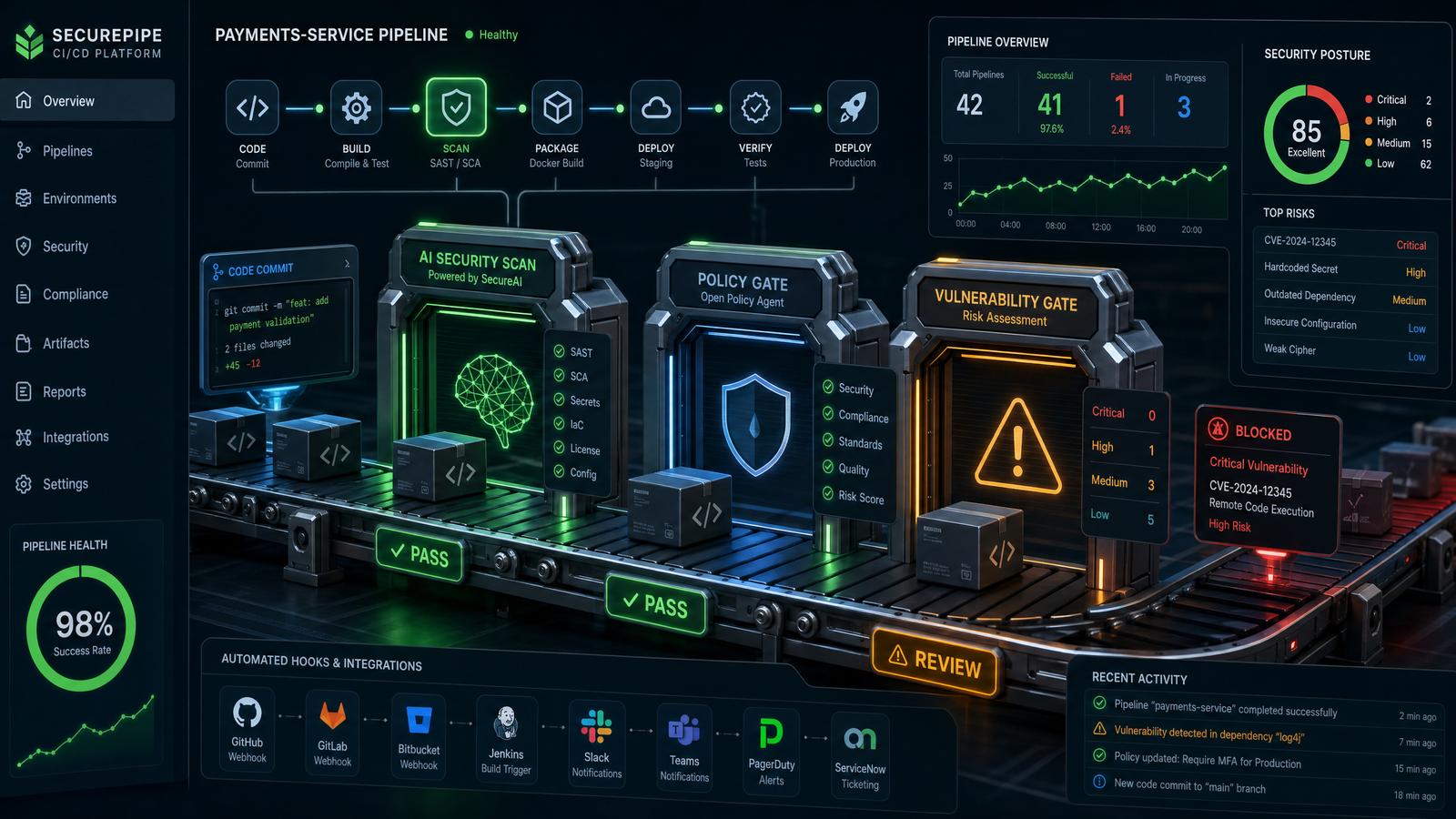
In modern enterprise software development, automation and secure programmatic access to AI services are paramount. Codex Hooks and Programmatic Access Tokens represent a sophisticated approach to integrating AI-powered tools into continuous integration/continuous deployment (CI/CD) pipelines, release workflows, and internal automation processes. This guide provides an exhaustive, technical overview of these features, demonstrating how they empower enterprises to maintain security, improve workflow efficiency, and customize AI interactions at scale.
As AI adoption accelerates across various business units, ensuring that interactions with AI models are both secure and auditable becomes critical. Codex Hooks act as customizable integration points that allow developers to trigger AI tasks in response to events such as code commits, pull requests, or deployment stages. Combined with programmatic access tokens, enterprises gain granular control over authentication, scope, and lifecycle management of AI service credentials.
Key Benefits of Codex Hooks and Programmatic Access Tokens
- Granular Security Controls: Fine-tuned scopes limit token permissions to minimum necessary access, reducing attack surfaces.
- Seamless Pipeline Integration: Automate AI-driven code analysis, generation, and testing within existing CI/CD workflows.
- Scalable Access Management: Automate token issuance, rotation, and revocation to maintain compliance and reduce manual overhead.
- Operational Transparency: Enable detailed logging and audit trails for AI interactions, critical for governance and troubleshooting.
- Customizable Event Hooks: Define triggers and payloads for AI tasks tailored to organizational workflows.
Understanding Codex Hooks in Enterprise Contexts
Codex Hooks are essentially event-driven connectors that allow developers to embed AI operations directly within software lifecycle events. For example, a post-commit hook can invoke an AI-powered code reviewer that comments on potential bugs or improvements. These hooks accept configurable payloads and context parameters, enabling dynamic AI query construction.
Example: GitHub Workflow Integration with Codex Hooks
Below is a production-grade GitHub Actions workflow snippet that demonstrates invoking a Codex Hook after a pull request is created, using a programmatic access token for authentication.
name: AI Code Review on PR

on:
  pull_request:
    types: [opened, synchronize]

jobs:
  codex-hook:
    runs-on: ubuntu-latest
    steps:
      - name: Trigger Codex Hook for AI Review
        env:
          CODEX_ACCESS_TOKEN: ${{ secrets.CODEX_ACCESS_TOKEN }}
          PR_NUMBER: ${{ github.event.pull_request.number }}
          REPO_NAME: ${{ github.repository }}
        run: |
          curl -X POST https://api.enterprise-ai.com/codex/hooks/review \
            -H "Authorization: Bearer $CODEX_ACCESS_TOKEN" \
            -H "Content-Type: application/json" \
            -d '{
              "repository": "'"$REPO_NAME"'",
              "pull_request_number": '"$PR_NUMBER"',
              "event_type": "pull_request_opened",
              "metadata": {
                "triggered_by": "GitHub Actions",
                "timestamp": "'$(date --utc +%Y-%m-%dT%H:%M:%SZ)'"
              }
            }'
Breaking Down the Workflow
- Trigger Event: The workflow listens for pull request events, specifically when a PR is opened or updated.
- Token Usage: The programmatic access token is injected securely via GitHub Secrets, ensuring it is not exposed in logs.
- API Call: A POST request is sent to the Codex Hook endpoint with relevant context, prompting an AI-powered code review.
- Response Handling: While this example focuses on the trigger, in production environments, developers should handle success/failure responses and log them accordingly.
Programmatic Access Tokens: Security and Lifecycle Management
Programmatic Access Tokens are OAuth-style bearer tokens designed specifically for machine-to-machine authentication with AI services. They differ from user tokens by their ability to be scoped down to specific API endpoints and by supporting automated lifecycle management including rotation and revocation.
Token Scope and Permissions
Defining the minimal required scope for each token is a critical security best practice. Common scopes include:
| Scope | Description | Typical Use Case |
|---|---|---|
| code:read | Read access to code repositories | AI analysis of codebases |
| code:write | Write access to code (comments, PRs) | AI-generated code suggestions or fixes |
| hooks:trigger | Permission to invoke Codex Hooks | Automated AI task triggering |
| logs:read | Access to AI interaction logs | Audit and monitoring tools |
Token Rotation and Revocation Automation
In production environments, automating token rotation reduces risk of token leakage and unauthorized access. Below is an example of a shell script to automate token rotation using the AI services’ token management API.
#!/bin/bash

# Variables
TOKEN_NAME="ci-codex-hook-token"
API_URL="https://api.enterprise-ai.com/tokens"
AUTH_HEADER="Authorization: Bearer $ADMIN_ACCESS_TOKEN"

# Step 1: Revoke existing token
curl -X DELETE "$API_URL/$TOKEN_NAME" -H "$AUTH_HEADER"

# Step 2: Create new token with required scopes
curl -X POST "$API_URL" -H "$AUTH_HEADER" -H "Content-Type: application/json" -d '{
  "name": "'"$TOKEN_NAME"'",
  "scopes": ["code:read", "hooks:trigger"],
  "expires_in": 2592000  # 30 days in seconds
}'
Integrating this script into a scheduled CI job or secure secrets manager ensures tokens remain fresh and reduces manual intervention.
Auditing and Compliance Considerations
Enterprises often require detailed audit trails of AI service usage. Codex Hooks can be configured to emit structured logs that capture:
- Event timestamps and origins
- Token identifiers and scopes used
- Payloads sent to AI services
- AI response metadata and statuses
These logs can be forwarded to centralized logging systems such as ELK Stack, Splunk, or cloud-native monitoring services for real-time analysis and compliance reporting.
Summary
This introduction outlines the foundational concepts and practical applications of Codex Hooks and Programmatic Access Tokens within enterprise automation ecosystems. Subsequent sections will delve into advanced configuration, error handling strategies, best practices for secure token management, and real-world case studies illustrating successful deployments.
Understanding Programmatic Access Tokens
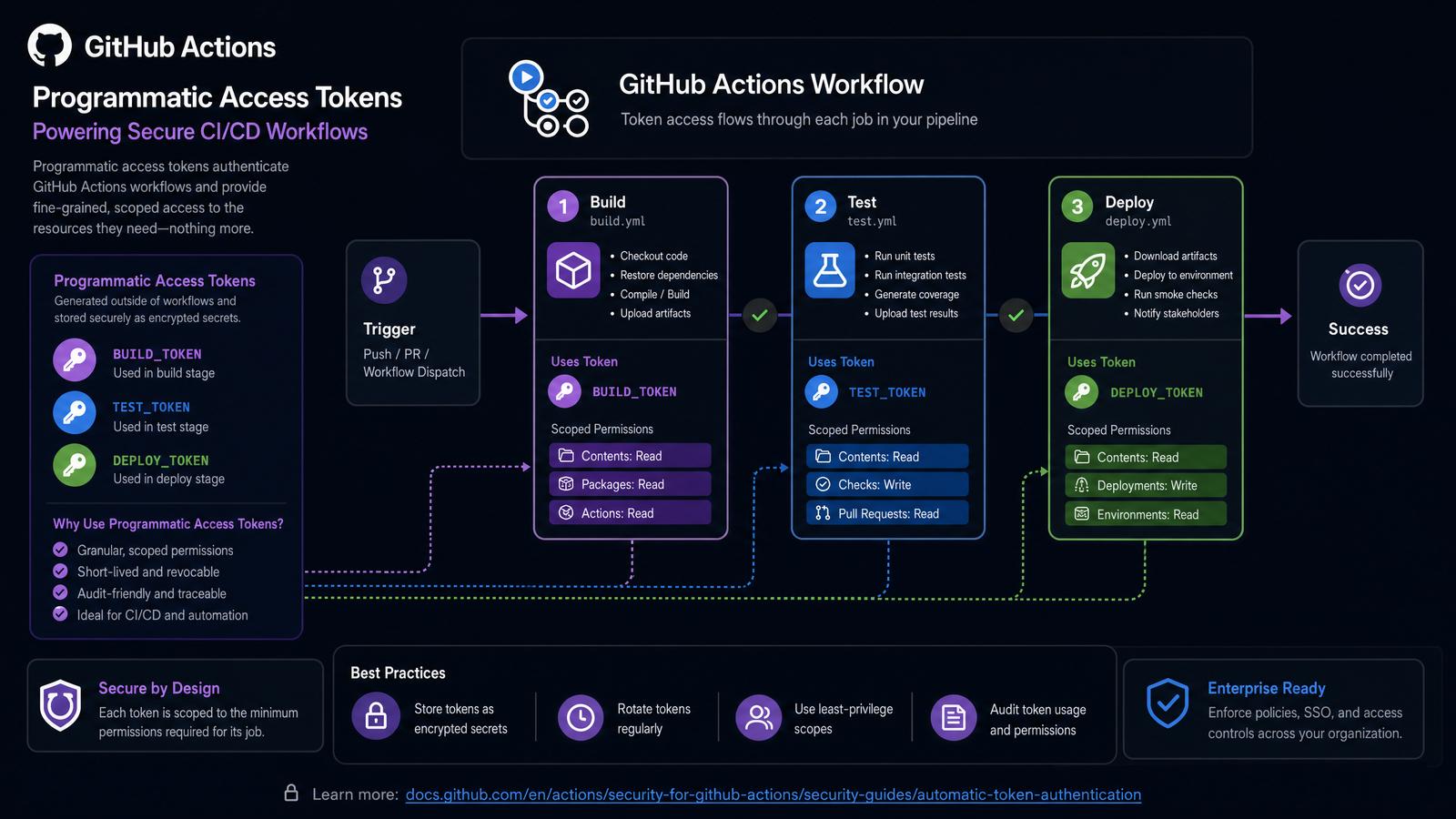
Programmatic Access Tokens (PATs) serve as crucial authentication mechanisms, enabling secure and controlled access to AI services and enterprise APIs. Unlike traditional user credentials such as passwords or API keys—which often possess broad access privileges and pose elevated security risks—PATs are designed with granular scope and lifecycle management capabilities tailored for automated systems. This distinction is especially important in large-scale enterprise environments where automation, security compliance, and auditability are paramount.
By leveraging PATs, organizations can enforce least-privilege principles, ensuring that automated workflows or applications receive only the permissions necessary to perform their functions. This reduces the attack surface by limiting exposure if a token is compromised. Additionally, PATs simplify credential management by decoupling automation access from individual user accounts, facilitating streamlined token rotation and revocation without disrupting user productivity.
Key Features of Programmatic Access Tokens
- Scoped Permissions: Programmatic Access Tokens support fine-grained permission models. Permissions can be scoped to specific actions such as
read,write, andexecute; to resource types like AI models, code repositories, or webhook endpoints; and even constrained by usage contexts such as IP address whitelisting or time windows. This scope enforcement is typically implemented through OAuth-style scopes or custom claims embedded within JSON Web Tokens (JWTs). - Revocation and Rotation: Enterprises can revoke individual tokens instantly in case of suspicious activity or routine credential refresh cycles. Token rotation policies can be automated via CI/CD tools or secret management platforms (e.g., HashiCorp Vault, AWS Secrets Manager), minimizing downtime and preventing token misuse. Integration with identity providers (IdPs) enables centralized token lifecycle management.
- Auditability: Every token usage event is logged with metadata such as timestamp, IP address, invoked API endpoints, and token identifier. These logs feed into Security Information and Event Management (SIEM) systems and anomaly detection tools to identify abnormal patterns—such as token use outside allowed IP ranges or unexpected access times—enabling rapid incident response.
- Integration Friendly: PATs are optimized for embedding into automated pipelines and internal tooling. They support header-based authentication schemes (e.g., Bearer tokens) compatible with RESTful APIs and SDKs. Popular CI/CD platforms like GitHub Actions, Jenkins, GitLab CI, and Azure DevOps provide native support for secret storage and token injection, streamlining secure integration.
- Expiration and Renewal Policies: Tokens can be configured with precise expiration intervals (e.g., hours, days, months), after which they are invalidated automatically. This limits long-term risk exposure and enforces adherence to security policies. Renewal mechanisms often involve automated workflows using refresh tokens or external secret rotation orchestrators.
- Multi-Factor Enforcement: Advanced PAT implementations may support multi-factor authentication (MFA) triggers on token usage, especially for high-privilege scopes or sensitive operations, adding an additional security layer.
Use Cases for Programmatic Access Tokens in Enterprises
- CI/CD Pipelines: Automate complex workflows such as AI-driven code reviews, automated test case generation, or dynamic documentation creation. PATs allow these pipelines to securely invoke AI services to analyze pull requests, generate commit messages, or run static analysis without manual credential exposure.
- Release Workflows: Use PATs to integrate AI-powered tools that generate release notes, automate changelog compilation, or validate deployments through intelligent assessments. Scoped tokens ensure that these automations only access the necessary repositories or deployment environments.
- Internal Automations: Enable enterprise chatbots, internal knowledge base augmentation systems, or codebase scanning utilities to interact with AI APIs safely. PATs provide controlled access, preventing unauthorized data leakage and maintaining compliance with internal governance standards.
- DevSecOps Automation: Integrate PATs within security scanning tools that automatically analyze infrastructure as code (IaC) templates, container images, or vulnerability databases. Scoped tokens restrict the tools to read-only or specific write actions, reducing risk.
- Data Analytics Pipelines: Use PATs to authenticate data ingestion or transformation jobs that utilize AI services for natural language processing, anomaly detection, or predictive analytics within secure data platforms.
Example: Creating a Scoped Programmatic Access Token
The following JSON configuration depicts a typical request to an enterprise token management API for generating a scoped programmatic access token. This example illustrates key security controls such as scoped permissions, expiry settings, and IP restrictions to limit token usage to trusted network segments.
{
  "token_name": "ci-cd-pipeline-access",
  "scopes": [
    "repository:read",
    "repository:write",
    "hooks:execute"
  ],
  "expires_in": "30d",
  "allowed_ips": [
    "192.168.1.0/24",
    "10.0.0.0/16"
  ]
}
Field Breakdown:
token_name: A descriptive identifier for the token, facilitating management and audit tracking.scopes: Defines the exact permissions granted by this token:repository:read— Allows read access to code repositories.repository:write— Permits committing changes or updating repositories.hooks:execute— Authorizes execution of configured webhook hooks.
expires_in: Sets the token’s validity duration; here, 30 days.allowed_ips: Restricts token usage to specified IP address ranges, mitigating risk from token theft.
Practical Implementation Example: Token Creation API Call
Below is an example of how to programmatically request such a token using a cURL command with a JSON payload:
curl -X POST https://api.enterpriseai.com/v1/tokens \
  -H "Authorization: Bearer YOUR_ADMIN_API_KEY" \
  -H "Content-Type: application/json" \
  -d '{
    "token_name": "ci-cd-pipeline-access",
    "scopes": [
      "repository:read",
      "repository:write",
      "hooks:execute"
    ],
    "expires_in": "30d",
    "allowed_ips": [
      "192.168.1.0/24",
      "10.0.0.0/16"
    ]
  }'
Integrating PATs into GitHub Actions Workflow
Once issued, the token can be securely stored as a secret in GitHub and used within workflows. Below is a sample GitHub Actions snippet demonstrating how to utilize a PAT for invoking an AI service:
name: AI-assisted Code Review

on:
  pull_request:
    types: [opened, synchronize]

jobs:
  ai-review:
    runs-on: ubuntu-latest
    steps:
      - name: Checkout code
        uses: actions/checkout@v3

      - name: Call AI service for code review
        env:
          AI_SERVICE_TOKEN: ${{ secrets.PAT_TOKEN }}
        run: |
          curl -X POST https://api.enterpriseai.com/v1/reviews \
            -H "Authorization: Bearer $AI_SERVICE_TOKEN" \
            -H "Content-Type: application/json" \
            -d '{"pull_request_number": ${{ github.event.pull_request.number }}}'
Token Lifecycle Management Best Practices
- Token Issuance: Generate tokens with the narrowest possible scope. Avoid all-encompassing permissions.
- Storage: Store tokens securely in secret management solutions or environment variables with restricted access.
- Rotation: Automate token renewal workflows, ideally synchronized with CI/CD pipeline runs or scheduled maintenance windows.
- Revocation: Immediately revoke tokens upon detection of suspicious activity or when no longer needed.
- Monitoring: Continuously monitor token usage metrics and audit logs for compliance and anomaly detection.
Summary Table: PAT Attributes and Security Controls
| Attribute | Description | Example | Security Implication |
|---|---|---|---|
| Token Name | Unique identifier for the token | ci-cd-pipeline-access | Facilitates audit and management |
| Scopes | Defines permitted actions and resources | repository:read, hooks:execute | Enforces least privilege access |
| Expiration | Token validity period | 30 days | Limits risk window for compromised tokens |
| Allowed IPs | Restricts token usage to IP ranges | 192.168.1.0/24 | Mitigates unauthorized use from unknown sources |
| Revocation | Ability to invalidate token before expiry | Immediate revocation via API | Enables rapid incident response |
By adopting Programmatic Access Tokens with these robust security features and management practices, enterprises can confidently automate interactions with AI services, ensuring operational efficiency without compromising security or compliance.
Deep Dive into Codex Hooks
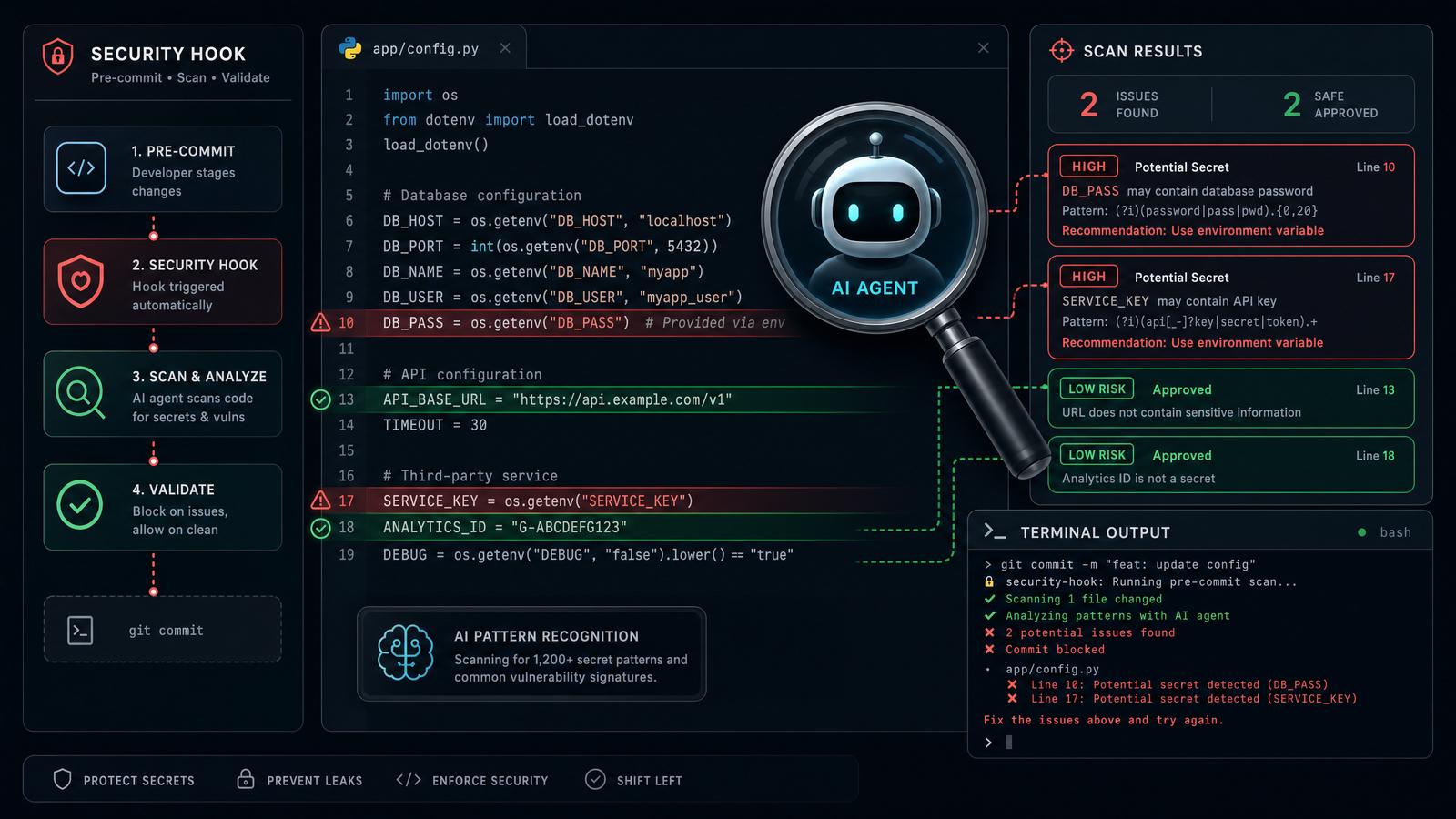
Codex Hooks are advanced, programmable event-driven integrations designed to empower enterprises with granular control over AI interactions within their repositories. By leveraging hooks, organizations can embed custom logic that automatically triggers in response to specific AI lifecycle events. This automation capability enables enhanced security, compliance, and contextual relevance, crucial for enterprise-grade AI deployments.
At their core, Codex Hooks operate as modular scripts or configurations that listen for predefined triggers such as prompt submissions, AI response completions, or conversation state changes. Once triggered, these hooks execute user-defined actions, which can range from validating input data to logging interactions for auditing.
The extensibility of Codex Hooks allows enterprises to seamlessly integrate AI workflows with existing infrastructure, thereby facilitating robust automation pipelines that maintain consistency and governance across AI-powered applications.
Core Functionalities of Codex Hooks
- Secret Scanning: Codex Hooks enable real-time inspection of user inputs and AI prompts for sensitive data, such as API keys, passwords, tokens, or personally identifiable information (PII). This proactive detection mitigates the risk of inadvertent data leaks, supporting compliance with security standards like SOC 2, GDPR, and HIPAA.
- Custom Validators: Enterprises can define domain-specific validation logic tailored to their operational policies or ethical guidelines. For example, prompts can be validated to exclude offensive language, ensure technical accuracy, or enforce formatting rules before they reach the AI model.
- Conversation Logging: Detailed logging of AI conversations facilitates audit trails, debugging, and analytics. Logs can be centralized, encrypted, and indexed to support compliance reporting and performance optimization.
- Custom Memories: Hooks can manage repository-specific stateful data stores, enabling AI models to access contextual information from previous interactions or external systems. This enhances response relevance and supports complex workflows requiring persistent knowledge.
Additional Functionalities
- Rate Limiting and Throttling: Implement controls to prevent abuse or overuse of AI services by monitoring event frequency and enforcing limits.
- Dynamic Prompt Augmentation: Automatically enrich prompts with metadata or contextual snippets fetched from internal databases or knowledge bases.
- Multi-Stage Workflow Orchestration: Chain multiple hooks to execute sequential or conditional logic, enabling sophisticated automation scenarios.
Codex Hooks Event Model
Codex Hooks are fundamentally event-driven, subscribing to and reacting upon specific lifecycle events within AI interaction workflows. Understanding the event model is essential for designing effective hooks that target precise integration points.
| Event Name | Trigger Timing | Description | Typical Use Cases |
|---|---|---|---|
prompt.submitted |
Before AI model processes the prompt | Occurs immediately after a user or system submits a prompt for AI processing. | Secret scanning, input validation, prompt enrichment |
response.generated |
After AI model produces a response | Triggered once the AI completes generating a response to a prompt. | Response filtering, sentiment analysis, quality assurance |
conversation.updated |
When the conversation state is modified | Fires on any change to the conversation, including message additions, edits, or metadata updates. | Conversation logging, analytics, state synchronization |
hook.executed |
After a hook completes execution | Allows chaining hooks or triggering follow-up actions based on prior hook results. | Workflow orchestration, error handling, notification dispatch |
Enterprises can subscribe to multiple events simultaneously, enabling hooks to perform composite operations that span the entire AI interaction lifecycle.
Example: Secret Scanner Hook Configuration (YAML)
name: secret-scanner
description: Scan prompts for secrets before processing
events:
  - prompt.submitted
actions:
  - name: scan-secrets
    type: validator
    script: |
      import re
      import logging

      # Define regex patterns for common secret formats
      SECRET_PATTERNS = [
          r'AKIA[0-9A-Z]{16}',            # AWS Access Key ID
          r'sk_live_[0-9a-zA-Z]{24}',     # Stripe Live Secret Key
          r'-----BEGIN PRIVATE KEY-----', # PEM Private Key Block
          r'AIza[0-9A-Za-z\\-_]{35}',     # Google API Key
          r'eyJ[A-Za-z0-9-_=]+\\.[A-Za-z0-9-_=]+\\.?[A-Za-z0-9-_.+/=]*',  # JWT Tokens (simplified)
      ]

      def contains_secrets(prompt_text):
          """
          Scans the prompt text for any patterns matching known secret formats.
          Returns True if any secret is found.
          """
          for pattern in SECRET_PATTERNS:
              if re.search(pattern, prompt_text):
                  logging.warning(f'Secret pattern detected: {pattern}')
                  return True
          return False

      def handler(event):
          prompt = event.get('prompt', {})
          prompt_text = prompt.get('text', '')
          if contains_secrets(prompt_text):
              # Abort processing by raising an exception with a clear message
              raise Exception('Secret detected in prompt. Execution aborted for security reasons.')

      # Entry point for the hook execution
      handler(event)
This hook listens to the prompt.submitted event and employs a robust Python script to identify a broad range of secret patterns using regular expressions. The script includes logging to aid in monitoring secret detections. If any secret is detected, the hook raises an exception, which halts further processing of the prompt to prevent potential security breaches.
Production Considerations:
- Integrate with centralized logging systems (e.g., ELK Stack, Splunk) to capture warnings and errors.
- Maintain an up-to-date and customizable list of secret patterns based on organizational security policies.
- Consider anonymizing prompt data in logs to comply with privacy regulations.
- Implement unit tests for the validator script to ensure accuracy and avoid false positives.
Extending the Hook: You can enhance the secret scanner by integrating third-party secret detection libraries such as detect-secrets or leveraging AI-based anomaly detection for improved accuracy.
Example: Conversation Logger Hook Configuration (JSON)
{
  "name": "conversation-logger",
  "description": "Logs conversations for audit and analysis",
  "events": ["conversation.updated"],
  "actions": [
    {
      "name": "log-conversation",
      "type": "logger",
      "output": "enterprise-logs/conversations.log",
      "format": "json",
      "options": {
        "rotate": {
          "enabled": true,
          "max_size_mb": 100,
          "max_files": 10
        },
        "encrypt": true,
        "compression": "gzip",
        "include_metadata": true
      }
    }
  ]
}
This conversation logger hook subscribes to the conversation.updated event and writes all conversation changes to a centralized log file in structured JSON format. The configuration includes advanced logging options:
- Log Rotation: Ensures log files do not exceed 100 MB and maintains up to 10 archived files to prevent disk exhaustion.
- Encryption: Enables at-rest encryption of logs, crucial for protecting sensitive conversation data.
- Compression: Applies gzip compression to optimize storage usage.
- Include Metadata: Captures contextual information such as timestamps, user identifiers, and conversation IDs for comprehensive audit trails.
Integration Tips:
- Forward logs to Security Information and Event Management (SIEM) systems like Splunk or IBM QRadar for real-time monitoring.
- Implement access control policies to restrict log access to authorized personnel.
- Leverage log analytics tools to identify usage patterns, detect anomalies, and generate compliance reports.
- Ensure log data retention aligns with enterprise data governance policies.
Sample Log Entry (JSON):
{
  "timestamp": "2024-06-15T14:23:05Z",
  "conversation_id": "conv_1234567890",
  "user_id": "user_987654321",
  "event": "message_added",
  "message": {
    "role": "user",
    "content": "How do I configure Codex Hooks for secret scanning?"
  },
  "metadata": {
    "source": "web_app",
    "session_id": "sess_abcd1234"
  }
}
This structured log format ensures that every conversation update is captured with sufficient context to support forensic investigations and machine learning analytics.
Integrating Programmatic Access Tokens in CI/CD Environments
Enterprises commonly use CI/CD platforms such as GitHub Actions, Jenkins, or GitLab CI to automate software delivery, testing, and deployment workflows. Integrating Codex programmatic access tokens into these pipelines enables secure, seamless, and auditable AI interactions that can enhance automation capabilities—ranging from code reviews and documentation generation to automated refactoring and security scanning.
Stay Ahead of the AI Curve
Get weekly insights on ChatGPT, OpenAI, and AI tools delivered to your inbox.
Programmatic access tokens are OAuth-style bearer tokens issued by the Codex enterprise platform, scoped with precise permissions and lifetimes to minimize security risks. By securely managing these tokens within your CI/CD platform’s secrets or credential stores, you can safely authenticate API calls without exposing sensitive credentials in logs or version control.
In the following subsections, we provide detailed, production-grade examples and best practices for integrating Codex programmatic tokens with popular CI/CD systems.
GitHub Actions Example: Using Programmatic Access Token
GitHub Actions workflows allow you to define automation triggered by GitHub events such as pull requests, pushes, or scheduled intervals. Below is an enhanced example demonstrating a secure, robust integration of Codex programmatic tokens for performing AI-powered code reviews on pull requests targeting the main branch.
name: AI Code Review

on:
  pull_request:
    branches:
      - main

permissions:
  contents: read  # Required to checkout code
  actions: read   # Limit permissions to minimum necessary

jobs:
  codex-review:
    runs-on: ubuntu-latest
    env:
      CODEX_TOKEN: ${{ secrets.CODEX_PROGRAMMATIC_TOKEN }}
    steps:
      - name: Checkout code
        uses: actions/checkout@v3
        with:
          fetch-depth: 0  # Fetch full history for diff analysis

      - name: Extract changed JavaScript files
        id: changed-files
        run: |
          git diff --name-only origin/main...HEAD | grep '\.js$' > changed_js_files.txt || true
          echo "changed_js_files<<EOF" >> $GITHUB_OUTPUT
          cat changed_js_files.txt >> $GITHUB_OUTPUT
          echo "EOF" >> $GITHUB_OUTPUT

      - name: Prepare code snippet for AI prompt
        id: prepare-prompt
        run: |
          code_snippet=""
          while IFS= read -r file; do
            echo "Processing $file"
            code_snippet+="File: $file\n"
            code_snippet+="$(head -n 50 "$file")\n\n"
          done < changed_js_files.txt
          echo "::set-output name=prompt::$code_snippet"

      - name: Run Codex AI Code Review
        if: steps.changed-files.outputs.changed_js_files != ''
        run: |
          curl -s -X POST https://api.codexenterprise.example.com/v1/repositories/myrepo/prompts \
            -H "Authorization: Bearer $CODEX_TOKEN" \
            -H "Content-Type: application/json" \
            -d @- <<EOF
          {
            "prompt": "Review the following JavaScript code snippets for security vulnerabilities and suggest improvements:\n${{ steps.prepare-prompt.outputs.prompt }}"
          }
          EOF
Detailed Explanation:
- Permissions: The workflow restricts permission scopes to only those required, following the principle of least privilege.
- Fetching Full Git History: Setting
fetch-depth: 0ensures the workflow has access to the full commit history, which is necessary to compute diffs accurately. - Extracting Changed Files: The workflow dynamically detects changed JavaScript files using
git diffand filters for.jsfiles. - Preparing Prompt: To prevent overwhelming the AI model with large files, only the first 50 lines of each changed file are included in the prompt.
- Secure Token Usage: The programmatic access token is injected from GitHub Secrets into an environment variable
CODEX_TOKENand passed securely in the HTTP Authorization header. - Conditional Execution: The AI review step runs only if there are changed JavaScript files, preventing unnecessary API calls.
Security Best Practices:
- Store programmatic tokens in GitHub Secrets with strict repository access controls.
- Avoid printing tokens or sensitive data in job logs by using environment variables and masked secrets.
- Rotate tokens periodically and revoke them when no longer needed.
Jenkins Pipeline Example: Using Programmatic Access Token
Jenkins pipelines offer a powerful Groovy-based DSL to define complex build and deployment workflows. Below is a production-grade scripted pipeline example demonstrating how to securely retrieve Codex programmatic tokens from Jenkins credentials, invoke the Codex API, and handle JSON responses for AI-assisted documentation generation.
pipeline {
  agent any
  environment {
    // Use Jenkins credentials binding plugin to inject token securely
    CODEX_TOKEN = credentials('codex-programmatic-token')
  }
  stages {
    stage('Checkout Source') {
      steps {
        checkout scm
      }
    }

    stage('Read Documentation Draft') {
      steps {
        script {
          // Read draft markdown file into a Groovy string variable
          docDraft = readFile('src/README_draft.md')
        }
      }
    }

    stage('Invoke Codex API') {
      steps {
        script {
          // Construct JSON payload with prompt
          def requestBody = [
            prompt: "Generate detailed, structured documentation from the following draft:\n${docDraft}",
            max_tokens: 1500,
            temperature: 0.3
          ]

          // Perform HTTP POST request using Jenkins HTTP Request Plugin
          def response = httpRequest(
            url: 'https://api.codexenterprise.example.com/v1/prompts',
            httpMode: 'POST',
            authentication: 'codex-programmatic-token', // Alternatively use env.CODEX_TOKEN in headers
            requestBody: groovy.json.JsonOutput.toJson(requestBody),
            contentType: 'APPLICATION_JSON',
            validResponseCodes: '200:299'
          )

          // Parse JSON response
          def jsonResponse = readJSON text: response.content
          echo "Generated Documentation:\n${jsonResponse.choices[0].text}"
        }
      }
    }

    stage('Save Documentation') {
      steps {
        script {
          writeFile file: 'docs/generated_documentation.md', text: jsonResponse.choices[0].text
          archiveArtifacts artifacts: 'docs/generated_documentation.md', fingerprint: true
        }
      }
    }
  }
  post {
    failure {
      echo 'Pipeline failed. Please check logs.'
    }
    success {
      echo 'Documentation generation completed successfully.'
    }
  }
}
Production Considerations:
- Credential Management: Use Jenkins Credentials Plugin to store tokens securely and reference them by ID, avoiding hardcoding sensitive data.
- HTTP Request Plugin: The
httpRequeststep simplifies API calls with support for authentication, content types, and response validation. - Error Handling: Define post-build actions to handle failure scenarios gracefully and notify stakeholders or trigger alerts.
- Response Parsing: Use Jenkins' JSON parsing utilities to extract AI-generated content programmatically.
- Artifact Archiving: Store generated documentation as build artifacts for traceability and downstream consumption.
Additional Best Practices for CI/CD Integration
- Token Scope Management: Assign minimum required scopes to programmatic tokens; for example, restrict tokens used for code review to read-only repository access and AI API calls.
- Token Rotation Automation: Implement automated token rotation workflows that update secrets in CI/CD platforms and notify relevant teams.
- Rate Limiting and Backoff: Design workflows to handle Codex API rate limits gracefully, including exponential backoff and retry mechanisms.
- Audit Logging: Enable audit logs on Codex platform and CI/CD systems to monitor token usage and detect anomalies.
- Logging and Masking: Ensure logs redact sensitive information such as tokens or API keys to prevent accidental exposure.
Summary Table: Token Integration Methods Across CI/CD Platforms
| CI/CD Platform | Token Storage Method | Injection Method | API Call Example | Notes |
|---|---|---|---|---|
| GitHub Actions | GitHub Secrets (CODEX_PROGRAMMATIC_TOKEN) |
Environment Variable CODEX_TOKEN |
curl -H "Authorization: Bearer $CODEX_TOKEN" |
Use least privilege scopes in token; mask secrets in logs. |
| Jenkins | Jenkins Credentials Plugin (Secret Text) | Environment Binding credentials('codex-programmatic-token') |
httpRequest authentication: 'codex-programmatic-token' |
Use HTTP Request Plugin for simplified API calls. |
| GitLab CI | GitLab CI/CD Variables (Protected) | Environment Variable $CODEX_TOKEN |
curl -H "Authorization: Bearer $CODEX_TOKEN" |
Protect variables to restrict usage to protected branches/tags. |
By following these guidelines and sample implementations, enterprises can effectively leverage Codex programmatic access tokens within their CI/CD environments to automate AI-driven workflows securely and reliably.
Complete Guide to Anthropic’s Claude Agent SDK Credits: Pricing, Limits, and Optimization Strategies
Advanced Use Cases for Codex Hooks and Tokens
Beyond routine automation, Codex Hooks and Programmatic Access Tokens enable advanced enterprise scenarios that significantly enhance AI-driven workflows, enforce organizational policies, and provide dynamic adaptability within complex development environments. These capabilities are critical for scaling AI assistance while ensuring security, compliance, and contextual accuracy in large-scale software projects.
Custom Memories for Repository Context
Hooks can be configured to inject repository-specific context or "memories" that persist across conversations, improving AI relevance and enabling a more tailored interaction experience. This persistent contextual awareness allows Codex to maintain a deep understanding of project-specific norms, conventions, and recent changes, which is paramount for enterprises managing multiple repositories or large monorepos.
For example, a memory hook may preload coding standards, architectural guidelines, or recent change summaries for a specific repository. This ensures that generated code suggestions or refactoring advice are aligned with the team's best practices and current project state.
Implementing a Custom Memory Hook
Below is an example of a memory hook implemented in Node.js that injects a repository's coding standards and architectural notes into Codex's context at the start of each session:
const fs = require('fs');
const path = require('path');

async function loadRepositoryMemory(repoPath) {
    const standardsPath = path.join(repoPath, 'docs', 'coding-standards.md');
    const architecturePath = path.join(repoPath, 'docs', 'architecture-overview.md');

    const codingStandards = fs.existsSync(standardsPath)
        ? fs.readFileSync(standardsPath, 'utf8')
        : 'No coding standards document found.';
    const architectureNotes = fs.existsSync(architecturePath)
        ? fs.readFileSync(architecturePath, 'utf8')
        : 'No architecture overview document found.';

    // Combine memory content
    return `Repository Coding Standards:\n${codingStandards}\n\nArchitecture Overview:\n${architectureNotes}`;
}

// Hook function to add memory to Codex session context
async function codexMemoryHook(session) {
    const repoPath = '/var/repos/my-enterprise-repo';
    const memoryContent = await loadRepositoryMemory(repoPath);

    // Inject memory into Codex session context
    session.context.prepend(memoryContent);
}
Best Practices for Memory Management
- Selective Memory Injection: Only include the most relevant documents or summaries to avoid exceeding token limits and maintain performance.
- Periodic Memory Refresh: Automate memory updates triggered by repository changes, such as pull request merges or documentation updates.
- Token Budgeting: Monitor the token footprint of injected memories and trim or summarize content as needed.
Multi-Stage Validation Pipelines
By combining hooks with programmatic tokens, enterprises can architect sophisticated multi-stage validation pipelines to govern AI-generated code outputs. These pipelines are essential to enforce security policies, coding standards, and compliance requirements before integrating AI contributions into production codebases.
Typical Multi-Stage Pipeline Workflow
- AI Code Generation: A developer submits a prompt; Codex generates code suggestions.
- Automated Policy Enforcement Hook: A validation hook scans the generated code for sensitive information, insecure patterns, or policy violations using static analysis tools.
- Compliance Gate: If the code passes automated checks, it proceeds; otherwise, the hook triggers an alert and escalates for manual review.
- Manual Review Stage: Security or code review teams analyze flagged outputs and either approve or reject changes.
- Final Integration: Approved outputs are committed, while rejected outputs are logged with detailed feedback for model retraining or prompt refinement.
Example: Programmatic Token Usage in Validation Pipeline
The following snippet demonstrates how programmatic access tokens can be scoped and rotated dynamically within a validation pipeline to ensure least-privilege access and auditability:
const axios = require('axios');

// Function to request a scoped programmatic token with specific permissions
async function requestScopedToken(scopes) {
    const response = await axios.post('https://auth.enterprise.com/token', {
        grant_type: 'client_credentials',
        scope: scopes.join(' '),
    }, {
        headers: {
            'Authorization': `Basic ${Buffer.from('client_id:client_secret').toString('base64')}`
        }
    });
    return response.data.access_token;
}

// Example usage in validation stage
async function validateGeneratedCode(codeSnippet) {
    const token = await requestScopedToken(['code:scan', 'logs:write']);
    const scanResponse = await axios.post('https://api.enterprise.com/code-scan', {
        code: codeSnippet,
    }, {
        headers: { 'Authorization': `Bearer ${token}` }
    });

    if (scanResponse.data.issues.length > 0) {
        // Trigger manual review workflow
        await triggerManualReview(scanResponse.data);
        return false;
    }
    return true;
}
Policy Enforcement Tools Integration
Validation hooks can integrate with popular static analysis and security scanning tools such as:
- SonarQube: Continuous inspection of code quality with customizable rules.
- Snyk: Automated scanning for vulnerabilities in dependencies.
- TruffleHog: Secret detection in code history and generated outputs.
- Custom Linters: Enforce proprietary coding standards and patterns.
Dynamic Hook Configuration via API
Enterprises can programmatically update hook configurations in response to project lifecycle events, enabling adaptive automation that aligns with evolving requirements. This capability is crucial for maintaining security posture, compliance, and operational transparency throughout different phases such as development, testing, release, and audit cycles.
API-Driven Hook Configuration Management
Most enterprise-grade Codex platforms expose RESTful or GraphQL APIs for managing hooks and tokens. These APIs allow teams to:
- Enable or disable specific hooks dynamically.
- Adjust hook parameters such as scanning strictness, logging verbosity, or memory injection content.
- Rotate or revoke programmatic tokens automatically based on schedules or events.
Example: Updating Hook Configuration During Release Candidate (RC) Phase
The following curl command illustrates how to update a hook configuration to enable stricter secret scanning during the RC phase using a REST API:
curl -X PATCH https://api.enterprise.com/hooks/configuration \
  -H "Authorization: Bearer <admin_access_token>" \
  -H "Content-Type: application/json" \
  -d '{
    "hookId": "secretScannerHook",
    "enabled": true,
    "parameters": {
      "scanLevel": "strict",
      "alertThreshold": 0
    }
  }'
Audit Logging and Compliance
Dynamic hook configuration updates are typically logged with metadata including user identity, timestamp, and change details to support audit requirements. Enterprises often integrate these logs with centralized SIEM (Security Information and Event Management) solutions such as Splunk or Elastic Stack for real-time monitoring and historical analysis.
Sample Hook Configuration Table
| Hook Name | Purpose | Configurable Parameters | Typical Use Case |
|---|---|---|---|
| CustomMemoryHook | Injects repo-specific context into Codex sessions | Memory sources, refresh interval, token budget | Maintain coding standards awareness |
| SecretScannerHook | Scans AI-generated code for secrets | Scan level (strict/lenient), alert thresholds | Prevent credential leaks during RC phases |
| ComplianceValidationHook | Enforces code policy compliance | Ruleset selection, manual review triggers | Ensure regulatory compliance (e.g., GDPR, HIPAA) |
| LoggingHook | Controls conversation and code snippet logging | Log verbosity, retention period | Audit conversation history during security reviews |
By leveraging these advanced use cases, enterprises can transform Codex Hooks and Programmatic Access Tokens into powerful instruments for scalable, secure, and context-aware AI automation.
Security Best Practices
- Least Privilege Principle: Always scope tokens narrowly to reduce risk.
When generating programmatic access tokens for Codex hooks or any automation, define the minimal set of permissions needed for the task. For example, if a token is only used to trigger specific hooks or read particular repository metadata, avoid granting it broad scopes like full repository write access or admin-level permissions.
Example: Scoping a GitHub Personal Access Token (PAT)
When creating a PAT on GitHub, select only the necessary scopes:
repo:statusfor status updates.repo_deploymentfor deployment hooks.read:orgif organizational data is required.
{
  "token": "ghp_xxxxxxxx",
  "scopes": ["repo:status", "repo_deployment"],
  "note": "For Codex hook deployments only"
}
Limiting scope reduces the blast radius if the token is compromised.
- Rotate Tokens Regularly: Automate token rotation and ensure CI/CD workflows handle updates gracefully.
Token rotation is critical to reduce exposure time. Set up automated schedules or triggers (e.g., every 30 days) to revoke and regenerate tokens. Integrate this rotation with your CI/CD pipelines and secrets management systems so that deployments do not fail due to expired tokens.
Step-by-Step Token Rotation Workflow
- Use your identity provider’s API to create a new token programmatically.
- Update the secret in your secure vault (e.g., HashiCorp Vault, AWS Secrets Manager).
- Trigger a pipeline to redeploy applications or services with the new token.
- Revoke the old token after successful deployment verification.
Example: AWS Secrets Manager CLI Rotation
aws secretsmanager rotate-secret --secret-id codex-hook-token --rotation-lambda-arn arn:aws:lambda:us-east-1:123456789012:function:RotateCodexTokenThis command sets up automatic rotation leveraging an AWS Lambda function to handle token regeneration and update.
- Encrypt Secrets: Use secure vaults and encrypted environment variables for token storage.
Never hardcode tokens in source code or configuration files. Instead, use dedicated secret management solutions that provide encryption at rest and in transit, access control, and audit logging.
Popular Secret Management Tools
Tool Key Features Integration Examples HashiCorp Vault Dynamic secrets, encryption as a service, policy-based access control Vault Agent injecting secrets as environment variables in containers AWS Secrets Manager Automatic rotation, integrated with IAM, audit logging via CloudTrail Lambda functions for rotation, integration with ECS task definitions Azure Key Vault Hardware security modules (HSM), RBAC, secret versioning Azure DevOps pipelines pulling secrets during build Code Example: Injecting Token as Environment Variable in Kubernetes
apiVersion: v1
kind: Secret
metadata:
  name: codex-token-secret
type: Opaque
data:
  codex_token: <base64_encoded_token>

---
apiVersion: apps/v1
kind: Deployment
metadata:
  name: codex-hook-runner
spec:
  template:
    spec:
      containers:
      - name: runner
        image: codex/hook-runner:latest
        env:
        - name: CODEX_TOKEN
          valueFrom:
            secretKeyRef:
              name: codex-token-secret
              key: codex_token
This approach avoids exposing secrets in plaintext in container specs or logs.
- Monitor Usage: Track token usage patterns and implement anomaly detection.
Continuous monitoring of token usage helps detect unauthorized access or abuse early. Leverage logging and alerting systems to analyze token activity, such as:
- Number and frequency of API calls made with the token
- Geographical location or IP address anomalies
- Unusual time-of-day activity
- Failed authentication attempts
Example: Using ELK Stack for Token Usage Monitoring
By forwarding API gateway logs or server logs to Elasticsearch, you can create Kibana dashboards that visualize token activity.
{
  "query": {
    "bool": {
      "filter": [
        { "term": { "auth.token_id": "ghp_xxxxxxxx" } },
        { "range": { "@timestamp": { "gte": "now-24h" } } }
      ]
    }
  }
}
Alerts can be configured to trigger when usage deviates from established baselines.
- Audit Hook Scripts: Review custom hook code for potential security vulnerabilities or data leaks.
Custom scripts triggered by Codex hooks often run with elevated privileges and access sensitive data. Conduct thorough code reviews and static analysis to identify:
- Hardcoded secrets or tokens
- Insecure API calls or unvalidated inputs
- Improper error handling that leaks information
- Potential injection vulnerabilities (e.g., shell injection)
Static Code Analysis Tools
- Bandit: Python security linter for common vulnerabilities.
- ESLint with security plugins: For JavaScript/Node.js hook scripts.
- SonarQube: Comprehensive code quality and security scanning.
Example: Running Bandit on a Hook Script
bandit -r hooks/ --exclude tests/ -lllThis command recursively scans the
hooks/directory with maximum verbosity, excluding test files, to surface security issues before deployment.Additionally, implement runtime protections like sandboxing hook execution environments and restricting network access to reduce risk.
Related Reading
Conclusion
Codex Hooks and Programmatic Access Tokens collectively establish a robust, scalable, and secure foundation for enterprises aiming to integrate advanced AI capabilities directly into their automated workflows. These technologies enable developers and system architects to embed AI-driven logic at critical junctures of their application lifecycle, ensuring that interactions with AI models are not only contextually enriched but also tightly governed by fine-grained access controls.
Key Advantages of Codex Hooks
Codex Hooks serve as customizable interception points within AI pipelines, allowing enterprises to:
- Inject Contextual Data: Utilize dynamic memories or external databases to provide the AI model with rich, up-to-date information relevant to each request.
- Pre- and Post-Processing: Modify inputs before they reach the AI or transform outputs before they are consumed by downstream systems, enabling seamless integration with existing business logic.
- Auditability and Logging: Capture detailed telemetry on AI interactions for compliance and monitoring purposes, which is critical in regulated industries such as finance and healthcare.
Example: Codex Hook Implementation in Node.js
const express = require('express');
const { createCodexClient } = require('openai-codex-sdk');

const app = express();
app.use(express.json());

const codexClient = createCodexClient({
  apiKey: process.env.CODEX_API_KEY,
});

// Custom hook to append user-specific context before request
async function codexPreHook(request) {
  // Fetch user profile data from internal service
  const userProfile = await fetchUserProfile(request.userId);
  request.input += `\\nUser Profile: ${JSON.stringify(userProfile)}`;
  return request;
}

// Endpoint that processes requests with Codex hook
app.post('/generate', async (req, res) => {
  let codexRequest = { input: req.body.prompt, userId: req.body.userId };

  codexRequest = await codexPreHook(codexRequest);

  const response = await codexClient.generate({
    prompt: codexRequest.input,
    model: 'codex-2026',
  });

  // Post-processing hook example: redact sensitive info
  const sanitizedOutput = response.text.replace(/\\b(password|ssn)\\b/gi, '[REDACTED]');

  res.json({ result: sanitizedOutput });
});

app.listen(3000, () => console.log('Server running on port 3000'));
Programmatic Access Tokens: Security and Flexibility
Programmatic Access Tokens (PATs) provide a scalable method for granting scoped, time-limited access to AI resources. Their key features include:
- Scope Restriction: Tokens can be limited to specific API endpoints, datasets, or actions, reducing the attack surface.
- Expiration and Rotation: Time-bound validity enables automatic token expiry and encourages regular rotation, mitigating risks from token leakage.
- Audit Trails: Each token usage is logged, facilitating forensic analysis and compliance audits.
Production-Grade Access Token Policy Example (YAML)
access_tokens:
  - token_id: "enterprise-internal-automation"
    scopes:
      - codex:generate
      - codex:memory:read
    expiration: "2025-12-31T23:59:59Z"
    ip_restrictions:
      - "10.0.0.0/16"
      - "192.168.1.0/24"
    usage_limits:
      max_requests: 100000
      reset_interval: "24h"
    audit_enabled: true
Best Practices for Enterprise Deployment
- Plan Credential Management: Integrate PAT issuance and rotation into your CI/CD pipelines to avoid service disruptions.
- Implement Role-Based Access Control (RBAC): Map tokens to roles with minimal privileges necessary for the task.
- Monitor and Alert: Set up anomaly detection on token usage patterns to detect potential compromises early.
- Use Encryption and Secure Storage: Store tokens and hook configurations in secure vaults such as HashiCorp Vault or AWS Secrets Manager.
- Test Hooks Thoroughly: Validate hooks in staging environments with synthetic data to ensure stability and security before production rollout.
Summary
By harnessing Codex Hooks in combination with Programmatic Access Tokens, enterprises can architect AI solutions that are both powerful and secure. This approach facilitates seamless AI integration into existing systems, enhances contextual awareness, enforces strict access control, and supports compliance with organizational security policies.
For comprehensive step-by-step guides, advanced use cases, and best-practice patterns, refer to the following resources:
How to Set Up OpenAI Codex Windows Sandbox for Secure AI-Assisted Development
OpenAI Codex Named Leader in 2026 Gartner Magic Quadrant for Enterprise AI Coding Agents
