
How to Automate Enterprise Workflows with Claude Managed Agents: A Complete Tutorial
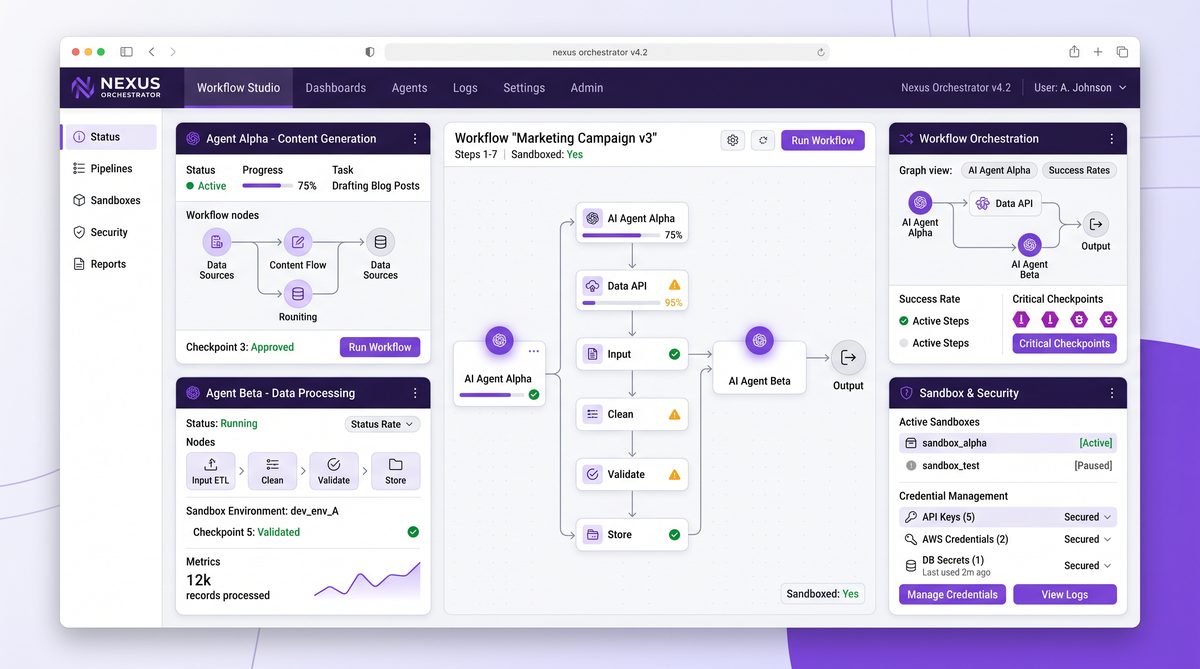
How to Automate Enterprise Workflows with Claude Managed Agents
In today’s fast-paced enterprise environments, automating workflows is not just a luxury but a necessity. The increasing complexity of business processes, combined with the demand for rapid execution and minimal errors, has driven organizations to adopt intelligent automation solutions. Anthropic’s Claude Managed Agents offer a powerful and flexible framework that enables developers and operations teams to build, deploy, and manage automated workflows with ease and precision.
This comprehensive tutorial will guide you through the process of leveraging Claude Managed Agents to automate your enterprise workflows effectively. We will cover the foundational concepts such as sandboxed code execution, checkpointing to ensure reliability, credential scoping for secure access management, and setting up Routines including cron jobs and webhook integrations. By the end of this tutorial, you will be equipped with the knowledge to implement scalable and secure automation pipelines tailored to your enterprise needs.
Understanding Sandboxed Code Execution with Claude Managed Agents

At the heart of Claude Managed Agents lies the principle of safe and controlled execution of code. Enterprise workflows often involve processing sensitive data and interacting with critical systems; hence, executing code in an isolated and sandboxed environment is paramount. This section will provide an in-depth examination of how sandboxed code execution works within Claude Managed Agents, why it is critical, and how it can be configured and optimized for your specific workflow requirements.
What is Sandboxed Code Execution?
Sandboxed code execution refers to running code in a restricted environment that limits its access to the underlying system and network. This containment strategy prevents potentially harmful or untrusted code from affecting other parts of the system or accessing unauthorized resources. In the context of Claude Managed Agents, sandboxing ensures that each step of your automated workflow executes in a secure, isolated manner while still allowing necessary interactions with external APIs and data sources.
Key Benefits of Sandboxed Execution in Enterprise Workflows
- Security: Limits the risk of code injection attacks or accidental data leaks by isolating execution.
- Reliability: Faults in one agent’s code do not propagate, preserving the stability of the overall system.
- Traceability: Execution logs and outputs are confined and easier to audit, helping with compliance requirements.
- Resource Management: Sandboxing enables fine-grained control over resource usage such as CPU, memory, and network access.
How Claude Managed Agents Implement Sandboxing
Claude Managed Agents utilize containerization and virtualized runtime environments to achieve sandboxing. Each agent runs its code in a dedicated ephemeral container that is spun up at execution time and destroyed afterward. This design ensures no persistent state outside of explicitly checkpointed data, eliminating risks of cross-contamination between tasks.
Internally, the sandbox environment provides a controlled interface for executing scripts written in supported languages (e.g., Python, JavaScript). It limits system calls and restricts network calls to predefined endpoints, which can be configured via credential scoping policies. Additionally, resource quotas and timeouts prevent runaway processes from impacting system performance.
Configuring Sandboxed Execution
When defining a Claude Managed Agent, developers specify the runtime environment and resource constraints to tailor the sandbox to their needs. Key configuration parameters include:
- Runtime Language and Version: Select the language interpreter or runtime version (e.g., Python 3.9) appropriate for your codebase.
- Resource Limits: Define CPU shares, memory limits, and execution timeouts to prevent resource exhaustion.
- Network Access Control: Specify whitelisted domains or IP addresses the agent can communicate with during execution.
- File System Access: Restrict read/write permissions to temporary directories only, preventing unauthorized data access.
Example configuration snippet for a sandboxed Python agent:
{
  "runtime": "python3.9",
  "cpu_limit": "1",
  "memory_limit": "512MB",
  "timeout_seconds": 300,
  "network_whitelist": [
    "api.enterprise-internal.com",
    "storage.enterprise-cloud.net"
  ],
  "filesystem_access": "temp_only"
}
Best Practices for Writing Code Within the Sandbox
Developers should keep certain best practices in mind when authoring code to run inside Claude Managed Agents’ sandboxed environments:
- Minimize external dependencies; pre-package or vendor libraries where possible to avoid network fetches.
- Implement robust error handling to gracefully handle timeout or resource limit exceptions.
- Use environment variables for configuration rather than hardcoding sensitive information.
- Log sufficiently detailed execution traces for debugging but avoid logging sensitive data.
- Test code locally in a similar containerized environment to mirror sandbox constraints.
Use Cases of Sandboxed Execution in Enterprise Automation
Sandboxed code execution enables a range of automated workflow scenarios, such as:
- Data Transformation Pipelines: Safely parsing and transforming sensitive customer data before loading into analytics platforms.
- API Orchestration: Coordinating calls to third-party services with strict network access control.
- Compliance Checks: Running validation scripts on financial transactions without risking data exposure.
- Dynamic Report Generation: Generating documents or reports on-demand while isolating execution from the main application.
Summary
Sandboxed code execution forms the security and reliability backbone of Claude Managed Agents. By isolating code execution within ephemeral, resource-constrained containers, enterprises can automate complex workflows confidently, knowing that each step is protected from unintended side effects. With proper configuration and coding best practices, sandboxed agents unlock a new level of safe automation for mission-critical systems.
Checkpointing and Credential Scoping: Ensuring Reliability and Security
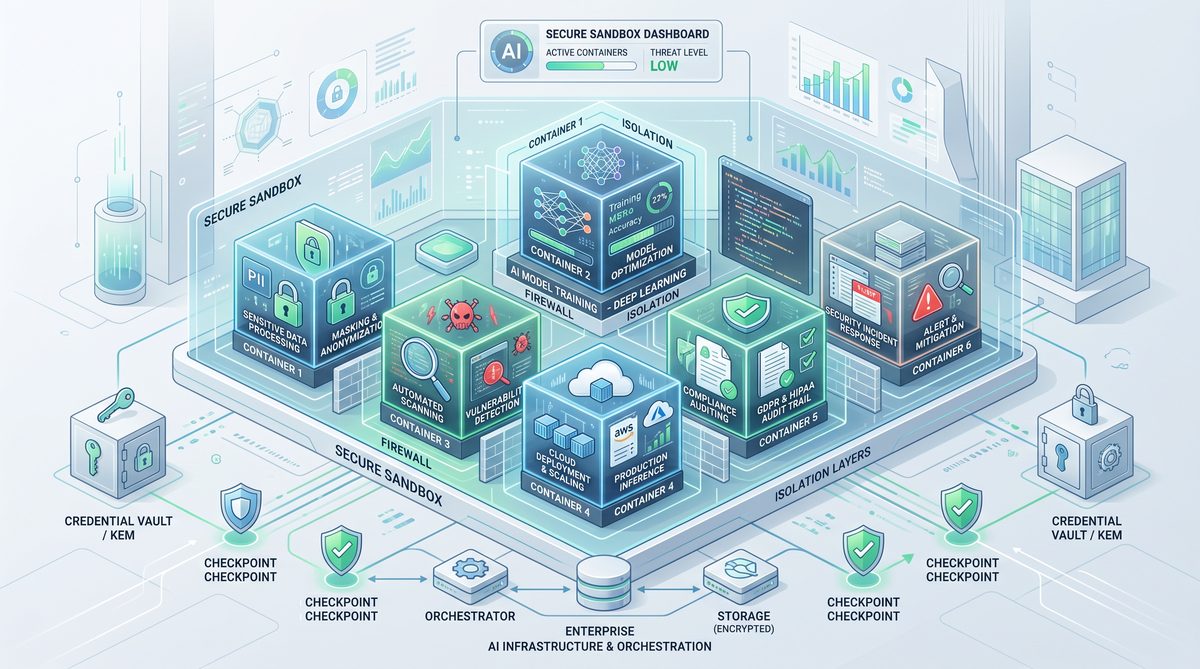
Automating enterprise workflows requires not only secure execution but also mechanisms to maintain state and protect sensitive credentials. Claude Managed Agents incorporate advanced checkpointing features to save intermediate execution states, and credential scoping to enforce least-privilege access controls. This section dives deep into these foundational capabilities, illustrating how they work and how to leverage them to build robust, secure automation pipelines.
The Concept of Checkpointing in Workflow Automation
Checkpointing refers to the process of saving the state of a running process or workflow at specific points. This allows workflows to resume from the last saved state in cases of failure, interruptions, or scheduled pauses. In enterprise automation, checkpointing is vital for ensuring data integrity and avoiding costly rework.
Claude Managed Agents provide built-in checkpointing that automatically persists state snapshots to a secure storage backend. Developers can also insert manual checkpoints at critical junctures within their agent code to capture custom state information.
How Checkpointing Works in Claude Managed Agents
Checkpointing is integrated into the agent lifecycle through:
- Automatic State Persistence: At key milestones or completion of steps, the agent’s execution context, including variables and outputs, is serialized and stored.
- Manual Checkpoints: Developers can programmatically invoke checkpoint creation to capture partial results or save progress before long-running operations.
- Resumption Capability: Upon restart or recovery, the agent loads the latest checkpoint and resumes execution seamlessly, eliminating the need to start over.
Designing Checkpoints for Maximum Effectiveness
Effective checkpointing requires thoughtful design to balance performance, storage costs, and recovery granularity:
- Checkpoint Frequency: More frequent checkpoints reduce replay time on failure but increase storage overhead.
- Data Scope: Only serialize necessary state data to minimize checkpoint size and speed up recovery.
- Checkpoint Naming and Metadata: Use meaningful checkpoint identifiers and metadata to facilitate troubleshooting and auditing.
- Security: Ensure checkpoint data is encrypted at rest and access-controlled to prevent unauthorized retrieval.
Credential Scoping: Minimizing Security Risks in Enterprise Automation
Handling credentials securely is one of the most critical aspects of automation. Poorly managed credentials can lead to unauthorized access and data breaches. Claude Managed Agents address this by implementing credential scoping, which restricts agents’ access to only the credentials necessary for their specific tasks.
Credential scoping enforces the principle of least privilege by:
- Binding credentials to specific agents or routines
- Defining granular scopes such as read-only or limited API endpoints
- Rotating credentials automatically without manual intervention
Implementing Credential Scoping in Claude Managed Agents
When configuring an agent, you specify which credentials it can access and under what conditions. This is done via a declarative policy that defines:
- Credential Types: API keys, OAuth tokens, SSH keys, database credentials, etc.
- Access Scopes: Permissions and resource boundaries (e.g., read-only access to a database schema)
- Usage Limits: Rate limits or expiration policies to reduce exposure
Example credential scope policy:
{
  "credentials": {
    "crm_api_key": {
      "type": "api_key",
      "scope": "read:contacts",
      "validity": "30d",
      "max_requests_per_hour": 1000
    },
    "db_read_only": {
      "type": "database",
      "scope": "read_only",
      "databases": ["customer_data"]
    }
  }
}
Combining Checkpointing and Credential Scoping for Resilient Automation
Checkpointing and credential scoping complement each other to create reliable and secure automation workflows. Checkpoints ensure your workflow can recover from failures without re-executing sensitive operations, while credential scoping limits the impact of credential leakage or misuse.
Scheduling Workflows with Routines: Cron and Webhooks
Claude Managed Agents support sophisticated scheduling mechanisms called Routines, enabling automated workflows to trigger based on time or external events. The two primary Routine types are cron-based schedules and webhooks.
Cron Routines
Cron routines allow you to schedule agents to run at fixed intervals or specific times, using familiar cron syntax. This is ideal for batch jobs, regular report generation, or periodic data syncs.
- Configuration: Define the cron expression, timezone, and optional start/end dates.
- Example: Running a data cleanup agent every night at 2 AM:
{
  "routine_type": "cron",
  "schedule": "0 2 * * *",
  "timezone": "America/New_York"
}
Webhook Routines
Webhook routines trigger agents in response to HTTP requests sent by external systems. This enables event-driven automation, such as responding to customer actions or system alerts in real time.
- Configuration: Specify the webhook URL, authentication method, and payload validation rules.
- Security: Use signature verification or token-based authentication to secure webhook endpoints.
- Example: Triggering an order processing agent when a new purchase event is sent:
{
  "routine_type": "webhook",
  "endpoint": "https://enterprise.com/agent-webhook",
  "auth_method": "HMAC",
  "secret_key": "your-webhook-secret"
}
Comparative Overview of Checkpointing, Credential Scoping, and Routines
| Feature | Description | Primary Benefit | Typical Use Cases |
|---|---|---|---|
| Checkpointing | Saving intermediate state during agent execution for fault tolerance and recovery. | Ensures workflow reliability and data integrity in failure scenarios. | Long-running batch processes, data pipelines, multi-step automations. |
| Credential Scoping | Restricting access of agents to specific credentials and permissions. | Enhances security by enforcing least privilege access. | API integrations, database access, cloud resource automation. |
| Routines (Cron) | Scheduling agents to run at predefined times using cron syntax. | Automates repetitive tasks on a fixed schedule. | Daily report generation, system maintenance, data syncs. |
| Routines (Webhook) | Triggering agents in response to external HTTP events. | Enables event-driven, real-time automation. | Order processing, alert handling, user-initiated workflows. |
Integrating These Concepts in Your Workflow Design
When designing your enterprise automation workflows with Claude Managed Agents, consider the interplay between sandboxed execution, checkpointing, credential scoping, and Routines. For example, a cron-scheduled agent that processes daily data exports should checkpoint progress regularly to handle interruptions, while its API credentials should be scoped narrowly to prevent misuse.
Similarly, a webhook-triggered agent responding to real-time events can leverage sandboxing to isolate execution and credential scoping to limit third-party API access. These combined strategies create a resilient and secure automation fabric that can adapt to evolving enterprise needs.
For further details on configuring agent runtimes and security policies, refer to the official Claude Managed Agents documentation
While this tutorial focuses on enterprise-scale deployments, smaller organizations can also leverage Claude’s agentic capabilities. Our guide to 15 agentic workflows for small businesses using Claude demonstrates how the same underlying technology scales down for teams with fewer resources and simpler infrastructure requirements.
. Additionally, learn how to optimize workflow performance through advanced routine configurations
One of the most powerful capabilities of Managed Agents is their ability to improve over time. Anthropic’s ‘Dreaming’ feature enables agents to consolidate learnings from past sessions during idle periods, effectively building institutional knowledge that makes each subsequent execution more efficient and accurate.
.
Sandboxed Code Execution and Checkpointing with Claude Managed Agents
One of the most transformative features of Anthropic’s Claude Managed Agents is the ability to execute code in a sandboxed environment safely and to leverage checkpointing for stateful workflow continuity. These capabilities empower developers to build complex, multi-step enterprise workflows that interact with real-world data and systems without risking security or data integrity.
Understanding Sandboxed Code Execution
Sandboxed code execution refers to running code in a controlled, isolated environment where it cannot affect the host system or access unauthorized resources. Claude Managed Agents provide a secure sandbox to run scripts, API calls, data transformations, and more as part of an automated workflow.
Key benefits include:
- Security: The sandbox restricts access to sensitive files or system resources.
- Predictability: Execution is deterministic within the sandbox, reducing unexpected side effects.
- Auditability: Each sandboxed execution is logged and monitored for compliance.
Implementing Sandboxed Scripts in Managed Agents
To utilize sandboxed code execution, you define specific code blocks within your agent’s configuration or routine. Claude Managed Agents support multiple programming languages, including Python and JavaScript, with pre-built libraries for common enterprise APIs.
Example snippet to execute a Python script inside a sandboxed environment:
{
  "action": "execute_code",
  "language": "python",
  "script": "
def fetch_and_process_data():
    import requests
    response = requests.get('https://api.acme-corp.io/data')
    data = response.json()
    # Process data logic here
    return data

result = fetch_and_process_data()
return result
"
}
Within this sandbox, network calls are permitted only to whitelisted endpoints, and the runtime environment restricts file system access based on credential scopes (covered later). Any network failure or script error triggers controlled exception handling, allowing the agent to retry or escalate.
Checkpointing for Workflow Continuity
Checkpointing is essential for long-running or stateful workflows. It allows Managed Agents to save intermediate states and resume execution later from the last checkpoint rather than starting over.
This feature is particularly valuable when:
- Executing multi-step data processing pipelines.
- Waiting for external event triggers or human approvals.
- Handling large workloads that exceed execution time limits.
How Checkpointing Works in Claude Managed Agents
Checkpointing is built into the managed runtime. When a checkpoint is reached, the agent serializes its current state — including variables, workflow position, and intermediate results — and securely persists it. On restart, the agent reloads this state and continues execution seamlessly.
Developers define checkpoints explicitly in the workflow or rely on automatic checkpointing at key lifecycle points.
{
  "workflow": [
    {"step": "fetch_data"},
    {"step": "checkpoint"},
    {"step": "process_data"},
    {"step": "checkpoint"},
    {"step": "finalize"}
  ]
}
Best Practices for Using Sandboxed Execution and Checkpointing
- Limit external resource calls: Use credential scoping (see next section) to restrict API access, minimizing attack surface.
- Design idempotent steps: Ensure steps can be safely retried after checkpoint restores.
- Monitor checkpoint health: Implement logging and alerting around checkpoint failures or anomalies.
- Test sandboxed scripts rigorously: Use local simulations before deploying to production agents.
Example Use Case: Data Enrichment Pipeline
Imagine an enterprise workflow that ingests customer records, enriches them with third-party data, and updates a CRM system. Using sandboxed code execution, the agent fetches data via APIs, transforms it, and checkpointing ensures that updates continue smoothly even if the process is interrupted.
| Step | Description | Sandboxed Action | Checkpointing Role |
|---|---|---|---|
| 1. Fetch Customer Data | Retrieve raw customer records from internal DB | Sandboxed Python script querying internal API | Checkpoint after data retrieval |
| 2. Enrich Data | Call external enrichment APIs | Sandboxed HTTP requests with credential scoping | Checkpoint after enrichment |
| 3. Update CRM | Upload enriched records to CRM system | Sandboxed script with scoped CRM credentials | Final checkpoint for completion |
These capabilities enable robust, maintainable workflows that can safely interact with diverse systems and recover gracefully from failures.
Credential Scoping and Setting Up Routines (cron, webhooks) in Claude Managed Agents
Enterprise workflow automation requires secure and flexible management of credentials and scheduling mechanisms. Claude Managed Agents provide advanced credential scoping to enforce least privilege access and support multiple routine triggers such as cron schedules and webhook events.
Credential Scoping: Principle of Least Privilege
Credential scoping is the practice of granting the minimum necessary access rights to a process or agent. Claude Managed Agents implement credential scoping at multiple levels:
- Agent-level credentials: Credentials associated with the entire agent instance.
- Routine-level credentials: Scoped credentials limited to specific routines within an agent.
- Action-level credential overrides: Temporary elevation or narrowing of credential privileges for particular code executions.
Defining Scoped Credentials
Credentials are stored securely in the Anthropic managed vault and mapped via policies that specify which API keys, OAuth tokens, or secrets are accessible to each agent or routine.
Example credential policy JSON snippet:
{
  "credentials": {
    "crm_api_key": {
      "access": ["agent_123", "routine_update_crm"],
      "scopes": ["write:crm_records"]
    },
    "enrichment_api_token": {
      "access": ["routine_data_enrich"],
      "scopes": ["read:enrichment_data"]
    }
  }
}
This ensures that a routine updating the CRM cannot use enrichment API credentials, and vice versa, minimizing risk.
Integrating Credentials in Sandboxed Code
When writing sandboxed scripts, you request credentials by name, and the runtime injects the scoped secrets securely at execution time. This prevents hardcoding secrets and reduces exposure.
Example Python snippet accessing a scoped secret:
api_key = agent.get_credential("crm_api_key")
headers = {"Authorization": f"Bearer {api_key}"}
response = requests.post("https://crm.acme-corp.io/api/records", headers=headers, json=data)
Setting Up Routines: Cron Schedules and Webhooks
Routines define when and how Managed Agents execute workflows. Two primary routine types are:
- Cron-based Routines: Time-based triggers allowing agents to run tasks on schedules (e.g., every hour, daily at midnight).
- Webhook-based Routines: Event-driven triggers invoking agents in response to external HTTP calls.
Configuring Cron Routines
Cron expressions define schedules with precision. Claude Managed Agents support standard cron syntax with added flexibility for time zones and jitter to avoid thundering herds.
Example routine definition for a daily midnight task:
{
  "routine_name": "daily_data_sync",
  "trigger": {
    "type": "cron",
    "expression": "0 0 * * *",
    "timezone": "UTC"
  },
  "actions": [
    {"step": "fetch_data"},
    {"step": "process_data"},
    {"step": "update_database"}
  ],
  "credentials": ["db_write_key"]
}
Webhook-Driven Routines
Webhook routines allow external systems to push data or trigger workflows dynamically. The agent exposes a secure HTTPS endpoint with authentication mechanisms such as API keys, JWTs, or mutual TLS.
Example webhook routine configuration:
{
  "routine_name": "on_customer_signup",
  "trigger": {
    "type": "webhook",
    "endpoint": "/webhooks/customer_signup",
    "auth": {
      "type": "api_key",
      "header_name": "X-API-Key",
      "valid_keys": ["abcdef123456"]
    }
  },
  "actions": [
    {"step": "validate_payload"},
    {"step": "create_customer_record"},
    {"step": "send_welcome_email"}
  ],
  "credentials": ["email_service_key", "crm_api_key"]
}
Combining Credential Scoping with Routines
Each routine can specify exactly which credentials it requires, and the runtime enforces access restrictions. This separation ensures that even if a webhook endpoint is compromised, the attacker gains minimal access.
Routine Lifecycle and Monitoring
Claude Managed Agents provide a dashboard for monitoring routine executions, including success rates, latency, error logs, and credential usage. Alerts can be configured for failures or unusual activity.
Advanced Tips for Routine Management
- Use variable interpolation in cron expressions to dynamically adjust schedules based on business needs.
- Implement retry policies with exponential backoff for webhook routines to handle transient failures gracefully.
- Leverage
The quality of your Managed Agent’s output depends heavily on how you structure its instructions. Our comprehensive guide on writing effective instructions for autonomous AI systems covers the specific prompting patterns that maximize agent reliability in production environments.
to integrate with enterprise logging and observability platforms.
- Regularly audit credential scopes to tighten security and reduce attack surfaces.
Example Scenario: Automated Incident Response
Consider an incident response workflow where a webhook notifies the agent of a security alert. The agent validates the alert, queries internal systems via sandboxed code using scoped credentials, and triggers remediation steps on a schedule if the incident persists.
| Routine | Trigger | Credential Scope | Purpose |
|---|---|---|---|
| security_alert_listener | Webhook on alert | read:security_logs | Validate and log incident |
| incident_escalation | Cron every 10 minutes | write:ticketing_system | Escalate unresolved incidents |
| auto_remediation | Cron every 5 minutes | execute:remediation_scripts | Run automated fixes |
By combining sandboxed execution, credential scoping, and flexible routines, enterprise teams can build resilient, secure automated workflows that respond rapidly to operational events.
For more on integrating Claude Managed Agents with cloud infrastructure automation, check out .
Access 40,000+ AI Prompts for ChatGPT, Claude & Codex — Free!
Subscribe to get instant access to our complete Notion Prompt Library — the largest curated collection of prompts for ChatGPT, Claude, OpenAI Codex, and other leading AI models. Optimized for real-world workflows across coding, research, content creation, and business.
Useful Links
- Anthropic Claude Official Site
- Claude Managed Agents Documentation
- Cron Expression Syntax Reference
- OWASP Top Ten Security Risks
- The Twelve-Factor App Methodology
- MDN Webhooks Guide
- AWS Secrets Manager
- HashiCorp Vault
- Least Privilege Principle – Wikipedia
- Postman API Testing Tool
