
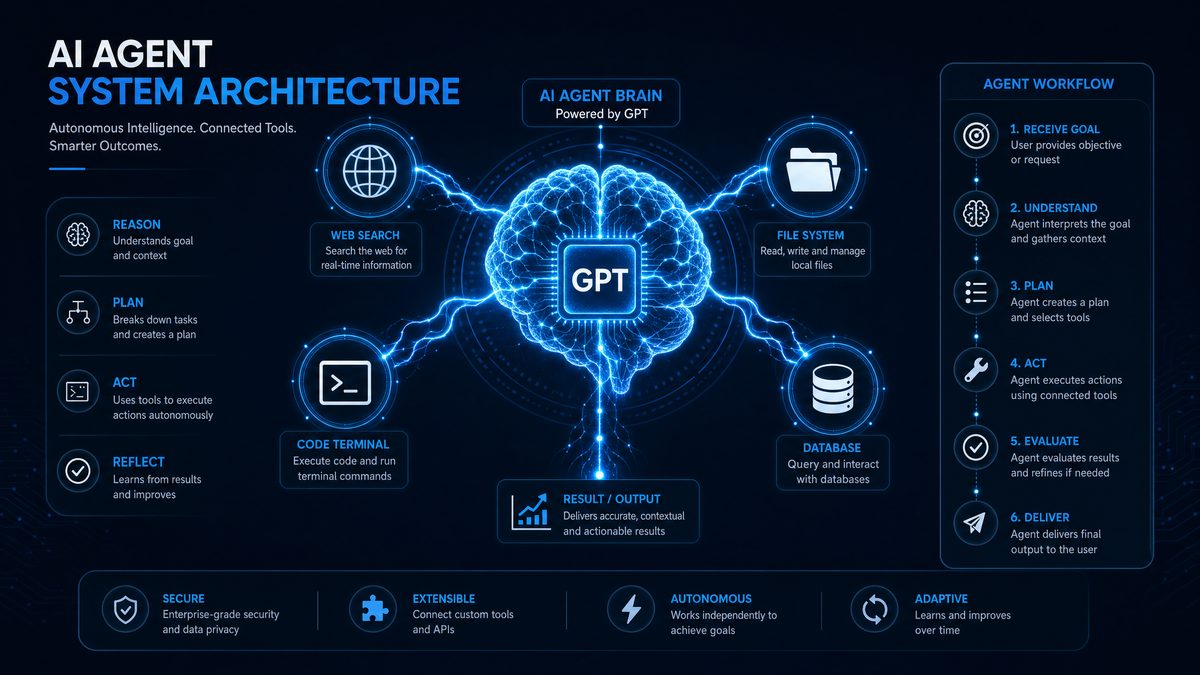
As artificial intelligence continues to advance at a breakneck pace, autonomous GPT agents have become indispensable tools in technology landscapes by 2026. These agents are no longer confined to simple question-answering tasks but have evolved into versatile entities capable of performing complex workflows, integrating with multiple tools, and operating independently. Central to this transformation is OpenAI’s Responses API—a powerful interface that empowers developers to build highly customizable and autonomous GPT agents effortlessly.
This comprehensive tutorial will guide you through the entire process of building a custom GPT agent using OpenAI’s Responses API. From understanding the foundational concepts of autonomous agents and the API’s unique capabilities, to architecting scalable solutions, integrating essential tools like web search and file system access, to deploying and scaling your agent effectively, this article covers every critical aspect. By the end, you will be equipped with the knowledge and practical skills to create autonomous GPT agents tailored to your specific needs.
1. Understanding Autonomous GPT Agents and the Responses API
1.1 What Are Autonomous GPT Agents?
Autonomous GPT agents represent a significant evolution beyond traditional chatbots. In 2026, these agents are designed to perform complex tasks independently by orchestrating multiple tools and managing extended conversational contexts. Unlike simple chatbots that respond passively to user queries, autonomous agents proactively execute multi-step workflows, retrieve real-time data, interact with software systems, and learn from their environment.
These agents possess capabilities such as:
- Dynamic tool integration, allowing the agent to leverage web search, file systems, and custom APIs.
- Long-term memory management to maintain context across sessions.
- Decision-making logic to plan and execute multi-step tasks.
Real-world applications of autonomous GPT agents include virtual customer support representatives, research assistants that synthesize information from diverse sources, automated scheduling and logistics coordinators, and intelligent IoT controllers managing smart environments.
1.2 Overview of OpenAI’s Responses API
The OpenAI Responses API, released in 2026, marks a pivotal advancement over traditional language model APIs. Unlike the prior completion-based APIs, the Responses API is specifically engineered to facilitate autonomous agent creation by natively supporting multi-tool orchestration, persistent context handling, and function calling.
Key differentiators and enhancements include:
- Multi-tool orchestration: Seamlessly integrate and coordinate various external tools.
- Built-in memory management: Support for both short-term and long-term conversational context.
- Function calling: Direct invocation of custom functions and APIs within agent workflows.
- Enhanced security and compliance: Features to safeguard data privacy and API usage.
This API empowers developers to move beyond static text generation, enabling agents to act as autonomous digital assistants capable of complex reasoning and interaction with their environment.
1.3 Key Concepts: Tool-Oriented Agent Design
At the heart of building effective GPT agents lies the concept of tool-oriented agent design. This approach involves augmenting the language model with specialized external tools to extend its capabilities far beyond text generation.
Supported tool types include:
- Web Search: Real-time information retrieval to access up-to-date knowledge.
- File Search: Indexing and querying local or cloud-based documents.
- Computer Use: Executing commands and scripts for automation.
- Function Calling: Invoking custom APIs for domain-specific actions.
Integrating these tools allows an agent to perform tasks such as booking appointments, gathering live data, manipulating files, or controlling IoT devices. This modular design not only enhances the agent’s autonomy but also provides flexibility to tailor functionality to specific use cases.
For developers interested in exploring various prompt techniques that optimize such tool integration, see ChatGPT Prompts.
2. Architecting a Custom GPT Agent: Design Principles
2.1 Agent Architecture Overview
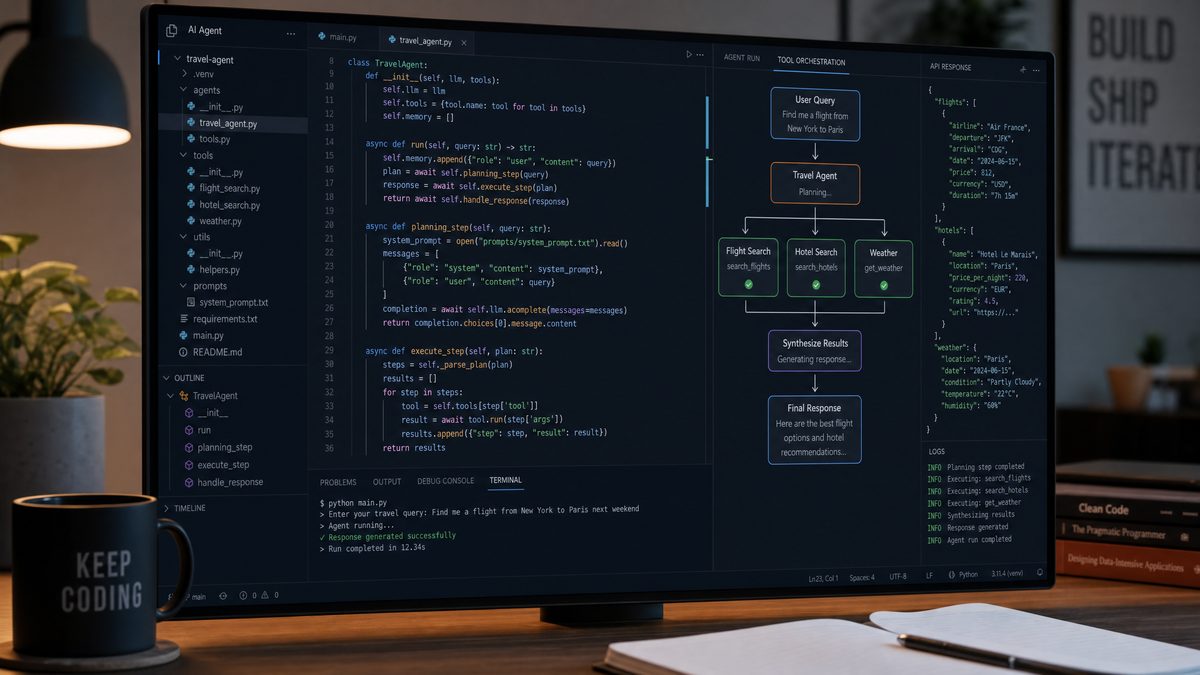
Designing an autonomous GPT agent requires a well-structured architecture to manage complex interactions and tool coordination. A typical high-level architecture includes the following components:
| Component | Description |
|---|---|
| GPT Core | The central language model responsible for natural language understanding, reasoning, and generating responses. |
| Tool Manager | Manages the invocation, coordination, and response handling of integrated external tools. |
| Memory Module | Stores and retrieves conversational context and long-term knowledge. |
| Planner | Determines the sequence of actions, tool calls, and GPT queries to accomplish complex tasks. |
The interaction flow typically begins with the GPT Core interpreting user input, consulting the Planner to determine required tool calls, invoking the Tool Manager to execute these tools, and integrating the results back into the conversation with memory support.
Designing your agent with modularity in mind allows you to replace or upgrade components independently, facilitating extensibility and maintainability.
2.2 Defining Agent Roles and Responsibilities
Clearly delineating the responsibilities of the language model versus external tools is essential for efficient agent operation:
- Language Model: Handles natural language understanding, reasoning, and generating human-like responses. It decides what needs to be done.
- Tools: Execute specific actions such as retrieving data, performing computations, or interfacing with hardware. They handle the how.
Effective context and state management ensures the agent maintains coherence across multiple interactions. This involves tracking task progress, user preferences, and tool outputs.
Error handling is critical—agents must detect failed tool calls, recover gracefully, and notify users appropriately. Fallback strategies might include retrying, switching tools, or providing alternative suggestions.
2.3 Choosing the Right Tools for Your Agent
Selecting the appropriate toolset depends largely on your agent’s domain and use cases:
| Tool | Best Use Cases | Considerations |
|---|---|---|
| Web Search | Real-time data retrieval, breaking news, general knowledge queries | Latency, relevance filtering, API rate limits |
| File Search | Document summarization, data extraction, knowledge base querying | Security permissions, indexing performance |
| Computer Use | Automating repetitive tasks, system monitoring, file management | Security risks, sandboxing, access controls |
| Function Calling | Domain-specific workflows, IoT control, appointment scheduling | API stability, error handling, function registration |
Developers can also create custom tools tailored to their unique requirements, extending the agent’s capabilities beyond built-in integrations.
For detailed examples on API interactions and function calling, refer to OpenAI API.
3. Setting Up Your Development Environment
3.1 Prerequisites and Tools
Before building your GPT agent, ensure you have the following prerequisites:
- Programming Language: Choose from Node.js (v18+), Python (3.10+), or other officially supported languages with OpenAI SDKs.
- OpenAI Account: Register on OpenAI’s platform and obtain API credentials with access to the Responses API.
- IDE: Recommended integrated development environments include Visual Studio Code, PyCharm, or WebStorm for enhanced debugging and code management.
- Version Control: Git for source control and collaboration.
Securely managing API keys is essential—use environment variables or secret management tools to avoid exposing sensitive credentials.
3.2 Installing Dependencies and SDKs
Install the necessary SDKs and dependencies following these steps:
- Node.js Example:
npm install openai dotenv
- Python Example:
pip install openai python-dotenv
Create a .env file to store your API key securely:
OPENAI_API_KEY=your_api_key_here
Load environment variables in your application before initializing the OpenAI client.
3.3 Project Structure Best Practices
Organizing your project for clarity and scalability is crucial. A recommended directory layout might be:
/my-gpt-agent
 ├── /src
 │    ├── agent.js          # Core GPT agent logic
 │    ├── tools.js          # Tool integrations and adapters
 │    ├── planner.js        # Task orchestration logic
 │    ├── memory.js         # Context and state management
 ├── /config
 │    └── config.env        # Environment variables and API keys
 ├── /tests
 │    └── agent.test.js     # Unit and integration tests
 ├── package.json or requirements.txt
 └── README.md
Separating concerns between agent logic, tool integrations, and configuration ensures maintainability and eases collaboration.
4. Building the Core GPT Agent with the Responses API
4.1 Initializing a Basic GPT Agent
Start by creating a minimal GPT agent instance using the Responses API. Below is a simplified example in JavaScript:
import OpenAI from "openai";

const openai = new OpenAI({
  apiKey: process.env.OPENAI_API_KEY,
});

async function basicAgent(input) {
  const response = await openai.chat.completions.create({
    model: "gpt-4o-responses-2026",
    messages: [{ role: "user", content: input }],
  });
  return response.choices[0].message.content;
}

(async () => {
  const answer = await basicAgent("Hello, what can you do?");
  console.log(answer);
})();
This initializes the agent and sends a user query, receiving a conversational response. This foundation will be extended with memory, tools, and orchestration.
4.2 Incorporating Memory and Context Management
Maintaining context between interactions is key to natural conversations. The Responses API provides mechanisms to embed and recall conversation history efficiently.
Strategies include:
- Short-term memory: Keep recent messages in the chat history payload.
- Long-term memory: Use external vector databases or knowledge stores indexed by embeddings.
Example: Append recent conversation turns to each API call, and query a vector store for relevant long-term context.
Below is a conceptual snippet illustrating context preservation:
let conversationHistory = [];

async function chatWithMemory(userInput) {
  conversationHistory.push({ role: "user", content: userInput });

  const response = await openai.chat.completions.create({
    model: "gpt-4o-responses-2026",
    messages: conversationHistory,
  });

  const assistantReply = response.choices[0].message;
  conversationHistory.push(assistantReply);

  return assistantReply.content;
}
For scalable memory management, consider integrating external databases and embedding search solutions.
4.3 Implementing a Planner for Task Orchestration
Complex tasks often require multiple tool calls in a specific sequence. A planner component directs this orchestration by generating a plan of actions based on user input and agent goals.
With the Responses API, you can implement a planner that generates step-by-step instructions, deciding which tools to invoke and in what order.
Example planner logic:
async function planAndExecute(taskDescription) {
  // 1. Generate plan steps from the GPT model
  const planResponse = await openai.chat.completions.create({
    model: "gpt-4o-responses-2026",
    messages: [
      { role: "system", content: "You are a planner that breaks down tasks." },
      { role: "user", content: `Create steps to accomplish: ${taskDescription}` }
    ],
  });

  const planSteps = planResponse.choices[0].message.content.split("\n");

  // 2. Iterate and execute each step, invoking tools as needed
  for (const step of planSteps) {
    if (step.includes("web search")) {
      // Call web search tool
    } else if (step.includes("read file")) {
      // Call file search tool
    } else {
      // Handle with GPT or other tools
    }
  }
}
By combining planning with tool invocation, your agent can autonomously complete multi-step workflows.
5. Integrating Key Tools for Enhanced Autonomy
5.1 Web Search Tool Integration
Accessing current information is vital for many applications. Integrate a live web search API such as Bing Search or Google Custom Search to enable real-time data retrieval.
Steps to integrate:
- Obtain an API key from your chosen web search provider.
- Implement a wrapper function to query the search API.
- Parse and filter search results to extract relevant snippets.
- Pass results back to the GPT agent for synthesis.
Example integration code (Node.js):
import fetch from "node-fetch";

async function webSearch(query) {
  const response = await fetch(`https://api.bing.microsoft.com/v7.0/search?q=${encodeURIComponent(query)}`, {
    headers: { "Ocp-Apim-Subscription-Key": process.env.BING_API_KEY },
  });
  const data = await response.json();
  // Extract top 3 results
  return data.webPages.value.slice(0, 3).map(result => ({
    title: result.name,
    url: result.url,
    snippet: result.snippet,
  }));
}

// Usage within agent workflow
const results = await webSearch("Latest AI trends 2026");
console.log(results);
Ensure you handle API usage limits and implement caching for frequent queries.
5.2 File Search and File System Access
Allowing the GPT agent to access and query files enhances its ability to provide personalized and contextual responses.
Approaches include:
- Local File Indexing: Use libraries like
lunr.jsorWhooshto create searchable indexes of local documents. - Cloud Storage Access: Integrate with APIs of cloud providers such as Google Drive, Dropbox, or OneDrive.
Example: Agent reading and summarizing a document content.
import fs from "fs";

function readFileContent(path) {
  return fs.readFileSync(path, "utf-8");
}

async function summarizeFile(path) {
  const content = readFileContent(path);
  const response = await openai.chat.completions.create({
    model: "gpt-4o-responses-2026",
    messages: [
      { role: "system", content: "Summarize the following document." },
      { role: "user", content: content }
    ],
  });
  return response.choices[0].message.content;
}
Always ensure proper security and permission checks when accessing files to prevent unauthorized data exposure.
5.3 Computer Use and Automation
Enabling your agent to execute commands or scripts on the host machine unlocks powerful automation capabilities. Use cases include:
- Automating repetitive tasks such as file backups or data processing.
- Managing system resources or monitoring logs.
- Interacting with other software via command-line interfaces.
For security, implement sandboxing and restrict command execution to predefined safe operations.
Example: Using Node.js to execute shell commands safely:
import { exec } from "child_process";

function runCommand(cmd) {
  return new Promise((resolve, reject) => {
    exec(cmd, (error, stdout, stderr) => {
      if (error) reject(error);
      else resolve(stdout || stderr);
    });
  });
}

// Usage
const output = await runCommand("ls -la");
console.log(output);
Integrate this functionality into your agent’s tool manager with strict validation.
5.4 Function Calling with Custom APIs
The Responses API’s advanced function calling allows your GPT agent to invoke custom code or external services as part of its workflow. This is invaluable for domain-specific actions like booking appointments, controlling IoT devices, or performing calculations.
Steps to implement function calling:
- Define the function signature and input/output schemas.
- Register the function with the Responses API during agent initialization.
- Handle calls by executing the corresponding business logic.
Example function registration and invocation:
const functions = [
  {
    name: "bookAppointment",
    description: "Book an appointment with date, time, and person",
    parameters: {
      type: "object",
      properties: {
        date: { type: "string" },
        time: { type: "string" },
        person: { type: "string" }
      },
      required: ["date", "time", "person"],
    },
  },
];

// Register functions with the Responses API client
const response = await openai.chat.completions.create({
  model: "gpt-4o-responses-2026",
  messages: [{ role: "user", content: "Book an appointment tomorrow at 3pm with Dr. Smith." }],
  functions,
  function_call: "auto",
});

// Handle function call execution
if (response.choices[0].message.function_call) {
  const { name, arguments: args } = response.choices[0].message.function_call;
  if (name === "bookAppointment") {
    const params = JSON.parse(args);
    // Call your backend API or service here with params
  }
}
This tight integration enables fluid, natural conversations that directly trigger backend workflows.
6. Orchestrating Tools: Coordination Strategies
6.1 Managing Concurrent Tool Usage
Modern autonomous agents often need to invoke multiple tools simultaneously or in rapid succession. Architect your agent to support:
- Asynchronous calls: Use async/await or promise-based concurrency models.
- Prioritization: Allocate resources to the most critical tasks first.
- Rate limiting: Respect API quotas and avoid overloading services.
Example concurrency management snippet:
const toolPromises = [
  webSearch("latest AI news"),
  fileSearch("project specs"),
  runCommand("df -h"),
];

const results = await Promise.allSettled(toolPromises);

results.forEach((result, idx) => {
  if (result.status === "fulfilled") {
    console.log(`Tool ${idx} output:`, result.value);
  } else {
    console.error(`Tool ${idx} failed:`, result.reason);
  }
});
6.2 Context Sharing Between Tools and GPT
Maintaining a consistent context across tools and the language model is critical. Share relevant data efficiently by:
- Passing summarized tool outputs back into GPT’s message history.
- Using structured data formats (JSON, XML) when appropriate.
- Synchronizing state variables across components.
This ensures the agent’s responses reflect all available information seamlessly.
6.3 Handling Failures and Timeouts
Robust error handling improves user experience and system reliability. Implement strategies such as:
- Retries: Automatically retry transient failures with exponential backoff.
- Fallbacks: Switch to alternative tools or provide default responses.
- Timeouts: Set reasonable time limits on tool calls to avoid blocking.
Logging and monitoring tool invocations facilitate debugging and performance optimization.
6.4 Example: Complex Multi-Tool Workflow
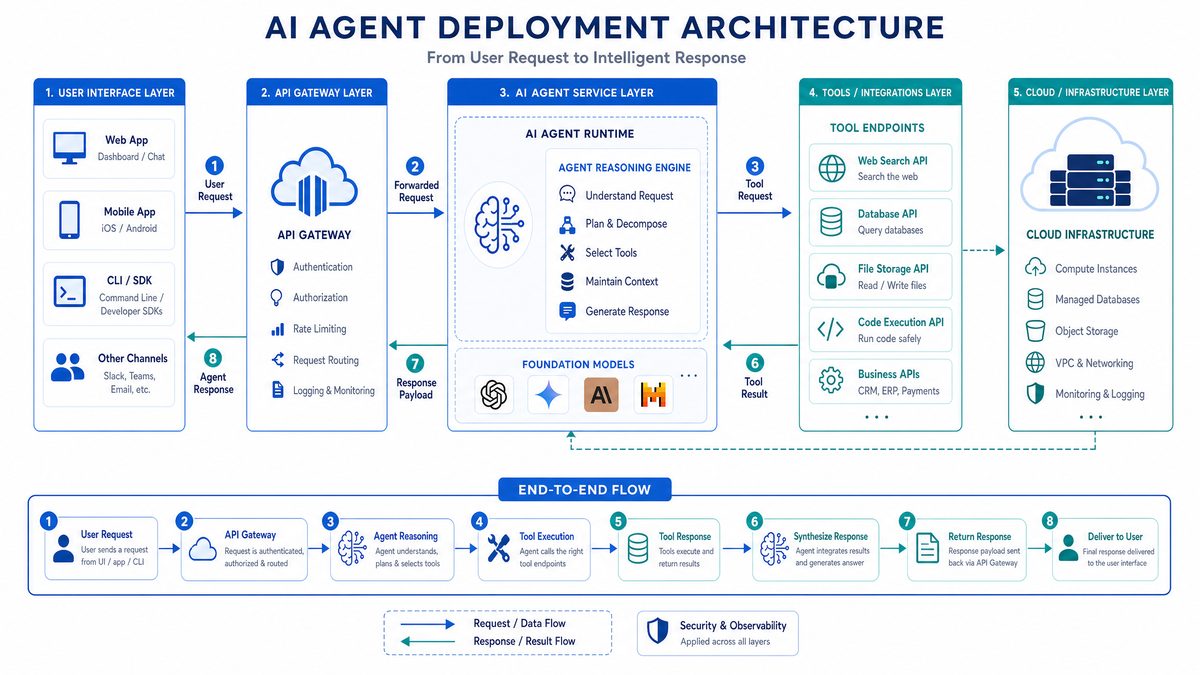
Consider an agent tasked with researching a topic, summarizing documents, and scheduling a follow-up meeting. The workflow might look like:
- Use the web search tool to gather recent articles.
- Search local files for related reports.
- Summarize findings using GPT.
- Call a calendar API via function calling to schedule a meeting.
The agent’s planner coordinates these steps, integrates results, and manages context and error handling throughout.
For a detailed walkthrough and code examples of multi-tool orchestration, visit AI Agents.
7. Deploying and Scaling Your Custom GPT Agent
7.1 Deployment Patterns
In 2026, developers have multiple options for deploying GPT agents depending on scale and latency requirements:
- Local Deployment: Suitable for development, testing, or private use. Requires sufficient compute resources.
- Cloud Deployment: Use cloud providers such as AWS, Azure, or GCP for scalable and globally accessible agents.
- Containerization: Package your agent using Docker for consistent environments and easy scaling.
- Serverless Architectures: Deploy functions triggered by events or HTTP requests to minimize operational overhead.
7.2 Scaling for Performance and Reliability
To handle increased load and ensure uptime:
- Load Balancing: Distribute requests across multiple instances of your agent.
- Horizontal Scaling: Add more instances dynamically based on demand.
- Caching: Cache frequent queries to reduce redundant API calls.
Cloud-native features such as autoscaling groups and managed Kubernetes clusters simplify scaling management.
7.3 Security and Compliance Considerations
Protecting user data and API keys is paramount:
- Store API credentials securely, avoid hardcoding.
- Encrypt sensitive data both at rest and in transit.
- Implement role-based access controls for agent operations.
- Ensure compliance with GDPR, CCPA, and other regional privacy laws.
- Monitor agent behavior to detect and prevent misuse or unintended actions.
7.4 Continuous Integration and Updates
Maintain a robust development lifecycle by:
- Automating testing with unit and integration tests.
- Using CI/CD pipelines for automated deployments.
- Version controlling agent code and configurations.
- Rolling out updates with minimal downtime via blue-green or canary deployments.
8. Advanced Topics and Future Directions
8.1 Customizing GPT Model Behavior with Fine-tuning and Prompt Engineering
For specialized domains or unique conversational styles, customize your agent’s behavior by:
- Fine-tuning: Train the GPT model on domain-specific datasets to improve accuracy.
- Prompt Engineering: Develop advanced prompt templates and dynamic prompt generation to guide responses effectively.
Combining these techniques can yield highly tailored and engaging agent interactions.
8.2 Incorporating Multimodal Inputs and Outputs
Expanding beyond text, GPT agents can process images, audio, and video inputs, and generate rich multimodal outputs. This enables applications such as:
- Image captioning and interpretation.
- Voice-controlled assistants.
- Video summarization and synthesis.
Leveraging multimodal models alongside the Responses API enhances user engagement and interaction depth.
8.3 Emerging Trends in Autonomous Agents (2026+)
The future of autonomous GPT agents includes exciting innovations such as:
- AI Agent Collaboration: Multiple agents working as swarms to solve complex problems.
- Explainability: Improving transparency and trust by making agent decisions interpretable.
- Enhanced Tooling: New integrations and APIs that broaden agent capabilities.
Staying abreast of these trends will position developers to build next-generation AI systems.
Useful Links
- OpenAI Responses API Documentation
- Bing Web Search API
- Google Cloud Storage API
- Kubernetes for Container Orchestration
- JavaScript Promises and Async Programming
- General Data Protection Regulation (GDPR)
- Fine-tuning Language Models
- Multimodal Machine Learning Research
- Explainable AI Innovations
Conclusion
Building a custom autonomous GPT agent using OpenAI’s Responses API in 2026 unlocks immense possibilities for creating intelligent systems capable of complex, independent operation. This tutorial has walked you through foundational concepts, architectural design, tool integration, orchestration strategies, deployment patterns, and advanced customization techniques.
Armed with this knowledge, you are well-positioned to innovate by crafting agents tailored to your unique workflows and domains. Experiment with new tools, iterate on your designs, and engage with the vibrant AI development community to keep pace with ongoing advancements.
Autonomous GPT agents are reshaping the future of human-computer interaction—embrace the journey and build the next generation of intelligent assistants today.
Appendix
- Code Repository: OpenAI Responses API Sample Projects
- API Reference: OpenAI API Reference Documentation
- FAQs: OpenAI Help Center
- Troubleshooting Tips: Common errors and solutions when building GPT agents.
