
How to Use ChatGPT-5.5 for Financial Modeling: Revenue Forecasting, Scenario Analysis, and Investment Memo Generation

Using ChatGPT-5.5 for Financial Modeling: A Complete Guide
Build robust revenue forecasts, run bull/bear/base scenarios, generate institutional-grade investment memos, get DCF assistance, and automate sensitivity tables—augmented by ChatGPT-5.5.
Table of Contents
- Introduction and Key Concepts
- Setup and API Integration
- Prompt Design for Finance Use Cases
- Revenue Forecasting with ChatGPT-5.5
- Scenario Analysis: Bull, Base, and Bear
- Investment Memo Generation
- DCF Assistance: WACC, FCF, and Terminal Value
- Sensitivity Tables and What-If Analysis
- Building an End-to-End Modeling Pipeline
- Validation, Guardrails, and Auditability
- Exporting to Excel, CSV, and Sheets
- FAQ and Troubleshooting
- Next Steps
Introduction and Key Concepts
Financial modeling practitioners face three recurring challenges: speed, structure, and story. Speed is about producing reliable drafts fast; structure is about maintaining coherent logic across assumptions, calculations, and outputs; and story is the narrative that convinces decision-makers. ChatGPT-5.5 can help at each layer—summarizing input data, proposing initial assumptions, writing formulas and code, explaining methodologies, and drafting decision-ready narratives.
This tutorial is a hands-on, end-to-end guide to using ChatGPT-5.5 throughout your modeling workflow. We will apply it to revenue forecasting, scenario analysis (bull/base/bear), investment memo generation, DCF assistance, and sensitivity analysis. You will also learn how to integrate via API, request structured outputs (JSON), and export to Excel or Google Sheets.
model parameter accordingly.
What You Will Build
- A modular forecasting workbook (or Python notebook) where ChatGPT-5.5 assists with assumptions, formulas, and commentary.
- Bull/base/bear scenario engine with assumptions tables your stakeholders can edit.
- An automated pipeline to generate an investment memo from the model outputs.
- A DCF calculator with ChatGPT-5.5 support for WACC, FCF, and terminal value reasoning.
- One-way and two-way sensitivity tables that show what matters most.
When to Use ChatGPT-5.5 in Finance
- Rapid prototyping of models and narratives.
- Transforming unstructured data (customer interviews, 10-Ks, transcripts) into model-ready inputs.
- Cross-checking formulas, documenting logic, and explaining complex steps to non-finance stakeholders.
- Generating scenario assumptions based on industry heuristics.
Related:
For teams exploring related capabilities, our comprehensive guide on 25 ChatGPT-5.5 Prompts for DevOps Engineers provides detailed workflows and implementation strategies for prompts for CI/CD pipelines and infrastructure as code. The techniques covered there complement the approaches discussed in this article and offer additional depth for practitioners ready to expand their AI toolkit.
Setup and API Integration
In this section, you will connect to the API, send prompts, request structured data, and build small utilities you can reuse in the rest of the tutorial. We provide examples in Python, Node.js, and cURL.
Prerequisites
- API key and access to a model compatible with ChatGPT-5.5 style prompts and JSON outputs.
- Python 3.10+ or Node.js 18+ (if building scripts).
- Basic familiarity with HTTP requests, JSON, and parsing.
Environment Variables
Store credentials securely via environment variables to avoid committing secrets to source control.
# macOS/Linux
export OPENAI_API_KEY="YOUR_API_KEY"

# Windows PowerShell
setx OPENAI_API_KEY "YOUR_API_KEY"
Python Quickstart
import os
import json
import requests

API_KEY = os.getenv("OPENAI_API_KEY")
API_BASE = "https://api.openai.com/v1"  # Update if your provider differs
MODEL_ID = "chatgpt-5.5"  # Replace with the actual model ID you have access to

def chat_completion(messages, response_format=None, temperature=0.2):
    url = f"{API_BASE}/chat/completions"
    headers = {"Authorization": f"Bearer {API_KEY}", "Content-Type": "application/json"}
    payload = {
        "model": MODEL_ID,
        "messages": messages,
        "temperature": temperature
    }
    if response_format:
        # Some APIs support a "response_format" or "json_schema" parameter
        payload["response_format"] = response_format
    resp = requests.post(url, headers=headers, data=json.dumps(payload), timeout=120)
    resp.raise_for_status()
    data = resp.json()
    # Adjust parsing depending on your API response shape
    return data["choices"][0]["message"]["content"]

if __name__ == "__main__":
    system = {"role": "system", "content": "You are an expert financial modeling assistant."}
    user = {"role": "user", "content": "List the main components of a DCF model."}
    print(chat_completion([system, user]))
Node.js Quickstart
import fetch from "node-fetch";

const API_KEY = process.env.OPENAI_API_KEY;
const API_BASE = "https://api.openai.com/v1";  // Update if required
const MODEL_ID = "chatgpt-5.5";               // Replace with actual model name

async function chatCompletion(messages, { temperature = 0.2, response_format = null } = {}) {
  const body = {
    model: MODEL_ID,
    messages,
    temperature
  };
  if (response_format) body.response_format = response_format;

  const res = await fetch(`${API_BASE}/chat/completions`, {
    method: "POST",
    headers: {
      "Authorization": `Bearer ${API_KEY}`,
      "Content-Type": "application/json"
    },
    body: JSON.stringify(body)
  });
  if (!res.ok) {
    const errText = await res.text();
    throw new Error(`API error: ${res.status} - ${errText}`);
  }
  const data = await res.json();
  return data.choices[0].message.content;
}

(async () => {
  const system = { role: "system", content: "You are an expert financial modeling assistant." };
  const user = { role: "user", content: "What are typical revenue drivers for a SaaS business?" };
  const answer = await chatCompletion([system, user]);
  console.log(answer);
})();
cURL Example
curl https://api.openai.com/v1/chat/completions \
  -H "Authorization: Bearer $OPENAI_API_KEY" \
  -H "Content-Type: application/json" \
  -d '{
    "model": "chatgpt-5.5",
    "messages": [
      {"role": "system", "content": "You are an expert financial modeling assistant."},
      {"role": "user", "content": "Explain terminal value in a DCF."}
    ],
    "temperature": 0.2
  }'
Requesting Structured Outputs (JSON)
For spreadsheets and code, structured outputs are invaluable. Ask for JSON and validate it before use.
# Python example requesting a JSON-like response
schema_instruction = {
    "role": "system",
    "content": (
        "Return a valid JSON object only. Keys: 'assumptions', 'notes'. "
        "assumptions is a list of {'name': str, 'value': number, 'unit': str}."
    )
}
user_prompt = {"role": "user", "content": "Propose base-case SaaS assumptions: MRR, churn %, CAC, ARPU."}
json_text = chat_completion([schema_instruction, user_prompt])
data = json.loads(json_text)  # ensure try/except around this in production
print(data)See also:
Organizations implementing these workflows will also benefit from understanding The Codex Task Decomposition Playbook, which covers breaking complex projects into agent-ready subtasks in detail. The methodologies presented there provide a natural extension of the concepts explored above, particularly for teams scaling their AI-assisted processes.
Prompt Design for Finance Use Cases
Good prompts reduce noise and rework. For quantitative tasks, be explicit about:
- Role and scope (e.g., “You are a buy-side analyst covering mid-cap SaaS”).
- Outputs and format (JSON keys; table columns; units; rounding rules).
- Assumption constraints (ranges, industry norms, time horizons).
- Data lineage (cite dataset names or cells; reference where each number came from).
Reusable Prompt Template
Role: You are an expert financial modeling assistant.
Task: Given the inputs below, produce [OUTPUT_FORMAT] with [UNITS].
Constraints:
- Use [TIME_HORIZON] with [GRANULARITY].
- Respect ranges: [RANGE_TABLE_SUMMARY].
- Reference data lineages (sheet:cell or source note).
- Return only valid JSON with keys: [KEYS].

Inputs:
[PASTE_DATA_OR_LINKS]

Check:
- Are units and totals consistent?
- Are assumptions justified (1-2 bullets each)?
Example: Formula Debugging Prompt
System: You are a meticulous Excel and Python formula reviewer.
User: Here is an Excel formula and my intent. Identify errors and propose a corrected version.
Intent: "Compute monthly churned customers = prior_month_customers * churn_rate"
Formula: "=B10*C5"
Context: B10 is "current month customers", C5 is "monthly churn rate".
Return JSON: {"issues":[...], "fix":"...", "explanation":"..."}
Revenue Forecasting with ChatGPT-5.5
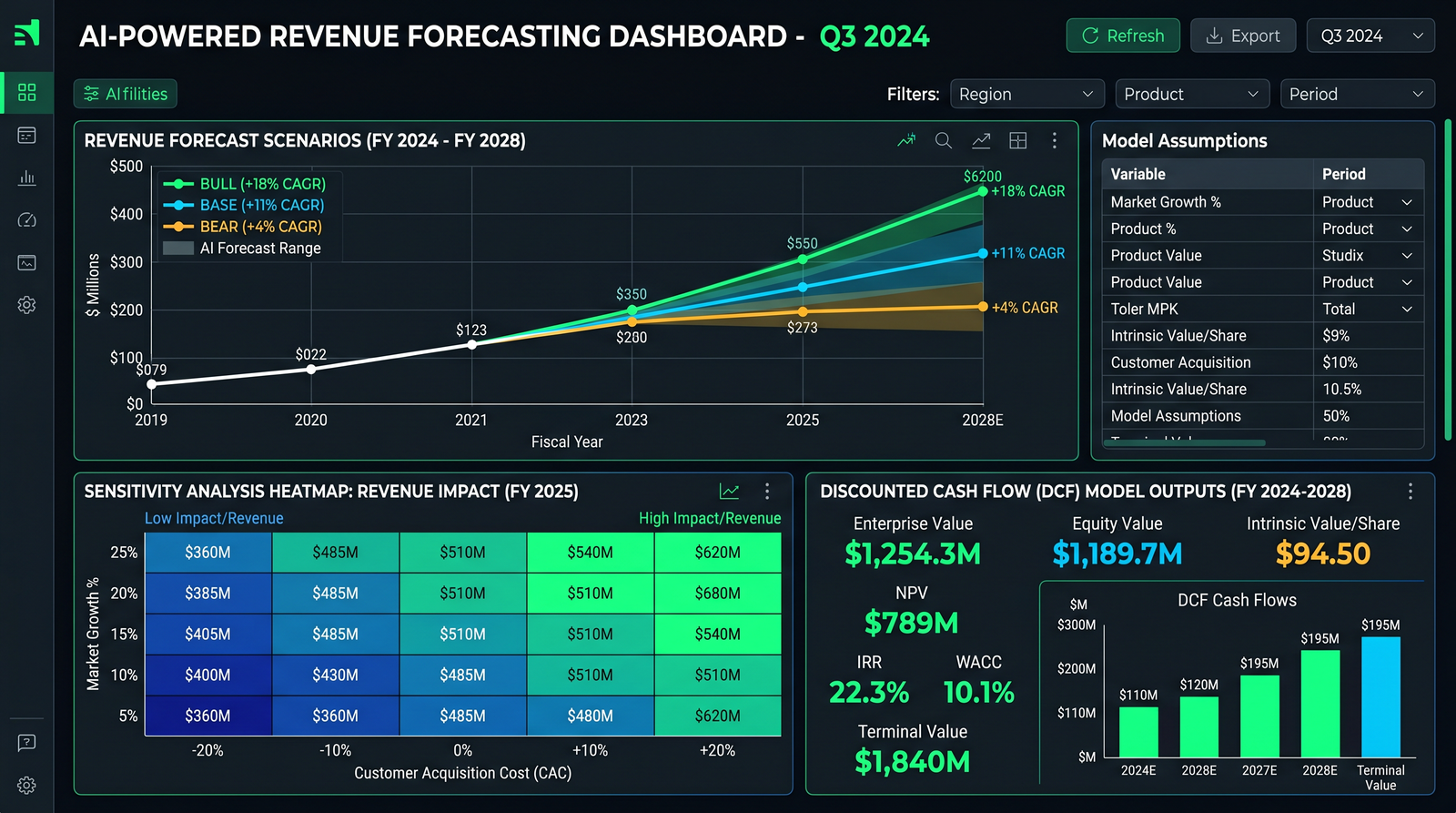
Revenue forecasting converts growth drivers and unit economics into a time-series of bookings, billings, and recognized revenue. ChatGPT-5.5 can help you structure drivers, write equations, draft code, and narrate results.
Step 1: Define Your Revenue Drivers
Start by enumerating drivers under a clear taxonomy. For a SaaS business, you might include acquisition, conversion, churn, expansion, pricing, and cohorts. For a marketplace, consider GMV growth, take rate, buyer/seller growth, and repeat purchase rates.
| Driver | Description | Unit | Typical Range |
|---|---|---|---|
| New leads | Top-of-funnel inquiries per month | Count | 500–50,000 |
| Lead-to-trial conversion | Leads that start a trial | % | 5–30% |
| Trial-to-paid conversion | Trials converting to paying customers | % | 10–40% |
| ARPU | Average revenue per user per month | $ | $20–$400 |
| Gross churn | Customers canceling each month | %/mo | 0.6–4.0% |
| Net expansion | Upsell/cross-sell net of downgrades | %/mo | 0–2.5% |
Step 2: Ask ChatGPT-5.5 to Propose Base-Case Assumptions
# Python: get a JSON of base-case assumptions
messages = [
  {"role":"system","content":"Return valid JSON only with keys: assumptions (list), notes (string)."},
  {"role":"user","content":(
    "Propose base-case SaaS revenue drivers for a B2B product with $100 ARPU, 5,000 MRR customers. "
    "Horizon: 36 months. Give: new_leads, lead_to_trial_pct, trial_to_paid_pct, monthly_gross_churn_pct, net_expansion_pct, price_increase_pct_annual. "
    "Include ranges and justifications in notes."
  )}
]
assumptions_json = chat_completion(messages)
assumptions = json.loads(assumptions_json)Step 3: Translate Assumptions into a Cohort-Based Forecast
Cohort modeling distinguishes customers by acquisition month and tracks each cohort’s retention and expansion profile. This captures the natural lag between acquisition and churn and better reflects reality than a single aggregated churn rate.
Cohort Flow Equations
- Cohort size (m) = new paid customers acquired in month m.
- Retained customers in month t for cohort m = Cohort(m) × Π(1 − churn_rate_k) for k from m to t−1.
- ARPU growth over time = base_ARPU × Π(1 + net_expansion_rate_k).
- Monthly revenue (t) = Σ over all cohorts m≤t of Retained(m→t) × ARPU(t).
Python Implementation
import numpy as np
import pandas as pd

def monthly_churn_series(base_churn_pct, months, trend=0.0):
    # e.g., trend = -0.02 means churn improves by 2% per year, monthly compounded
    mtrend = (1 + trend) ** (1/12) - 1
    churn = np.array([base_churn_pct * ((1 + mtrend) ** i) for i in range(months)])
    return np.clip(churn, 0, 1)

def monthly_expansion_series(net_expansion_pct, months):
    # Net expansion applied multiplicatively to ARPU
    return np.array([net_expansion_pct for _ in range(months)])

def simulate_cohorts(months=36, start_customers=5000, arpu=100.0,
                     new_leads=4000, lead_to_trial=0.20, trial_to_paid=0.25,
                     base_churn_pct=0.015, net_expansion_pct=0.01):
    # Derive monthly new paid customers
    new_paid = int(new_leads * lead_to_trial * trial_to_paid)  # simple constant case
    churn = monthly_churn_series(base_churn_pct, months)
    expansion = monthly_expansion_series(net_expansion_pct, months)

    # Cohorts: number acquired each month (constant for simplicity; replace with growth vector)
    cohort_sizes = np.array([new_paid for _ in range(months)])
    # Add initial customers as a special cohort at t=0
    initial = start_customers

    # Retention per cohort per month
    retention_factors = np.ones((months, months))
    for m in range(months):
        # For cohort m, retention from m to t is product of (1 - churn_k)
        running = 1.0
        for t in range(m, months):
            if t > m:
                running *= (1 - churn[t-1])
            retention_factors[m, t] = running

    # ARPU path with expansion
    arpu_path = np.zeros(months)
    running_arpu = arpu
    for t in range(months):
        if t > 0:
            running_arpu *= (1 + expansion[t])
        arpu_path[t] = running_arpu

    customers = np.zeros(months)
    revenue = np.zeros(months)

    for t in range(months):
        # Initial cohort contribution
        init_retained = initial
        for k in range(t):
            init_retained *= (1 - churn[k])
        # New cohorts up to t
        cohort_retained = 0
        for m in range(t+1):
            cohort_retained += cohort_sizes[m] * retention_factors[m, t]
        customers[t] = init_retained + cohort_retained
        revenue[t] = customers[t] * arpu_path[t]

    df = pd.DataFrame({
        "month": np.arange(1, months+1),
        "customers": customers.astype(int),
        "arpu": np.round(arpu_path, 2),
        "revenue": np.round(revenue, 2)
    })
    return df

df = simulate_cohorts()
print(df.head())
Step 4: Use ChatGPT-5.5 to Explain, Audit, and Improve
Feed the code and summary outputs to ChatGPT-5.5 to request audits and alternatives:
messages = [
  {"role":"system","content":"You are a meticulous quant reviewer. Be concise and specific."},
  {"role":"user","content":(
    "Review this Python code for a cohort-based revenue forecast (below). "
    "Identify potential logic gaps, suggest more realistic acquisition growth vectors, and "
    "recommend how to separate bookings, billings, and revenue recognition if we move to annual contracts.\n\n"
    + open("forecast.py").read()
  )}
]
review = chat_completion(messages, temperature=0.1)
print(review)
Step 5: Generate a Clean, Importable Assumptions Table
# Request a CSV-formatted assumptions table
messages = [
  {"role":"system","content":"Return CSV only with headers: variable, value, unit, notes"},
  {"role":"user","content":"Create a clean assumptions table for the base case from the previous JSON output. Format values as decimals or integers; percent as 0.xx."}
]
csv_table = chat_completion(messages)
with open("assumptions_base.csv","w") as f:
f.write(csv_table)Scenario Analysis: Bull, Base, and Bear
Scenario analysis formalizes uncertainty by bracketing outcomes. Well-constructed bull/base/bear cases differ in both assumptions and narrative. ChatGPT-5.5 can help create these variations, document rationale, and surface the few variables that drive most of the variance.

Step 1: Define the Scenario Knobs
In SaaS, this typically includes acquisition growth, conversion, pricing power, churn/retention, and net expansion. In capital-intensive industries, include utilization, capex ramp, and capacity constraints.
| Variable | Bear | Base | Bull | Unit | Notes |
|---|---|---|---|---|---|
| New leads MoM growth | 0.5% | 1.5% | 3.0% | %/mo | Bull reflects strong marketing efficiency and virality. |
| Lead-to-trial | 12% | 18% | 24% | % | Improves with better targeting and onboarding. |
| Trial-to-paid | 15% | 22% | 32% | % | Influenced by pricing experiments and product-market fit. |
| Monthly gross churn | 2.2% | 1.5% | 1.0% | %/mo | Bull assumes improved retention programs. |
| Net expansion | 0.2% | 0.8% | 1.5% | %/mo | Upsell motion effectiveness. |
| ARPU (start) | $90 | $100 | $110 | $ | Pricing power signals. |
Step 2: Auto-Generate Scenario Sets with ChatGPT-5.5
# Python: prompt for three scenario JSONs in one response
messages = [
  {"role":"system","content":"Return valid JSON only with keys: bear, base, bull. Each is an object of {variable, value, unit, justification} array."},
  {"role":"user","content":(
    "Construct SaaS scenarios for 36 months. Variables: new_leads_mom_growth, lead_to_trial_pct, trial_to_paid_pct, gross_churn_pct, net_expansion_pct, arpu_start. "
    "Keep units consistent and add 1-2 sentence justification per variable referencing plausible industry rationale."
  )}
]
scenarios_json = chat_completion(messages)
scenarios = json.loads(scenarios_json)
Step 3: Run the Simulation for Each Scenario
def run_scenario(label, months, start_customers, arpu_start, new_leads_start,
                 new_leads_mom_growth, lead_to_trial, trial_to_paid,
                 gross_churn_pct, net_expansion_pct):
    df = simulate_cohorts(
        months=months,
        start_customers=start_customers,
        arpu=arpu_start,
        new_leads=new_leads_start,
        lead_to_trial=lead_to_trial,
        trial_to_paid=trial_to_paid,
        base_churn_pct=gross_churn_pct,
        net_expansion_pct=net_expansion_pct
    )
    # Apply leads growth over time by adjusting new cohorts if needed (simple example omitted for brevity)
    df["scenario"] = label
    return df

bear_df = run_scenario("bear", 36, 5000, 90, 3000, 0.005, 0.12, 0.15, 0.022, 0.002)
base_df = run_scenario("base", 36, 5000, 100, 3500, 0.015, 0.18, 0.22, 0.015, 0.008)
bull_df = run_scenario("bull", 36, 5000, 110, 4000, 0.030, 0.24, 0.32, 0.010, 0.015)

summary = pd.concat([bear_df, base_df, bull_df])
print(summary.groupby("scenario")["revenue"].tail(1))
Step 4: Narrative and Risks
Ask ChatGPT-5.5 to narrate what is driving the divergence among scenarios, and produce a risk/opportunity register.
messages = [
  {"role":"system","content":"You write crisp investment memos. Be analytical and cite drivers numerically."},
  {"role":"user","content":(
    "Given the attached scenario summaries (CSV below), explain key deltas in customers, ARPU, and revenue at 12, 24, 36 months. "
    "Highlight top 5 sensitivities (variable -> revenue delta). Then list 5 risks and 5 upside opportunities.\n\n"
    + summary.to_csv(index=False)
  )}
]
narrative = chat_completion(messages)
print(narrative)
Explore more:
For teams exploring related capabilities, our comprehensive guide on Codex Record and Replay provides detailed workflows and implementation strategies for OpenAI’s screen recording feature for workflow automation. The techniques covered there complement the approaches discussed in this article and offer additional depth for practitioners ready to expand their AI toolkit.
Investment Memo Generation
The best investment memos compress a lot of context into a persuasive, structured narrative. Use ChatGPT-5.5 to turn model outputs and qualitative insights into an LP-ready memo. You can also ask it to produce an executive summary slide outline and a one-page version.
Memo Outline Template
- Executive Summary
- Business Overview
- Market and Competition
- Product and Moat
- Financial Overview (Revenue, Gross Margin, CAC/LTV, Burn)
- Scenarios (Bull/Base/Bear) and Key Drivers
- DCF/Valuation (Method, Assumptions, Results)
- Risks and Mitigations
- Recommendation
- Appendix (Data Sources, Definitions, Model Notes)
Prompt the Memo with Model Outputs
# Python: generate an institutional-style memo as markdown or HTML
memo_messages = [
  {"role":"system","content":"You are a private equity associate producing institution-grade memos. Be concise, analytical, and use data."},
  {"role":"user","content":(
    "Write a 2,000-word memo using the outline below. Use the CSV outputs. "
    "Use tables for metrics, and a bullet-point style for risks and recommendation.\n\n"
    "Outline:\n"
    "1) Executive Summary\n2) Business Overview\n3) Market and Competition\n4) Product and Moat\n"
    "5) Financial Overview\n6) Scenarios and Drivers\n7) DCF/Valuation\n8) Risks\n9) Recommendation\n\n"
    "Data: Revenue forecasts by scenario (CSV):\n" + summary.to_csv(index=False)
  )}
]
memo_html = chat_completion(memo_messages)
with open("investment_memo.html","w") as f:
    f.write(memo_html)
Insert Charts and Source Notes
Ask ChatGPT-5.5 to output placeholders for charts (e.g., revenue by scenario, customer growth waterfall). Then you can programmatically inject actual images from your plotting library.
# Ask the model to include markers like: <div class="chart" id="rev_by_scenario"></div>DCF Assistance: WACC, FCF, and Terminal Value
Discounted Cash Flow (DCF) valuation discounts expected future free cash flows (FCF) at a rate reflecting the risk (WACC). ChatGPT-5.5 can help with the mechanics and rationale—calculating WACC components, projecting FCF, and selecting a terminal value approach.
Key Formulas Refresher
- WACC = (E/V)×Re + (D/V)×Rd×(1−Tc)
- FCF = EBIT×(1−Tax rate) + D&A − Capex − ΔNWC
- Terminal value (Gordon growth) = FCF_final × (1 + g) / (WACC − g)
Ask ChatGPT-5.5 for WACC Inputs
wacc_prompt = [
  {"role":"system","content":"Return valid JSON with keys: cost_of_equity, cost_of_debt, tax_rate, target_debt_to_total_capital, notes."},
  {"role":"user","content":(
    "Estimate WACC inputs for a mid-cap B2B SaaS in the U.S. Use ranges if uncertain. "
    "Assume current 10y risk-free ~4%, beta 1.1–1.4, market risk premium 5–6%. "
    "Debt cost ~7–9%, tax rate 21%. Provide notes explaining each input."
  )}
]
wacc_json = chat_completion(wacc_prompt)
wacc = json.loads(wacc_json)
Python DCF Implementation
import numpy as np
import pandas as pd

def compute_wacc(cost_of_equity, cost_of_debt, tax_rate, debt_ratio):
    equity_ratio = 1 - debt_ratio
    return equity_ratio*cost_of_equity + debt_ratio*cost_of_debt*(1 - tax_rate)

def dcf_valuation(fcf, wacc, terminal_growth=0.02):
    # fcf: list/array of forecast free cash flows per year
    # Returns NPV and a detail table
    years = len(fcf)
    discount_factors = [(1 / ((1 + wacc) ** t)) for t in range(1, years+1)]
    pv_fcf = [fcf[t-1] * discount_factors[t-1] for t in range(1, years+1)]
    tv = fcf[-1] * (1 + terminal_growth) / (wacc - terminal_growth)
    pv_tv = tv * discount_factors[-1]
    npv = sum(pv_fcf) + pv_tv
    df = pd.DataFrame({
        "year": np.arange(1, years+1),
        "fcf": fcf,
        "discount_factor": np.round(discount_factors, 6),
        "pv_fcf": np.round(pv_fcf, 2)
    })
    return npv, pv_tv, df

# Example: derive FCF from the revenue model using margins/assumptions
annual_fcf = [8_000_000, 12_000_000, 18_000_000, 22_000_000, 28_000_000]
wacc_val = compute_wacc(cost_of_equity=0.105, cost_of_debt=0.08, tax_rate=0.21, debt_ratio=0.20)
npv, pv_tv, fcf_table = dcf_valuation(annual_fcf, wacc=wacc_val, terminal_growth=0.02)
print("WACC:", round(wacc_val,4), "NPV:", round(npv,2), "PV of TV:", round(pv_tv,2))
print(fcf_table)
Ask the Model to Validate DCF Inputs and Ranges
validate_prompt = [
  {"role":"system","content":"You are a valuation professor. Return JSON {issues:[...], suggestions:[...]}."},
  {"role":"user","content":(
    "Review this DCF: wacc="+str(round(wacc_val,4))+", terminal_growth=2%, "
    "annual FCF: "+str(annual_fcf)+". Identify red flags, such as g near WACC, and typical sensitivity ranges."
  )}
]
validation_json = chat_completion(validate_prompt)
print(validation_json)
Reporting: Table of DCF Results
| Year | FCF | Discount Factor | PV of FCF |
|---|---|---|---|
| 1 | $8,000,000 | 0.904978 | $7,239,824 |
| 2 | $12,000,000 | 0.819960 | $9,839,520 |
| 3 | $18,000,000 | 0.742349 | $13,362,282 |
| 4 | $22,000,000 | 0.671680 | $14,777,000 |
| 5 | $28,000,000 | 0.607506 | $17,810,168 |
Sensitivity Tables and What-If Analysis
Sensitivity analysis reveals which variables matter most. It informs risk, focus, and prioritization. We will build one-way and two-way tables and automate a heatmap-like summary. ChatGPT-5.5 can draft the code and explain results.
One-Way Sensitivity (e.g., Churn)
def one_way_sensitivity(var_name, values, base_params):
    rows = []
    for v in values:
        params = base_params.copy()
        params[var_name] = v
        df = simulate_cohorts(
            months=params["months"],
            start_customers=params["start_customers"],
            arpu=params["arpu"],
            new_leads=params["new_leads"],
            lead_to_trial=params["lead_to_trial"],
            trial_to_paid=params["trial_to_paid"],
            base_churn_pct=params["base_churn_pct"] if var_name!="base_churn_pct" else v,
            net_expansion_pct=params["net_expansion_pct"]
        )
        rows.append({"value": v, "m12_rev": df["revenue"].iloc[11], "m24_rev": df["revenue"].iloc[23], "m36_rev": df["revenue"].iloc[35]})
    return pd.DataFrame(rows)

base_params = {
    "months":36, "start_customers":5000, "arpu":100.0, "new_leads":3500, "lead_to_trial":0.18,
    "trial_to_paid":0.22, "base_churn_pct":0.015, "net_expansion_pct":0.008
}
churn_values = [0.010, 0.0125, 0.015, 0.0175, 0.020]
one_way = one_way_sensitivity("base_churn_pct", churn_values, base_params)
print(one_way)
Two-Way Sensitivity (WACC vs. Terminal Growth in DCF)
def two_way_dcf_sensitivity(wacc_values, g_values, fcf):
    grid = []
    for w in wacc_values:
        row = []
        for g in g_values:
            npv, pv_tv, df = dcf_valuation(fcf, wacc=w, terminal_growth=g)
            row.append(npv)
        grid.append(row)
    return np.array(grid)

wacc_values = [0.08, 0.09, 0.10, 0.11, 0.12]
g_values = [0.00, 0.01, 0.02, 0.03]
grid = two_way_dcf_sensitivity(wacc_values, g_values, annual_fcf)
print(pd.DataFrame(grid, index=wacc_values, columns=g_values))
Heatmap Rendering (ASCII/Console)
def heatmap_ascii(grid, row_labels, col_labels):
    # Normalize grid to 0-1
    grid = np.array(grid)
    mn, mx = np.min(grid), np.max(grid)
    shades = " .:-=+*#%@"
    out = []
    out.append("      " + " ".join([f"{c:>7.2%}" for c in col_labels]))
    for i, r in enumerate(row_labels):
        line = [f"{r:>5.2%}"]
        for j, _ in enumerate(col_labels):
            if mx - mn < 1e-9:
                idx = len(shades) - 1
            else:
                x = (grid[i, j] - mn) / (mx - mn)
                idx = min(int(x * (len(shades)-1)), len(shades)-1)
            line.append(f"   {shades[idx]*3}")
        out.append(" ".join(line))
    return "\n".join(out)

print(heatmap_ascii(grid, wacc_values, g_values))
Ask ChatGPT-5.5 to Interpret Sensitivities
interp_messages = [
  {"role":"system","content":"You are a chartered financial analyst. Explain implications clearly."},
  {"role":"user","content":(
    "Interpret this two-way sensitivity table (NPV) where rows=WACC and cols=terminal growth. "
    "Call out thresholds where valuation turns highly sensitive. Data:\n"
    + pd.DataFrame(grid, index=wacc_values, columns=g_values).to_csv()
  )}
]
interpretation = chat_completion(interp_messages)
print(interpretation)Building an End-to-End Modeling Pipeline
Create a simple orchestration layer that pulls inputs, calls ChatGPT-5.5 for assumptions or narrative, runs simulations, and saves outputs. This modularity lets you re-run the whole stack as data changes.
Directory Structure
finance-model/
├─ data/
│  ├─ assumptions_base.json
│  ├─ raw/
│  └─ exports/
├─ scripts/
│  ├─ assumptions.py
│  ├─ forecast.py
│  ├─ scenarios.py
│  ├─ dcf.py
│  ├─ sensitivity.py
│  └─ memo.py
├─ notebooks/
├─ reports/
│  └─ investment_memo.html
└─ README.md
Python Orchestrator
import json, os
import pandas as pd
from datetime import datetime

from assumptions import get_base_assumptions  # your wrapper using ChatGPT-5.5
from forecast import simulate_cohorts
from scenarios import build_scenarios
from dcf import dcf_valuation, compute_wacc
from memo import generate_memo  # your wrapper using ChatGPT-5.5

EXPORT_DIR = "data/exports"

def ensure_dir(p):
    if not os.path.exists(p):
        os.makedirs(p)

def run_pipeline():
    ensure_dir(EXPORT_DIR)
    # 1) Assumptions
    base = get_base_assumptions()
    with open("data/assumptions_base.json","w") as f:
        json.dump(base, f, indent=2)
    # 2) Forecasts
    base_df = simulate_cohorts(months=36, start_customers=5000, arpu=base["arpu"],
                               new_leads=base["new_leads"], lead_to_trial=base["lead_to_trial"],
                               trial_to_paid=base["trial_to_paid"], base_churn_pct=base["churn"],
                               net_expansion_pct=base["net_expansion"])
    base_df.to_csv(os.path.join(EXPORT_DIR,"forecast_base.csv"), index=False)
    # 3) Scenarios
    scens = build_scenarios()
    # ... produce scenario CSVs
    # 4) DCF
    wacc = compute_wacc(0.105, 0.08, 0.21, 0.20)
    fcf = [8e6, 12e6, 18e6, 22e6, 28e6]
    npv, pv_tv, table = dcf_valuation(fcf, wacc, terminal_growth=0.02)
    table.to_csv(os.path.join(EXPORT_DIR,"dcf_table.csv"), index=False)
    # 5) Memo
    memo_html = generate_memo(forecast_csv=os.path.join(EXPORT_DIR,"forecast_base.csv"),
                              dcf_csv=os.path.join(EXPORT_DIR,"dcf_table.csv"),
                              npv=npv, wacc=wacc)
    with open("reports/investment_memo.html","w") as f:
        f.write(memo_html)
    print("Pipeline complete at", datetime.now())

if __name__ == "__main__":
    run_pipeline()
Tool Use: Asking ChatGPT-5.5 to Write Helper Code
For repetitive tasks (e.g., computing retention curves), ask the model to generate functions, then test and version them. This keeps your pipeline clean and maintainable.
Validation, Guardrails, and Auditability
Quantitative integrity is paramount. Here are simple practices to increase reliability:
- Use structured outputs (JSON schemas) and validate types and ranges.
- Keep an assumptions log with datetime, user, and reason for change.
- Ask for “source notes” mapping each assumption to data, study, or cell.
- Cross-check ChatGPT-5.5 outputs against deterministic calculations in your own code.
- Add unit tests for core equations (e.g., churn application, ARPU compounding).
Validation Example: JSON Schema Check
from jsonschema import validate, Draft7Validator

schema = {
  "type":"object",
  "properties":{
    "assumptions":{
      "type":"array",
      "items":{
        "type":"object",
        "properties":{
          "name":{"type":"string"},
          "value":{"type":"number"},
          "unit":{"type":"string"}
        },
        "required":["name","value","unit"]
      }
    },
    "notes":{"type":"string"}
  },
  "required":["assumptions","notes"]
}

errors = sorted(Draft7Validator(schema).iter_errors(assumptions), key=lambda e: e.path)
for e in errors:
    print("Schema error:", e.message)
Unit Tests for Core Math
def test_retention_monotonicity():
    churn = 0.02
    df = simulate_cohorts(months=24, start_customers=1000, arpu=50, new_leads=100,
                          lead_to_trial=0.2, trial_to_paid=0.25,
                          base_churn_pct=churn, net_expansion_pct=0.0)
    # Customers should not jump arbitrarily if no growth in new leads
assert (df["customers"].diff().iloc[1:] <= 150).all()Exporting to Excel, CSV, and Google Sheets
Once your forecasts and valuations are computed, you need to publish them. ChatGPT-5.5 can generate accompanying narratives, footnotes, and even dynamic chart captions.
Excel Export with Python
import pandas as pd
from openpyxl import Workbook
from openpyxl.utils.dataframe import dataframe_to_rows
from openpyxl.styles import Font

def export_to_excel(forecast_df, dcf_table, path="reports/model_export.xlsx"):
    wb = Workbook()
    ws1 = wb.active
    ws1.title = "Forecast"
    for r in dataframe_to_rows(forecast_df, index=False, header=True):
        ws1.append(r)
    ws2 = wb.create_sheet("DCF")
    for r in dataframe_to_rows(dcf_table, index=False, header=True):
        ws2.append(r)
    # Style headers
    for cell in ws1[1]: cell.font = Font(bold=True)
    for cell in ws2[1]: cell.font = Font(bold=True)
    wb.save(path)

export_to_excel(base_df, fcf_table)
Google Sheets Push (via gspread)
import gspread
from google.oauth2.service_account import Credentials

def push_to_sheets(df, sheet_name, worksheet_title="Forecast"):
    scopes = ["https://www.googleapis.com/auth/spreadsheets"]
    creds = Credentials.from_service_account_file("service_account.json", scopes=scopes)
    gc = gspread.authorize(creds)
    sh = gc.open(sheet_name)
    try:
        ws = sh.worksheet(worksheet_title)
        sh.del_worksheet(ws)
    except:
        pass
    ws = sh.add_worksheet(title=worksheet_title, rows=str(len(df)+10), cols=str(len(df.columns)+10))
    ws.update([df.columns.values.tolist()] + df.values.tolist())

push_to_sheets(base_df, "Financial Model", "Forecast")
push_to_sheets(fcf_table, "Financial Model", "DCF")
Attach Narrative from ChatGPT-5.5
caption_messages = [
  {"role":"system","content":"You generate concise chart captions for executive readers."},
  {"role":"user","content":(
    "Create 3 captions for a chart with monthly revenue for base/bull/bear. "
    "Tone: objective, data-first. Limit 18 words each. Data (CSV head):\n" + summary.head(12).to_csv(index=False)
  )}
]
captions = chat_completion(caption_messages)
print(captions)
FAQ and Troubleshooting
How do I ensure numeric outputs are actually numbers?
Use JSON schemas and validate them. For text responses, perform robust parsing with regex and type coercion. Ask ChatGPT-5.5 explicitly to return decimals (0.15) instead of percentages (15%).
What if I get hallucinatory justifications or implausible ranges?
Feed in your own historicals, impose ranges in the prompt, and ask for alternative sets with credibility scores. Include a “reject if out of range” instruction and require the model to restate constraints before answering.
Access 40,000+ AI Prompts for ChatGPT, Claude & Codex — Free!
Subscribe to get instant access to our complete Notion Prompt Library — the largest curated collection of prompts for ChatGPT, Claude, OpenAI Codex, and other leading AI models. Optimized for real-world workflows across coding, research, content creation, and business.
How do I keep prompts and model behavior consistent across runs?
Save prompt templates in version control and use the same seed/temperature settings if available. Log inputs/outputs with timestamps for audit trails.
Can I combine deterministic math with model explanations?
Yes—compute all math in your code or spreadsheet, then use ChatGPT-5.5 to explain, QA, and narrate. This division of labor reduces risk.
What’s the best way to expose this to stakeholders?
Publish an interactive dashboard or spreadsheet. Use scenario and sensitivity toggles. Attach the memo and footnotes generated by ChatGPT-5.5. Keep assumptions editable.
Any tips for faster iteration cycles?
- Small, composable prompts scoped to a single task.
- Cache intermediate outputs (assumptions JSON, scenario CSVs).
- Automate with a simple orchestrator script and pre-flight checks.
Next Steps
- Clone the pipeline skeleton, wire the API calls, and run a base-case forecast.
- Generate scenarios using the template prompts and validate with your team.
- Compute DCF, produce one- and two-way sensitivities, and export to your reporting tool.
- Generate an investment memo and iterate with stakeholders until assumptions converge.
- Automate weekly re-runs with fresh data and a versioned assumptions log.
When you are ready, extend to cohort LTV/CAC analysis, cash runway modeling, and KPI dashboards. For more patterns, search within your knowledge base or check internal documentation at
To deepen your understanding of adjacent AI capabilities, explore our detailed analysis in 25 ChatGPT-5.5 Prompts for DevOps Engineers, which examines prompts for CI/CD pipelines and infrastructure as code. The frameworks and prompt patterns discussed there integrate seamlessly with the strategies outlined in this article.
.
Appendix: Additional API Integration Patterns
Function/Tool Calling (If Supported)
If your API supports tool calling, you can enforce strict argument shapes and let the model pick which tool to use (e.g., “calculate_dcf”, “simulate_revenue”).
# Pseudo-JSON of a tool definition (adapt to your provider)
{
  "tools":[
    {
      "type":"function",
      "function":{
        "name":"calculate_dcf",
        "description":"Compute DCF from FCF vector, WACC, terminal growth",
        "parameters":{
          "type":"object",
          "properties":{
            "fcf":{"type":"array","items":{"type":"number"}},
            "wacc":{"type":"number"},
            "terminal_growth":{"type":"number"}
          },
          "required":["fcf","wacc","terminal_growth"]
        }
      }
    }
  ]
}
Streaming Responses
For long memos or logs, streaming can improve UX. Here’s a Node.js sketch:
import fetch from "node-fetch";

async function streamChat(messages) {
  const res = await fetch("https://api.openai.com/v1/chat/completions", {
    method: "POST",
    headers: {
      "Authorization": `Bearer ${process.env.OPENAI_API_KEY}`,
      "Content-Type": "application/json"
    },
    body: JSON.stringify({ model: "chatgpt-5.5", messages, stream: true })
  });
  for await (const chunk of res.body) {
    process.stdout.write(chunk.toString());
  }
}

streamChat([{role:"user", content:"Generate an executive summary for the base-case forecast."}]);
Error Handling and Retries
import time, random
import requests

def resilient_post(url, headers, payload, retries=3, backoff=1.5):
    for attempt in range(1, retries+1):
        try:
            resp = requests.post(url, headers=headers, json=payload, timeout=120)
            resp.raise_for_status()
            return resp.json()
        except Exception as e:
            if attempt == retries:
                raise
            sleep_time = backoff ** attempt + random.uniform(0, 0.3)
            time.sleep(sleep_time)
Logging and Observability
import logging, json, time
logging.basicConfig(level=logging.INFO)

def log_interaction(tag, messages, response):
    logging.info(json.dumps({
        "tag": tag,
        "ts": time.time(),
        "messages": messages,
        "response_preview": response[:200]
    }))
Internal reference:
Organizations implementing these workflows will also benefit from understanding The Codex Task Decomposition Playbook, which covers breaking complex projects into agent-ready subtasks in detail. The methodologies presented there provide a natural extension of the concepts explored above, particularly for teams scaling their AI-assisted processes.
