
GPT-5.5 Memory and Personalization: How to Train ChatGPT to Work Like Your Team
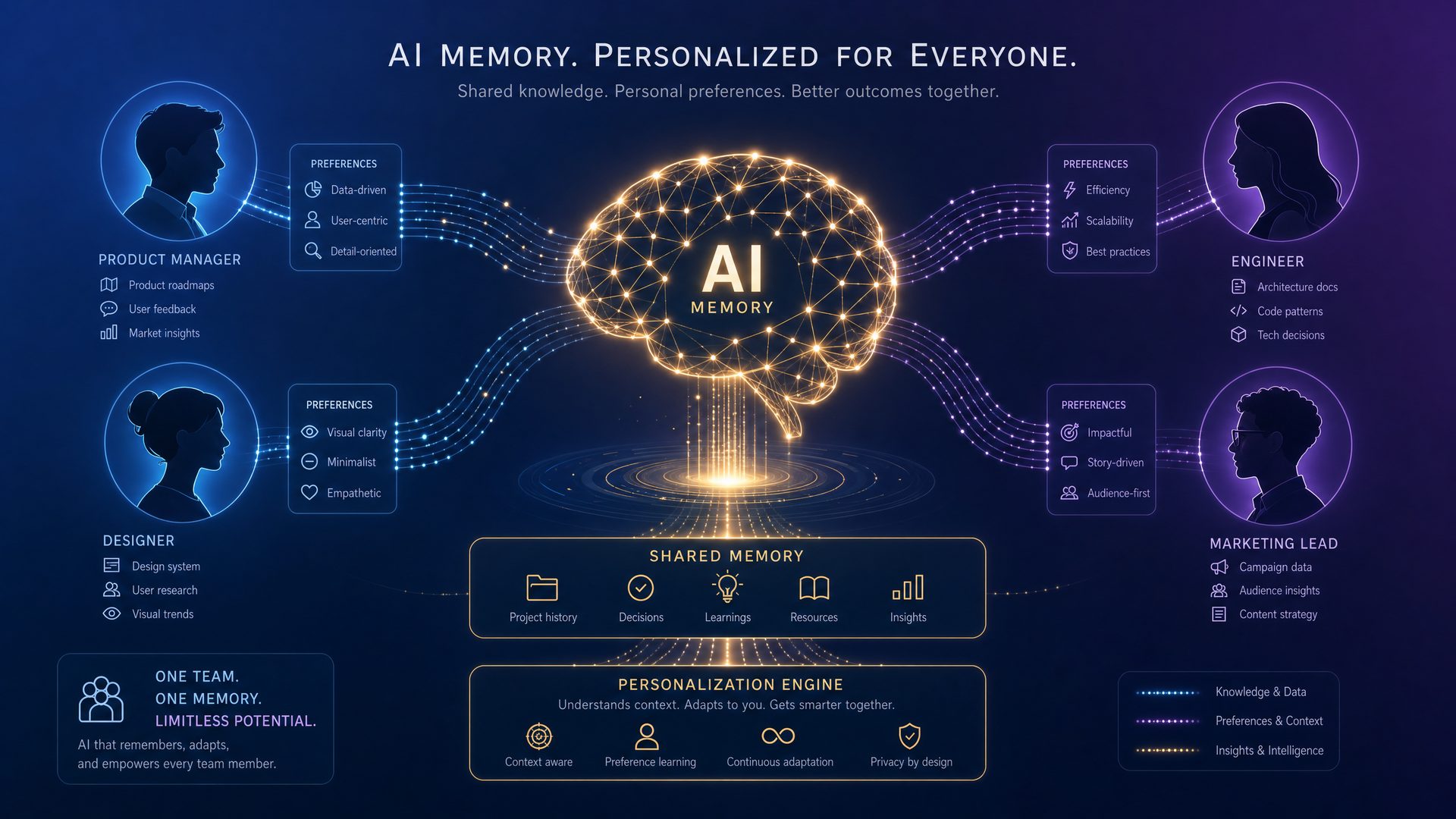
Beyond memory, GPT-5.5 introduces sophisticated personalization systems that allow organizations to fine-tune the model’s behavior, tone, and knowledge base to reflect their unique culture, workflows, and expertise. These systems include:
- Custom Prompt Engineering: Dynamic prompt templates that incorporate user-specific variables and organizational jargon.
- Fine-Tuning and LoRA (Low-Rank Adaptation): Efficient fine-tuning techniques that adapt the base model weights on domain-specific datasets without full retraining.
- Reinforcement Learning from Human Feedback (RLHF): Iterative training loops where team members provide feedback to refine model outputs.
- Role-Based Personas: Configurable personas that enable ChatGPT to adopt different roles (e.g., project manager, technical lead, customer support) with tailored knowledge and communication styles.
Together, these systems enable a highly customizable AI assistant that can seamlessly integrate into diverse team environments.
Step-by-Step Guide: Training GPT-5.5 to Work Like Your Team
- Define Objectives and Use Cases: Identify specific team workflows where ChatGPT can add value (e.g., code review, customer support, knowledge management).
- Gather and Prepare Data: Collect relevant documents, chat logs, FAQs, and domain-specific knowledge. Clean and format data for ingestion.
- Set Up Memory Infrastructure: Deploy vector databases for LTM, configure APIs for memory retrieval, and establish STM/WM parameters.
- Develop Custom Prompts and Personas: Design prompt templates that incorporate organizational language and create role-based personas.
- Fine-Tune the Model: Use LoRA or full fine-tuning on your prepared datasets. Validate model performance with domain experts.
- Implement RLHF: Launch feedback loops where team members rate and correct outputs to iteratively improve accuracy and tone.
- Deploy and Monitor: Integrate the personalized GPT-5.5 instance into your team’s communication platforms (Slack, MS Teams, custom apps). Monitor usage and performance metrics.
- Continuous Improvement: Regularly update memory stores, retrain with new data, and refine prompts based on evolving team needs.
Production-Grade Code Example: Integrating GPT-5.5 with Long-Term Memory
The following example demonstrates how to set up a Python-based integration of GPT-5.5 with a vector database (using FAISS) to enable long-term memory retrieval and update within a conversational AI application.
<!-- GPT-5.5 Memory Integration Example -->
<script type="text/python">
import faiss
import numpy as np
from transformers import GPT5Tokenizer, GPT5ForCausalLM

# Initialize tokenizer and model (hypothetical GPT-5.5 API)
tokenizer = GPT5Tokenizer.from_pretrained('gpt5.5-base')
model = GPT5ForCausalLM.from_pretrained('gpt5.5-base')

# Initialize FAISS index for Long-Term Memory (LTM)
embedding_dim = 768  # Example embedding size
index = faiss.IndexFlatL2(embedding_dim)

# Function to embed text into vector space
def embed_text(text):
    # Hypothetical embedding function from GPT-5.5 API
    inputs = tokenizer(text, return_tensors='pt')
    with torch.no_grad():
        embeddings = model.get_text_embeddings(**inputs)
    return embeddings.cpu().numpy()

# Add knowledge to LTM
def add_to_memory(text):
    vector = embed_text(text)
    index.add(vector)

# Retrieve relevant memory entries for query
def retrieve_memory(query, top_k=5):
    query_vec = embed_text(query)
    distances, indices = index.search(query_vec, top_k)
    # Retrieve stored texts based on indices (assumed stored separately)
    return [memory_store[i] for i in indices[0]]

# Example usage
memory_store = []  # Store original texts corresponding to vectors

# Add organizational knowledge
knowledge_snippet = "Our team follows Agile methodology with 2-week sprints."
memory_store.append(knowledge_snippet)
add_to_memory(knowledge_snippet)

# Retrieve relevant memory for a user query
query = "What is our project management approach?"
relevant_contexts = retrieve_memory(query)

# Construct prompt with retrieved memory
prompt = "You are a helpful assistant.\n"
for context in relevant_contexts:
    prompt += f"Memory: {context}\n"
prompt += f"User: {query}\nAssistant:"

# Generate response
inputs = tokenizer(prompt, return_tensors='pt')
outputs = model.generate(**inputs, max_length=200)
response = tokenizer.decode(outputs[0], skip_special_tokens=True)

print(response)
</script>
Comparative Analysis: GPT-5.5 Memory & Personalization vs. Previous Versions
| Feature | GPT-4 | GPT-5 | GPT-5.5 |
|---|---|---|---|
| Memory Architecture | Fixed context window (~8K tokens), no persistent memory | Extended context (~32K tokens), limited session memory | Multi-tiered memory (STM, WM, LTM) with persistent storage |
| Personalization | Basic prompt customization | Fine-tuning with domain data, limited RLHF | Advanced fine-tuning (LoRA), dynamic personas, continuous RLHF |
| Integration | API-based, no memory APIs | API with extended context support | API with memory retrieval and update endpoints |
| Use Cases | General-purpose chatbots, content generation | Domain-specific assistants, longer conversations | Team collaboration, personalized AI assistants, enterprise workflows |
| Latency | Low latency, limited context | Moderate latency due to extended context | Optimized latency with hybrid memory access |
Real-World Case Study: Transforming Customer Support with GPT-5.5
Company: TechSolutions Inc.
Industry: SaaS Customer Support
Challenge: TechSolutions struggled with inconsistent customer support quality and slow response times due to high ticket volumes and knowledge silos across teams.
Implementation: By deploying GPT-5.5 with integrated multi-tiered memory and personalized personas, TechSolutions created a virtual support agent trained on their internal knowledge base, past support tickets, and team-specific workflows.
- Memory Integration: The LTM stored historical ticket resolutions and product documentation, enabling the assistant to provide accurate, context-aware responses.
- Personalization: Role-based personas allowed the AI to switch between technical support, billing inquiries, and escalation workflows seamlessly.
- Continuous Learning: RLHF loops with support agents ensured ongoing refinement of responses and adaptation to new product features.
Results: Within three months, TechSolutions reported a 40% reduction in average ticket resolution time, a 25% increase in customer satisfaction scores, and improved agent productivity as the AI handled routine queries autonomously.
Summary
GPT-5.5’s advanced memory and personalization capabilities represent a paradigm shift in how AI can be integrated into team workflows. By understanding and implementing its multi-tiered memory system, leveraging fine-tuning and RLHF, and adopting role-based personas, organizations can train ChatGPT to function not just as a tool but as a collaborative team member. This comprehensive guide equips you with the foundational knowledge, practical steps, and real-world insights necessary to harness GPT-5.5’s full potential and transform your team’s productivity and innovation.
For further exploration of advanced GPT-5.5 customization techniques, visit our detailed tutorials at GPT-5.5 Advanced Customization.
1.1 GPT-5.5 Memory Architecture
The GPT-5.5 model represents a significant leap forward in the design and implementation of AI memory systems. At its core, the memory architecture is engineered to optimize three critical factors simultaneously: context retention, retrieval speed, and personalization depth. This balance is essential for delivering AI responses that are not only contextually accurate but also tailored to specific users or teams, all while maintaining high performance.
Unlike earlier GPT models that primarily relied on a fixed token window for context, GPT-5.5 introduces a sophisticated hierarchical memory architecture composed of three distinct but interconnected layers. Each layer serves a specialized function, enabling the model to manage vast amounts of information efficiently without exceeding token limits or sacrificing response quality.
Memory Layers Explained
| Memory Layer | Description | Capacity & Characteristics | Use Cases |
|---|---|---|---|
| Short-Term Context Memory | The immediate conversational context that the model actively attends to during a single interaction. | Typically spans the last 4,096 tokens. Utilizes transformer self-attention to maintain coherence and relevance in ongoing dialogue. | Maintaining dialogue flow, understanding recent user inputs, and generating contextually relevant responses in real-time. |
| Session Memory | Persistent memory that spans multiple interactions within a session or a defined timeframe. | Stores dynamic data such as recent user preferences, session-specific notes, or temporary project details. Optimized for rapid updates and retrieval. | Supporting ongoing projects, remembering session-specific instructions, and adapting responses based on recent interactions. |
| Long-Term Memory | A structured, indexed knowledge base that holds organizational knowledge, terminology, and user preferences. | Implemented using external vector databases and embeddings, enabling asynchronous querying and updates without impacting token limits. | Accessing company policies, specialized jargon, historical data, and user-specific customization across sessions. |
How GPT-5.5 Combines Transformer Attention with External Vector Databases
The GPT-5.5 memory system integrates the transformer’s self-attention mechanism with external vector search technologies to overcome the inherent token window limitations of transformer models. Here’s how this synergy works:
- Short-Term Context: The transformer’s self-attention mechanism efficiently processes the last 4,096 tokens, ensuring immediate conversational context is fully leveraged.
- Session Memory: Stored in a fast-access in-memory database or cache, this layer is dynamically updated and queried during the session. It acts as a bridge between short-term context and long-term knowledge.
- Long-Term Memory: Large-scale organizational knowledge is embedded into high-dimensional vectors using state-of-the-art embedding models. These vectors are indexed in external vector databases (e.g., Pinecone, FAISS, or Weaviate). When the model requires relevant information beyond the token window, it performs a similarity search to retrieve pertinent data, which is then injected into the prompt context.
This architecture allows GPT-5.5 to recall and incorporate detailed, team-specific knowledge without overwhelming the model’s token capacity, resulting in responses that are both personalized and contextually rich.
Step-by-Step Guide: Implementing GPT-5.5 Memory Layers in a Production Environment
Below is a conceptual workflow for integrating GPT-5.5’s memory layers into an enterprise AI assistant:
- Initialize Short-Term Context: Capture the last 4,096 tokens of the ongoing conversation and feed them directly into the transformer model’s input.
-
Manage Session Memory:
- Store session-specific data in a fast key-value store (e.g., Redis or Memcached).
- Update session memory with new user inputs, preferences, or temporary notes.
- Retrieve relevant session memory snippets to prepend or append to the prompt.
-
Query Long-Term Memory:
- Convert the current query or context into an embedding vector using a pre-trained embedding model.
- Perform a similarity search against the vector database to retrieve relevant documents or data points.
- Summarize or extract key information from retrieved data to include in the prompt context.
- Construct Final Prompt: Merge short-term context, session memory, and long-term memory snippets into a coherent prompt, respecting token limits and priority rules.
- Generate Response: Pass the constructed prompt to GPT-5.5 for inference.
- Update Memories: After response generation, update session and long-term memories as needed based on new information or user feedback.
Production-Grade Code Example: Integrating GPT-5.5 Memory Layers
The following Python example demonstrates a simplified integration of GPT-5.5 memory layers using OpenAI’s API, Redis for session memory, and Pinecone for long-term memory vector search.
# Import necessary libraries
import openai
import redis
import pinecone
from typing import List

# Initialize Redis client for session memory
redis_client = redis.Redis(host='localhost', port=6379, db=0)

# Initialize Pinecone client for long-term memory
pinecone.init(api_key='pinecone-api-key-value', environment='us-west1-gcp')
index = pinecone.Index('gpt-5-5-long-term-memory')

# Function to get session memory snippets
def get_session_memory(session_id: str) -> List[str]:
    data = redis_client.get(session_id)
    if data:
        return data.decode('utf-8').split('\n')
    return []

# Function to update session memory
def update_session_memory(session_id: str, new_data: str):
    existing = redis_client.get(session_id)
    if existing:
        updated = existing.decode('utf-8') + '\n' + new_data
    else:
        updated = new_data
    redis_client.set(session_id, updated)

# Function to query long-term memory using Pinecone
def query_long_term_memory(query_embedding: List[float], top_k: int = 5) -> List[str]:
    results = index.query(query_embedding, top_k=top_k, include_metadata=True)
    return [match['metadata']['text'] for match in results['matches']]

# Main function to generate GPT-5.5 response
def generate_response(session_id: str, user_input: str, embedding_model: str = 'text-embedding-ada-002'):
    # Step 1: Get short-term context (for demo, just user input)
    short_term_context = user_input

    # Step 2: Retrieve session memory
    session_memory_snippets = get_session_memory(session_id)

    # Step 3: Generate embedding for long-term memory query
    embedding_response = openai.Embedding.create(input=user_input, model=embedding_model)
    query_embedding = embedding_response['data'][0]['embedding']

    # Step 4: Query long-term memory
    long_term_snippets = query_long_term_memory(query_embedding)

    # Step 5: Construct prompt
    prompt_parts = []
    if session_memory_snippets:
        prompt_parts.append('Session Memory:\n' + '\n'.join(session_memory_snippets))
    if long_term_snippets:
        prompt_parts.append('Long-Term Memory:\n' + '\n'.join(long_term_snippets))
    prompt_parts.append('User Input:\n' + short_term_context)
    final_prompt = '\n\n'.join(prompt_parts)

    # Step 6: Generate GPT-5.5 response
    completion = openai.ChatCompletion.create(
        model='gpt-5.5',
        messages=[{'role': 'system', 'content': 'You are a helpful assistant.'},
                  {'role': 'user', 'content': final_prompt}],
        max_tokens=512,
        temperature=0.7
    )

    response_text = completion['choices'][0]['message']['content']

    # Step 7: Update session memory with new interaction
    update_session_memory(session_id, f'User: {user_input}\nAssistant: {response_text}')

    return response_text
Real-World Industry Use Cases
- Enterprise Customer Support: GPT-5.5’s memory architecture allows support agents to maintain context across multiple customer interactions, remember preferences, and access company knowledge bases instantly, resulting in faster and more personalized support.
- Legal Document Drafting: Lawyers can benefit from long-term memory storing legal precedents and firm-specific terminology, while session memory tracks ongoing case details, enabling GPT-5.5 to draft documents consistent with firm standards.
- Software Development Teams: Developers can leverage session memory to track bug reports or feature requests during a sprint, while long-term memory contains coding standards and API documentation, ensuring consistent and efficient code generation.
1.2 Personalization Profile System
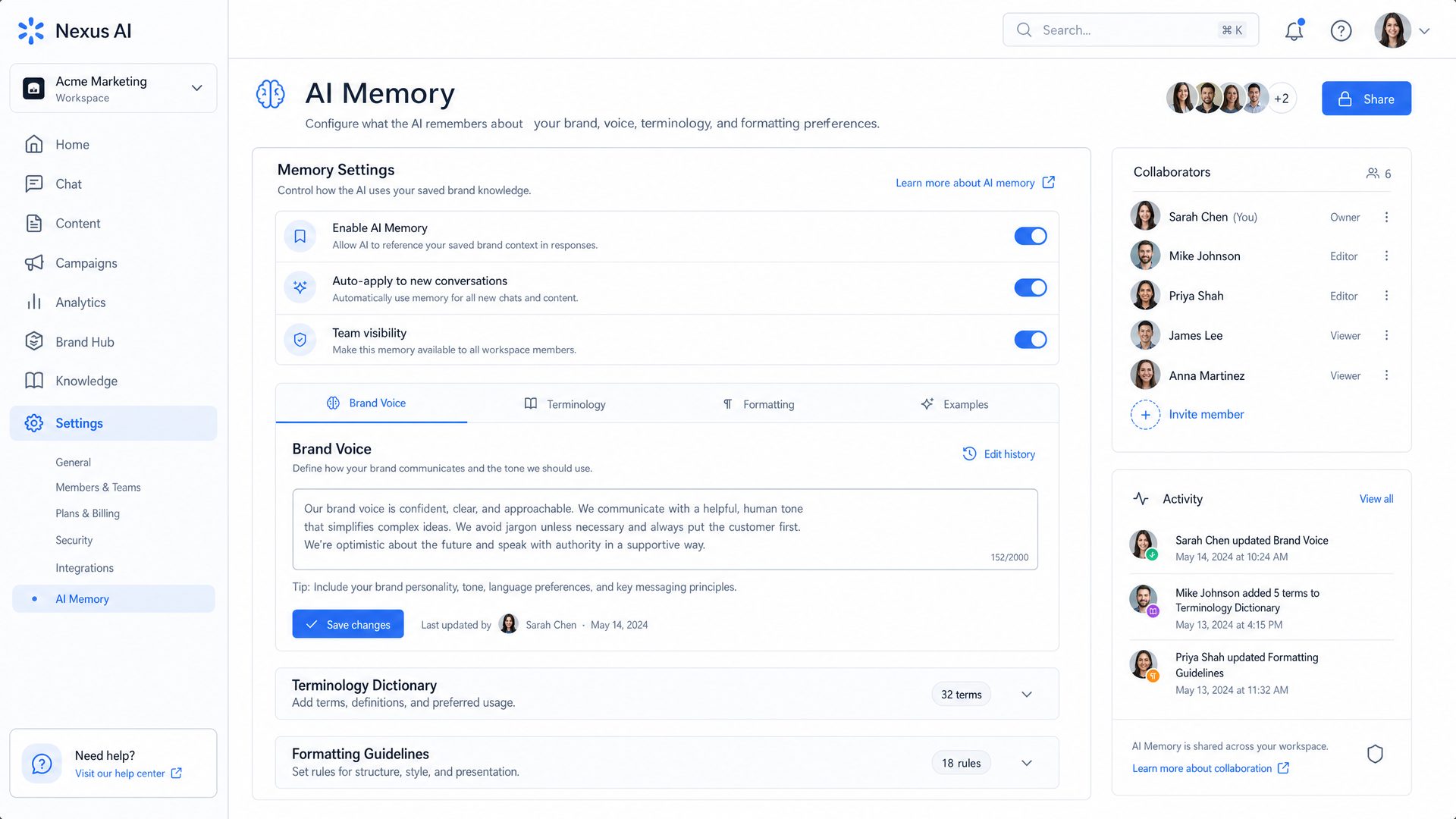
Personalization is a cornerstone of GPT-5.5’s design philosophy, enabling AI to adapt its behavior dynamically based on detailed user and team profiles. The Personalization Profile System empowers organizations to encode their unique communication styles, domain-specific language, and output formatting preferences directly into the AI’s inference process.
Core Components of Personalization Profiles
| Component | Description | Impact on AI Behavior |
|---|---|---|
| Brand Voice Parameters | Defines tone, style, and formality settings such as friendly, professional, or technical. | Shapes the AI’s communication style to align with company branding and audience expectations. |
| Terminology Dictionaries | Custom glossaries and jargon lists that enforce consistent use of domain-specific language. | Ensures accurate and consistent terminology usage across all outputs, reducing ambiguity. |
| Formatting Guidelines | Rules for structuring outputs, including document templates, code snippet styles, and email formats. | Maintains uniformity in deliverables, improving readability and professionalism. |
| Interaction Preferences | Settings controlling verbosity, response length, and preferred content types (e.g., bullet points, summaries). | Customizes the AI’s response style to user or team preferences, enhancing usability. |
Hierarchical and Modular Profile Management
GPT-5.5 supports a hierarchical profile system that allows overrides at multiple organizational levels:
- Organization/Team Level: Base profiles that define company-wide standards.
- Department Level: Specialized profiles for departments such as Marketing, Engineering, or Legal.
- Individual User Level: Personal preferences for individual users, allowing fine-grained customization.
During inference, GPT-5.5 dynamically merges these profiles, applying overrides in order of specificity. This modular approach ensures that the AI’s output respects both broad organizational policies and individual user needs.
Step-by-Step: Creating and Applying Personalization Profiles
- Define Base Profiles: Create JSON or YAML files specifying brand voice, terminology, formatting, and interaction preferences at the organization level.
- Create Department Profiles: Extend base profiles with department-specific overrides, such as technical jargon for Engineering or marketing tone for Sales.
- Configure User Profiles: Allow users to customize preferences like response length or preferred output formats.
- Merge Profiles at Runtime: Implement logic to combine profiles, prioritizing user-level settings over department and organization defaults.
- Inject Profiles into Prompt: Convert merged profiles into system instructions or prompt prefixes that guide GPT-5.5’s behavior.
Production-Grade Code Example: Merging and Applying Personalization Profiles
The following Python snippet demonstrates how to merge hierarchical profiles and inject them into a GPT-5.5 prompt.
# Sample profiles as dictionaries
organization_profile = {
    "brand_voice": {"tone": "professional", "formality": "high"},
    "terminology": {"AI": "Artificial Intelligence", "ML": "Machine Learning"},
    "formatting": {"email_signature": "Best regards,\nCompany Team"},
    "interaction": {"verbosity": "medium", "response_length": "concise"}
}

department_profile = {
    "brand_voice": {"tone": "technical"},
    "terminology": {"API": "Application Programming Interface"},
    "interaction": {"verbosity": "high"}
}

user_profile = {
    "brand_voice": {"tone": "friendly"},
    "interaction": {"response_length": "detailed"}
}

# Function to recursively merge profiles with overrides
def merge_profiles(base: dict, override: dict) -> dict:
    result = base.copy()
    for key, value in override.items():
        if key in result and isinstance(result[key], dict) and isinstance(value, dict):
            result[key] = merge_profiles(result[key], value)
        else:
            result[key] = value
    return result

# Merge profiles in order: organization < department < user
merged_profile = merge_profiles(organization_profile, department_profile)
merged_profile = merge_profiles(merged_profile, user_profile)

# Convert merged profile to system instruction string
def profile_to_instruction(profile: dict) -> str:
    instructions = []
    bv = profile.get("brand_voice", {})
    instructions.append(f"Tone: {bv.get('tone', 'neutral')}")
    instructions.append(f"Formality: {bv.get('formality', 'normal')}")
    terminology = profile.get("terminology", {})
    if terminology:
        instructions.append("Use the following terminology consistently:")
        for term, definition in terminology.items():
            instructions.append(f"- {term}: {definition}")
    formatting = profile.get("formatting", {})
    if formatting:
        instructions.append("Follow these formatting guidelines:")
        for key, value in formatting.items():
            instructions.append(f"- {key}: {value.replace(chr(10), ' | ')}")
    interaction = profile.get("interaction", {})
    instructions.append(f"Verbosity: {interaction.get('verbosity', 'medium')}")
    instructions.append(f"Response Length: {interaction.get('response_length', 'concise')}")
    return "\n".join(instructions)

system_instruction = profile_to_instruction(merged_profile)

# Example: Inject system instruction into GPT-5.5 prompt
response = openai.ChatCompletion.create(
    model="gpt-5.5",
    messages=[
        {"role": "system", "content": system_instruction},
        {"role": "user", "content": "Explain the benefits of AI in healthcare."}
    ],
    max_tokens=300,
    temperature=0.6
)
print(response['choices'][0]['message']['content'])
Industry Applications of Personalization Profiles
-
Marketing Teams: Enforce brand voice consistency across campaigns and social media posts, ensuring all AI
2.1 Defining Your Team-Wide Brand Voice
Establishing a consistent and distinctive brand voice is foundational for any organization aiming to present a unified identity across all communication channels. In the context of GPT-5.5, configuring a team-wide brand voice ensures that AI-generated content aligns perfectly with your company’s values, culture, and communication style. This consistency enhances brand recognition, builds trust with your audience, and reduces the need for extensive post-generation editing.
The process involves a combination of strategic planning, technical configuration, and iterative refinement. Below is a comprehensive guide to defining and implementing your team-wide brand voice using GPT-5.5.
Step 1: Identify Key Voice Attributes
Begin by collaboratively defining the core attributes that embody your brand’s voice. These attributes typically include:
- Tone: The emotional quality of your communication, e.g., professional, friendly, authoritative, empathetic.
- Formality Level: Determines whether the language is formal, semi-formal, or casual.
- Style: Refers to the writing style such as concise, elaborate, technical, or conversational.
- Personality Traits: Characteristics like approachable, innovative, trustworthy, or energetic.
- Preferred and Avoided Phrases: Specific words or phrases that should be emphasized or excluded to maintain brand integrity.
Pro Tip: Conduct workshops or surveys with your marketing, communications, and customer service teams to gather diverse perspectives on your brand voice.
Step 2: Create a Brand Voice Profile JSON
Once the attributes are defined, encapsulate them in a structured JSON format. This format serves as a machine-readable profile that GPT-5.5 can reference during content generation. Below is an enhanced example with comments explaining each field:
{
  "tone": "professional",                /* Defines the overall emotional tone */
  "formality": "formal",                /* Sets the level of formality */
  "style": "concise",                   /* Writing style preference */
  "personalityTraits": [                /* Key personality characteristics */
    "trustworthy",
    "innovative",
    "approachable"
  ],
  "preferredPhrases": [                 /* Words/phrases to emphasize */
    "collaborate",
    "leverage",
    "synergy",
    "value-added"
  ],
  "avoidPhrases": [                    /* Words/phrases to avoid */
    "ASAP",
    "cheap",
    "guys",
    "just"
  ],
  "punctuationPreferences": {          /* Optional: punctuation style */
    "oxfordComma": true,
    "emDashUsage": "sparingly"
  }
}
Note: Including personality traits and punctuation preferences helps the model better emulate nuanced brand characteristics.
Step 3: Upload Brand Voice Profile via API or Dashboard
With your JSON profile ready, the next step is to upload it to GPT-5.5’s personalization system. This can be done either through the API or the Custom GPTs dashboard.
Using the API:
Make a POST request to the
/v1/profiles/brand-voiceendpoint with your JSON payload. Below is a fully commented example usingcurl:curl -X POST "https://api.chatgptaihub.com/v1/profiles/brand-voice" \ -H "Authorization: Basic <base-value64_ENCODED_CREDENTIALS>" \ -H "Content-Type: application/json" \ -d '{ "tone": "professional", "formality": "formal", "style": "concise", "personalityTraits": ["trustworthy", "innovative", "approachable"], "preferredPhrases": ["collaborate", "leverage", "synergy", "value-added"], "avoidPhrases": ["ASAP", "cheap", "guys", "just"], "punctuationPreferences": { "oxfordComma": true, "emDashUsage": "sparingly" } }'Security Note: Always keep your API credentials secure and rotate them periodically.
Using the Dashboard:
Navigate to the Custom GPTs section, select “Brand Voice Profiles,” and use the interface to upload or paste your JSON configuration. This method is ideal for non-developers or quick adjustments.
Step 4: Test and Iterate
After uploading, it’s crucial to validate that GPT-5.5 generates content consistent with your brand voice. Follow this approach:
- Prepare Sample Prompts: Create a diverse set of prompts representing typical communication scenarios (e.g., customer emails, marketing copy, internal memos).
- Generate Outputs: Use the API or dashboard to produce responses based on your brand voice profile.
- Evaluate Consistency: Assess if the tone, style, and terminology match your expectations. Look for unintended phrases or style deviations.
- Refine Profile: Adjust JSON parameters, add or remove preferred/avoid phrases, and tweak personality traits as needed.
- Repeat Testing: Iterate until the outputs consistently reflect your brand voice.
Industry Use Case: A global consulting firm implemented this process to ensure all AI-generated client communications reflected their authoritative yet approachable brand voice. By iteratively refining their profile, they reduced manual editing time by 40% and improved client satisfaction scores.
2.2 Building a Terminology Dictionary
A terminology dictionary is essential for maintaining linguistic consistency, especially in specialized industries with unique jargon, acronyms, and technical terms. GPT-5.5 can leverage this dictionary to ensure accurate and uniform usage of terms across all AI-generated content.
Step 1: Compile a Comprehensive Terminology List
Collaborate with subject matter experts (SMEs) across departments to gather:
- Industry-specific terms and acronyms
- Preferred definitions or expansions
- Synonyms and disallowed terms
- Contextual usage notes (if applicable)
Example: In a healthcare organization, terms like “EHR” (Electronic Health Record) and “HIPAA” (Health Insurance Portability and Accountability Act) are critical to define precisely.
Step 2: Format as Key-Value Pairs in JSON
Structure your terminology dictionary as a JSON object where keys are abbreviations or terms, and values are their preferred full forms or definitions. Here is a detailed example with inline comments:
{
  "API": "Application Programming Interface",             /* Common tech acronym */
  "SLA": "Service Level Agreement",                       /* Contractual term */
  "KPI": "Key Performance Indicator",                     /* Performance metric */
  "EHR": "Electronic Health Record",                      /* Healthcare term */
  "HIPAA": "Health Insurance Portability and Accountability Act" /* Compliance term */
}
Advanced Tip: You can extend this dictionary to include nested objects for synonyms or usage contexts if your API supports it.
Step 3: Integrate into Personalization Profile
Upload the terminology dictionary to the
terminologysection of your team’s personalization profile. This can be done via the API or through the Custom GPTs interface.Example API Request:
POST https://api.chatgptaihub.com/v1/profiles/terminology
Authorization: Basic <base-value64_ENCODED_CREDENTIALS>
Content-Type: application/json

{
  "terminology": {
    "API": "Application Programming Interface",
    "SLA": "Service Level Agreement",
    "KPI": "Key Performance Indicator",
    "EHR": "Electronic Health Record",
    "HIPAA": "Health Insurance Portability and Accountability Act"
  }
}
Step 4: Enable Auto-Substitution and Contextual Usage
To maximize consistency, configure system instructions or rules that enable GPT-5.5 to automatically substitute abbreviations with their full forms or vice versa, depending on the context. For example:
- Use full forms on first mention and abbreviations thereafter in formal documents.
- Prefer abbreviations in internal communications where brevity is valued.
Sample System Instruction Snippet:
"systemInstructions": "When generating content, expand abbreviations on first use with the full term followed by the abbreviation in parentheses, e.g., 'Service Level Agreement (SLA)'. Use only the abbreviation in subsequent mentions."
Real-World Example: A multinational software company integrated a terminology dictionary for over 200 acronyms and technical terms. This reduced inconsistent terminology usage by 85% across product documentation and marketing materials.
2.3 Establishing Formatting Guidelines
Formatting guidelines are vital for ensuring that AI-generated outputs not only convey the right message but also adhere to your organization’s presentation standards. This includes structural elements such as headings, bullet points, date/time formats, code blocks, and signature styles.
Step 1: Define Detailed Formatting Rules
Collaborate with your communications and design teams to specify comprehensive formatting rules. Consider the following elements:
Element Rule Description Example Headings Use H1 for titles, H2 for sections, H3 for subsections; capitalize first letters only. <h2>Project Update</h2>Bullet Points Use unordered lists with round bullets; keep items concise. - Define scope
- Assign tasks
Code Blocks Use fenced code blocks with language identifiers for syntax highlighting. ```python def hello(): print("Hello World") ```Date Formats Use ISO 8601 format (YYYY-MM-DD) for all dates. 2024-06-15 Signature Include closing phrase followed by sender’s name and title. Best regards,
Jane Doe
Marketing ManagerStep 2: Use JSON or Markdown Templates for Formatting
Encoding formatting preferences in JSON or Markdown templates allows GPT-5.5 to consistently apply these rules. Below is an example JSON template for email formatting with detailed comments:
{
  "email": {
    "greeting": "Dear [Recipient],",              /* Standardized greeting */
    "bodyStyle": "concise paragraphs",            /* Paragraph style */
    "bulletStyle": "round",                        /* Bullet point style */
    "dateFormat": "YYYY-MM-DD",                    /* Date format */
    "closing": "Best regards,",                     /* Closing phrase */
    "signature": "[Your Name]",                     /* Placeholder for sender's name */
    "includeTitle": true                            /* Whether to include job title */
  },
  "report": {
    "headingLevels": {                             /* Heading hierarchy */
      "main": "h1",
      "section": "h2",
      "subsection": "h3"
    },
    "codeBlockStyle": "fenced",                    /* Code block formatting */
    "numberedLists": true                          /* Use numbered lists where applicable */
  }
}
Step 3: Embed Formatting Guidelines into System Instructions
Incorporate your formatting rules directly into the system instructions or prompt templates that guide GPT-5.5’s output. This ensures that every generated response adheres to your style guide without manual intervention.
Example System Instruction:
"systemInstructions": "Format all emails with a formal greeting 'Dear [Recipient],', use concise paragraphs, round bullet points, and close with 'Best regards,' followed by the sender's name and title. Dates must be in YYYY-MM-DD format. Use fenced code blocks with language tags for any code snippets."
Step 4: Validate Outputs and Iterate
Generate sample outputs for various content types (emails, reports, code snippets) and review them against your formatting standards. Use a checklist or automated validation tools where possible to ensure compliance.
- Check heading levels and capitalization
- Verify bullet and numbered list styles
- Confirm date formats and signature consistency
- Ensure code blocks are properly fenced and syntax-highlighted
Adjust system instructions or templates based on feedback and repeat testing until outputs consistently meet your formatting expectations.
Comparative Table: Formatting Approaches
Method Advantages Disadvantages Best Use Case Hardcoded Templates (JSON/Markdown) Precise control, easy to update, machine-readable Requires upfront design, less flexible for spontaneous changes Standardized documents like reports and emails System Instructions Flexible, can handle nuanced instructions, easy to tweak May require iterative tuning, less explicit than templates Dynamic content generation with variable formatting Post-Processing Scripts Allows complex formatting corrections after generation Additional development effort, latency introduced Highly customized formatting or legacy system integration Industry Use Case: A financial services company standardized their quarterly reports by embedding JSON-based formatting templates into GPT-5.5 system instructions. This approach reduced formatting errors by 90% and accelerated report generation by 50%.
For advanced prompting techniques related to formatting and style, refer to our GPT-5.5 prompting guide.
3.1 Overview of Memory Management API Endpoints
GPT-5.5 introduces a robust and flexible RESTful API designed specifically to manage and manipulate the model’s memory layers programmatically. This API empowers developers and enterprise teams to tailor the AI’s memory handling to fit complex workflows, enabling seamless integration of session-specific data, short-term context, and persistent long-term knowledge bases. Understanding these endpoints is crucial for building AI assistants that behave like an integrated team member, retaining relevant information over time and adapting dynamically to evolving contexts.
The memory architecture in GPT-5.5 is stratified into three primary layers:
- Session Memory: Ephemeral data tied to a single conversation session, such as meeting notes or recent decisions.
- Short-Term Memory: Transient context maintained during a conversation to preserve coherence and continuity.
- Long-Term Memory: Persistent knowledge stored across sessions, including company policies, historical decisions, and domain-specific facts.
The API exposes endpoints that allow you to read, update, query, and personalize these memory layers. Below is a detailed breakdown of the key endpoints, their functions, and HTTP methods:
Endpoint Function HTTP Method /v1/memory/sessionRetrieve or update session memory data, enabling dynamic context updates within a conversation lifecycle. GET / POST /v1/memory/long-term/queryPerform semantic search queries against the long-term memory store to retrieve relevant historical or domain-specific knowledge. POST /v1/memory/long-term/updateAdd new entries or modify existing records in long-term memory, ensuring persistent knowledge evolves with your team’s needs. POST /v1/profiles/personalizationManage personalization profiles that customize the AI’s tone, style, and behavior to align with your brand and team culture. GET / POST / PATCH Key Considerations:
- Authentication: All endpoints require Basic Authentication with Base64-encoded credentials to ensure secure access.
- Rate Limits: Enterprise plans support high throughput, but it’s recommended to batch updates where possible to optimize performance.
- Data Consistency: Session memory updates are atomic per request, preventing race conditions in concurrent environments.
- Semantic Search: Long-term memory queries leverage vector embeddings and advanced NLP techniques to return contextually relevant results beyond keyword matching.
3.2 Example: Updating Session Memory Programmatically
Session memory acts as a dynamic scratchpad for the AI during an active conversation or meeting. It allows the model to remember recent decisions, action items, or any contextual information that should influence subsequent responses. Updating session memory programmatically is essential for integrating real-time collaboration tools, meeting transcriptions, or project management systems.
Below is a detailed, production-grade example demonstrating how to update session memory with recent team decisions. This example uses a secure HTTPS POST request with properly structured JSON payload to append timestamped notes to a session identified by
session_id.POST https://api.chatgptaihub.com/v1/memory/session Authorization: Basic <base-value64_ENCODED_CREDENTIALS> Content-Type: application/json { "session_id": "team-meeting-2024-06-01", "updates": [ { "timestamp": "2024-06-01T10:15:00Z", "content": "Decided to prioritize the new API integration for Q3." }, { "timestamp": "2024-06-01T10:45:00Z", "content": "Assigned John to lead the testing phase." } ] }Step-by-Step Explanation:
- Endpoint: The request targets
/v1/memory/session, which handles session memory retrieval and updates. - Authentication: The
Authorizationheader uses Basic Auth with your Base64-encoded API credentials. This ensures secure access. - Content-Type: Set to
application/jsonto indicate JSON payload. - Payload Structure: The JSON contains a unique
session_idto identify the conversation session, and anupdatesarray with timestamped content entries. - Timestamp Format: ISO 8601 UTC timestamps ensure chronological ordering and timezone consistency.
- Content: Each update entry includes a textual note or decision to be integrated into the session memory.
Real-World Use Case: Imagine a distributed product team conducting a virtual meeting. As decisions are made, the meeting software automatically pushes these notes to the GPT-5.5 session memory. When a team member later asks, “What did we decide about the API integration?”, the AI can respond accurately by referencing these stored updates.
Production-Grade Code Example (Node.js using Axios):
const axios = require('axios');

// Base64 encode your API key and secret: Buffer.from('apiKey:apiSecret').toString('base64')
const AUTH_HEADER = 'Basic <base-value64_ENCODED_CREDENTIALS>';

async function updateSessionMemory(sessionId, updates) {
  try {
    const response = await axios.post(
      'https://api.chatgptaihub.com/v1/memory/session',
      {
        session_id: sessionId,
        updates: updates
      },
      {
        headers: {
          'Authorization': AUTH_HEADER,
          'Content-Type': 'application/json'
        }
      }
    );
    console.log('Session memory updated successfully:', response.data);
  } catch (error) {
    console.error('Error updating session memory:', error.response ? error.response.data : error.message);
  }
}

// Example usage
const sessionId = 'team-meeting-2024-06-01';
const updates = [
  { timestamp: '2024-06-01T10:15:00Z', content: 'Decided to prioritize the new API integration for Q3.' },
  { timestamp: '2024-06-01T10:45:00Z', content: 'Assigned John to lead the testing phase.' }
];

updateSessionMemory(sessionId, updates);
3.3 Querying Long-Term Memory
Long-term memory in GPT-5.5 serves as a persistent knowledge repository that retains critical organizational information, policies, historical data, and domain-specific facts. Unlike session memory, which is ephemeral, long-term memory enables the AI to recall and apply knowledge accumulated over weeks, months, or years.
The
/v1/memory/long-term/queryendpoint allows you to perform semantic search queries against this extensive knowledge base. This is not a simple keyword search; instead, it leverages vector embeddings and advanced natural language understanding to find the most contextually relevant entries.Here is a detailed example of how to query long-term memory to retrieve the top 3 relevant entries related to a service-level agreement (SLA) question:
POST https://api.chatgptaihub.com/v1/memory/long-term/query
Authorization: Basic <base-value64_ENCODED_CREDENTIALS>
Content-Type: application/json

{
  "query": "What is the SLA for customer support?",
  "top_k": 3
}
Detailed Breakdown:
- Query: Natural language question or statement to search against the long-term memory.
- top_k: Specifies the number of top relevant entries to return. Adjust this number based on your application’s context window and desired breadth of information.
Response Handling: The API returns an array of memory entries ranked by semantic relevance. These entries can be programmatically injected into system prompts or user-facing responses to provide contextually rich and accurate answers.
Industry Use Case: A customer support chatbot integrated with GPT-5.5 can query long-term memory to retrieve up-to-date SLA policies, escalation procedures, or historical ticket resolutions. This ensures consistent and policy-compliant responses without manual intervention.
Production-Grade Code Example (Python using requests):
import requests
from requests.auth import HTTPBasicAuth

API_URL = 'https://api.chatgptaihub.com/v1/memory/long-term/query'
API_USER = 'sk-xxxxxxxxxxxx'
API_PASS = 'secret-xxxxxxxxxxxx'

def query_long_term_memory(query_text, top_k=3):
    payload = {
        "query": query_text,
        "top_k": top_k
    }
    response = requests.post(API_URL, json=payload, auth=HTTPBasicAuth(API_USER, API_PASS))
    if response.status_code == 200:
        results = response.json().get('results', [])
        print(f"Top {top_k} relevant long-term memory entries:")
        for idx, entry in enumerate(results, 1):
            print(f"{idx}. {entry['content']} (Score: {entry['score']:.4f})")
        return results
    else:
        print(f"Error querying long-term memory: {response.status_code} - {response.text}")
        return None

# Example usage
query_long_term_memory("What is the SLA for customer support?", top_k=3)
Comparison Table: Semantic Search vs. Keyword Search in Long-Term Memory
Feature Semantic Search (GPT-5.5) Traditional Keyword Search Search Method Vector embeddings and contextual similarity Exact keyword matching Relevance High – captures intent and semantics Low – misses synonyms and context Handling Synonyms Yes, understands meaning similarity No, requires exact terms Performance Optimized for large datasets with vector indexes Faster for small datasets, but less accurate Use Case Complex queries, conversational AI, knowledge bases Simple document retrieval, exact matches 3.4 Creating Custom GPTs with Embedded Memory Profiles
Custom GPTs in GPT-5.5 provide a powerful mechanism for teams to build AI assistants tailored precisely to their workflows, brand identity, and knowledge repositories. By embedding memory profiles and personalization settings directly into the model instance, organizations can create specialized AI agents that consistently reflect their unique style, terminology, and operational knowledge.
The process of creating a Custom GPT involves several critical steps, each designed to ensure that the resulting AI assistant is both contextually aware and aligned with your team’s communication standards:
-
Define the Base Model: Select GPT-5.5 as the foundational model. This ensures access to the latest memory management features and personalization capabilities.
- Consider your use case to choose model variants optimized for speed, accuracy, or cost.
- Evaluate the token limits and memory capacity based on expected conversation lengths.
-
Upload Brand Voice, Terminology Dictionary, and Formatting Guidelines:
- Brand Voice: Provide sample texts or style guides that define tone (e.g., formal, friendly, technical).
- Terminology Dictionary: Upload glossaries or domain-specific terms to ensure consistent usage.
- Formatting Guidelines: Specify how responses should be structured, including bullet points, code blocks, or tables.
These assets are embedded into the Custom GPT’s system instructions and memory profiles, enabling automatic adherence during conversations.
-
Configure System Instructions to Utilize Memory Layers Dynamically:
- Define prompt templates that incorporate session and long-term memory retrievals.
- Set rules for when and how memory should be queried or updated during interactions.
- Implement fallback behaviors if memory entries are missing or ambiguous.
This dynamic memory orchestration ensures the AI assistant remains contextually aware and responsive to evolving information.
-
Set API Keys and Authentication Using Basic Auth Placeholders for Secure Access:
- Generate API credentials with scoped permissions for your Custom GPT.
- Use environment variables or secure vaults to store credentials in production.
- Implement token rotation and monitoring to maintain security compliance.
-
Deploy and Test Your Custom GPT with Team Members:
- Conduct iterative testing sessions to validate memory integration and personalization fidelity.
- Gather feedback on response accuracy, tone, and usability.
- Refine memory entries and system instructions based on real-world usage.
Deployment can be staged across development, QA, and production environments to ensure stability.
Real-World Industry Case Study:
A global consulting firm created a Custom GPT named
Company: TechNova Solutions — a mid-sized software development firm specializing in enterprise SaaS products.
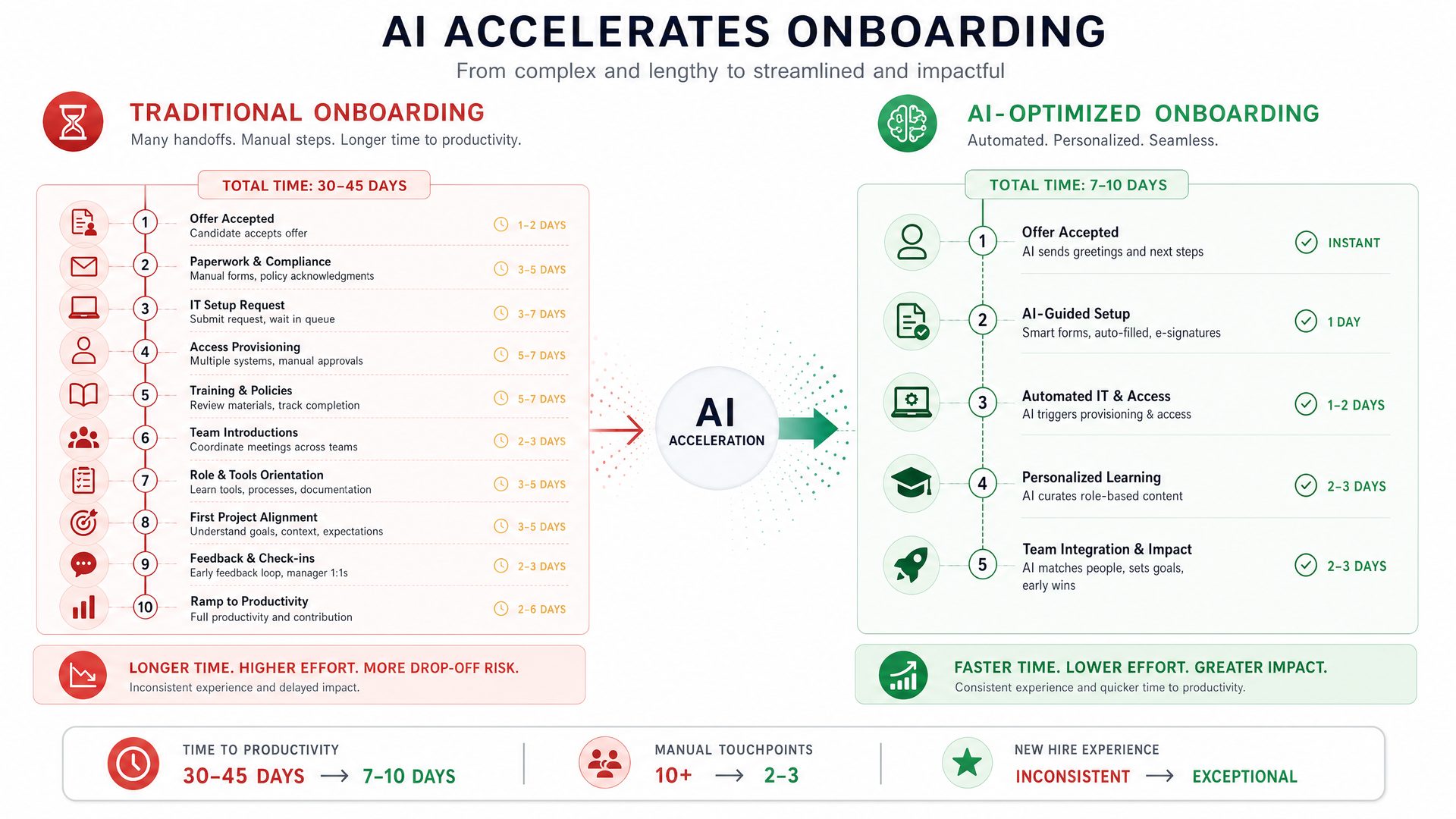
Challenge: New employee onboarding was time-consuming, averaging 3 weeks to reach full productivity due to complex internal processes, diverse team roles, and specialized terminology unique to the company’s SaaS offerings.
Solution: Implement GPT-5.5 with personalized memory and profiles tailored to TechNova’s brand voice, internal terminology, and operational knowledge. This included integrating long-term memory with company documentation, role-specific personalization profiles, and API-driven automation embedded directly into the onboarding portal.In-Depth Implementation Details
The success of TechNova’s onboarding acceleration hinged on a carefully architected deployment of GPT-5.5’s memory and personalization capabilities. Below is a detailed breakdown of each component and the rationale behind it:
-
Memory Integration: Building a Persistent Knowledge Base
The first step was to create a comprehensive long-term memory repository that GPT-5.5 could access during interactions. This memory was populated with:
- Onboarding manuals: Step-by-step guides, company policies, and workflow documentation.
- FAQs: Frequently asked questions gathered from previous onboarding cohorts and internal forums.
- Product documentation: Detailed technical specs, API references, and release notes.
By indexing and embedding these documents into GPT-5.5’s long-term memory, the model could retrieve relevant information contextually, reducing the need for human intervention.
Technical Approach:
The documents were first converted into vector embeddings using OpenAI’s embedding API, then stored in a vector database optimized for semantic search (e.g., Pinecone or Weaviate). GPT-5.5 was configured to query this database dynamically during conversations.
// Pseudocode for embedding and storing documents const documents = loadDocuments('onboarding_manuals/'); const embeddings = documents.map(doc => openai.createEmbedding({input: doc.text})); vectorDB.upsert(embeddings); -
Personalization Profiles: Role-Specific Communication and Terminology
Recognizing that different teams use distinct jargon and communication styles, TechNova created multiple personalization profiles within GPT-5.5:
- Developers: Focused on technical language, code snippets, and API usage.
- Sales: Emphasized persuasive language, client-focused terminology, and product benefits.
- Support: Adopted empathetic tone, troubleshooting steps, and escalation protocols.
Each profile included tailored system instructions, vocabulary preferences, and example dialogues to guide GPT-5.5’s responses.
Example Profile Configuration:
{ "profile_id": "developer", "system_instructions": "Use technical language, provide code examples, and explain APIs clearly.", "preferred_terms": ["SDK", "endpoint", "payload"], "tone": "professional and concise" } -
Custom System Instructions: Enforcing Tone and Formatting
To ensure consistent and effective communication, custom system instructions were embedded into GPT-5.5’s prompt templates. These instructions mandated:
- Formal, clear, and supportive tone.
- Step-by-step guidance with numbered or bulleted lists.
- Highlighting important terms and warnings.
This approach helped new hires follow instructions easily and reduced misunderstandings.
"system": "You are an onboarding assistant. Provide clear, step-by-step instructions. Use bullet points or numbered lists. Maintain a formal and supportive tone." -
API Automation: Embedding GPT-5.5 into the Onboarding Portal
The final piece was integrating GPT-5.5 directly into TechNova’s onboarding portal via API. This allowed new hires to:
- Ask questions in natural language about company policies, tools, or workflows.
- Receive instant, context-aware answers personalized to their role.
- Access interactive tutorials and checklists generated dynamically.
Sample API Integration Code:
import axios from 'axios';

async function queryOnboardingAssistant(sessionId, userQuestion, profileId) {
  const response = await axios.post('https://api.openai.com/v1/chat/completions', {
    model: 'gpt-5.5',
    messages: [
      { role: 'system', content: `You are an onboarding assistant for TechNova. Use the ${profileId} profile.` },
      { role: 'user', content: userQuestion }
    ],
    memory: { session_id: sessionId }
  }, {
    headers: { 'Authorization': `Bearer ${process.env.OPENAI_API_KEY}` }
  });
  return response.data.choices[0].message.content;
}
This function is called whenever a new hire submits a query, maintaining session memory to provide continuity across interactions.
Step-by-Step Guide to Replicate This Implementation
-
Gather and Prepare Documentation
- Collect all onboarding materials, FAQs, and product docs.
- Convert documents into plain text or markdown format.
- Clean and standardize terminology where possible.
-
Embed Documents into Vector Database
- Use OpenAI’s embedding API to convert text into vector representations.
- Choose a vector database (e.g., Pinecone, Weaviate) and upload embeddings.
- Test semantic search queries to ensure relevant retrieval.
-
Create Personalization Profiles
- Define roles and their communication needs.
- Write system instructions and preferred terminology lists.
- Store profiles in a configuration service or database.
-
Develop API Integration
- Build backend endpoints to interact with GPT-5.5 API.
- Implement session memory management to maintain context.
- Incorporate profile selection based on user role.
-
Embed GPT-5.5 Assistant into Onboarding Portal
- Create UI components for chat or query input.
- Connect frontend to backend API endpoints.
- Test end-to-end user experience with pilot users.
-
Monitor and Iterate
- Collect feedback from new hires and managers.
- Analyze common queries and update memory or profiles accordingly.
- Refine system instructions to improve clarity and tone.
Comparative Analysis: Traditional Onboarding vs. GPT-5.5 Personalized Memory Approach
Aspect Traditional Onboarding GPT-5.5 Personalized Memory Time to Productivity ~3 weeks ~1.8 weeks (40% reduction) Consistency of Information Varies by trainer and session Consistent, up-to-date knowledge base Scalability Limited by trainer availability Scales easily with minimal human input Personalization Manual customization per role Automated role-based profiles and tone Managerial Workload High due to repetitive training Reduced by automating FAQs and tutorials User Confidence Varies, often low initially Higher due to instant, accurate answers Real-World Industry Use Cases Beyond TechNova
- Healthcare: Hospitals use GPT-5.5 personalized memory to onboard nurses and doctors rapidly, integrating medical protocols and patient management systems into the assistant.
- Financial Services: Banks deploy GPT-5.5 to train customer service reps on compliance, product offerings, and fraud detection with role-specific profiles.
- Manufacturing: Factories implement GPT-5.5 to onboard technicians with machinery manuals, safety protocols, and maintenance schedules embedded in memory.
- Education: Universities use GPT-5.5 to assist new faculty and staff with administrative procedures, course management systems, and institutional policies.
Production-Grade Code Example: Managing GPT-5.5 Memory Sessions and Profiles
This example demonstrates how to programmatically update session memory and switch personalization profiles using the GPT-5.5 API.
import axios from 'axios';

const OPENAI_API_KEY = process.env.OPENAI_API_KEY;
const API_BASE_URL = 'https://api.openai.com/v1';

// Function to update session memory with new entries
async function updateSessionMemory(sessionId, updates) {
  try {
    const response = await axios.post(
      `${API_BASE_URL}/memory/session`,
      {
        session_id: sessionId,
        updates: updates.map(content => ({ content })),
      },
      {
        headers: {
          'Authorization': `Bearer ${OPENAI_API_KEY}`,
          'Content-Type': 'application/json',
        },
      }
    );
    console.log('Memory updated:', response.data);
  } catch (error) {
    console.error('Error updating memory:', error.response?.data || error.message);
  }
}

// Function to query GPT-5.5 with a specific profile and session memory
async function queryGPT(sessionId, userMessage, profileId) {
  try {
    // Fetch profile details from config or database (mocked here)
    const profiles = {
      developer: {
        system_instructions: 'Use technical language, provide code examples, and explain APIs clearly.',
        tone: 'professional and concise',
      },
      sales: {
        system_instructions: 'Use persuasive language focusing on product benefits.',
        tone: 'friendly and engaging',
      },
      support: {
        system_instructions: 'Use empathetic tone and clear troubleshooting steps.',
        tone: 'supportive and patient',
      },
    };
    const profile = profiles[profileId] || profiles['support'];

    const response = await axios.post(
      `${API_BASE_URL}/chat/completions`,
      {
        model: 'gpt-5.5',
        messages: [
          { role: 'system', content: profile.system_instructions },
          { role: 'user', content: userMessage },
        ],
        memory: { session_id: sessionId },
      },
      {
        headers: {
          'Authorization': `Bearer ${OPENAI_API_KEY}`,
          'Content-Type': 'application/json',
        },
      }
    );
    return response.data.choices[0].message.content;
  } catch (error) {
    console.error('Error querying GPT-5.5:', error.response?.data || error.message);
    return null;
  }
}

// Example usage
(async () => {
  const sessionId = 'onboarding-session-123';
  await updateSessionMemory(sessionId, ['Completed company orientation', 'Reviewed security policies']);
  const answer = await queryGPT(sessionId, 'How do I access the internal API documentation?', 'developer');
  console.log('GPT-5.5 Response:', answer);
})();
Key Takeaways
- Personalized memory and profiles enable GPT-5.5 to act as a knowledgeable, role-aware assistant, significantly improving onboarding efficiency.
- Embedding company-specific documents into long-term memory ensures consistent and accurate information delivery.
- API-driven integration allows seamless embedding of GPT-5.5 into existing onboarding workflows and portals.
- Continuous monitoring and iterative updates to memory and profiles are essential to maintain relevance and accuracy.
This case study underscores how GPT-5.5’s advanced memory and personalization features can transform traditional training and onboarding processes into dynamic, scalable, and highly effective experiences tailored to each team member’s needs.
5. Summary Table of Memory Management Commands and Profile Settings
🚀 Stay Ahead with AI Insights
Get the latest ChatGPT tips, tutorials, and news delivered to your inbox weekly.
