
How to Build AI Agents on Amazon Bedrock with GPT-5.6: Step-by-Step Developer Tutorial
Amazon Bedrock now offers the GPT-5.6 family (Sol, Terra, and Luna) as first-class foundation models, giving developers a secure, enterprise-grade path to run OpenAI models on AWS with unified tooling, IAM-based access control, VPC endpoints, CloudWatch observability, and fine-grained cost governance. In this in-depth developer tutorial, you’ll build a production-quality AI agent that runs on Bedrock with GPT-5.6, uses tools via function calling, manages memory across short and long horizons, and leverages prompt caching to cut token costs by up to 90% on repeated context. You’ll get end-to-end Python code, patterns for managed Agents for Bedrock vs. a DIY orchestrator, deployment options on Lambda or containers, and battle-tested best practices for scale, safety, and cost.
What you’ll build
- A task-oriented AI agent powered by GPT-5.6 (choose Sol, Terra, or Luna) on Amazon Bedrock
- Tool-using reasoning loop with function calls (weather API, DynamoDB read/write, HTTP fetch)
- Short-term conversation memory and long-term vector memory via Bedrock Knowledge Bases
- Prompt caching that reuses static context and yields 50–90% savings on repeated requests
- Observability with CloudWatch and cost controls with per-model routing and caching strategy
- Deployment on AWS Lambda + API Gateway (with IaC), plus alternatives (ECS/EKS)
If you’re migrating from self-hosted OpenAI usage and want OpenAI on AWS with least-privileged security and enterprise controls, this tutorial is a practical path to get to production fast. For related concepts, you may also explore
For a deeper exploration of related concepts, our comprehensive guide on Dell AI Factory + OpenAI Codex: How On-Premises AI Agents Are Changing Enterprise Software Development provides detailed frameworks and practical strategies that complement the approaches discussed in this article.
,
For a deeper exploration of related concepts, our comprehensive guide on How to Build Voice AI Agents with GPT-Realtime-2: Complete Developer Tutorial provides detailed frameworks and practical strategies that complement the approaches discussed in this article.
, and
For a deeper exploration of related concepts, our comprehensive guide on OpenAI Codex and GPT-5.5 Land on AWS: What Amazon Bedrock Integration Means for Enterprise AI provides detailed frameworks and practical strategies that complement the approaches discussed in this article.
within our library.
Audience and prerequisites
- Audience: Backend developers, ML engineers, SREs, and solutions architects shipping LLM-powered apps on AWS.
- Assumed skills: Python, basic AWS (IAM, VPC, CloudWatch), JSON schemas, HTTP APIs.
Before you start, ensure you have:
- AWS account with access to Amazon Bedrock and the GPT-5.6 models (Sol/Terra/Luna) enabled in your region
- AWS CLI configured (aws configure)
- Python 3.10+ and pip
- Permissions to create IAM roles/policies, DynamoDB tables, and (optionally) Knowledge Bases for Bedrock
Architecture at a Glance
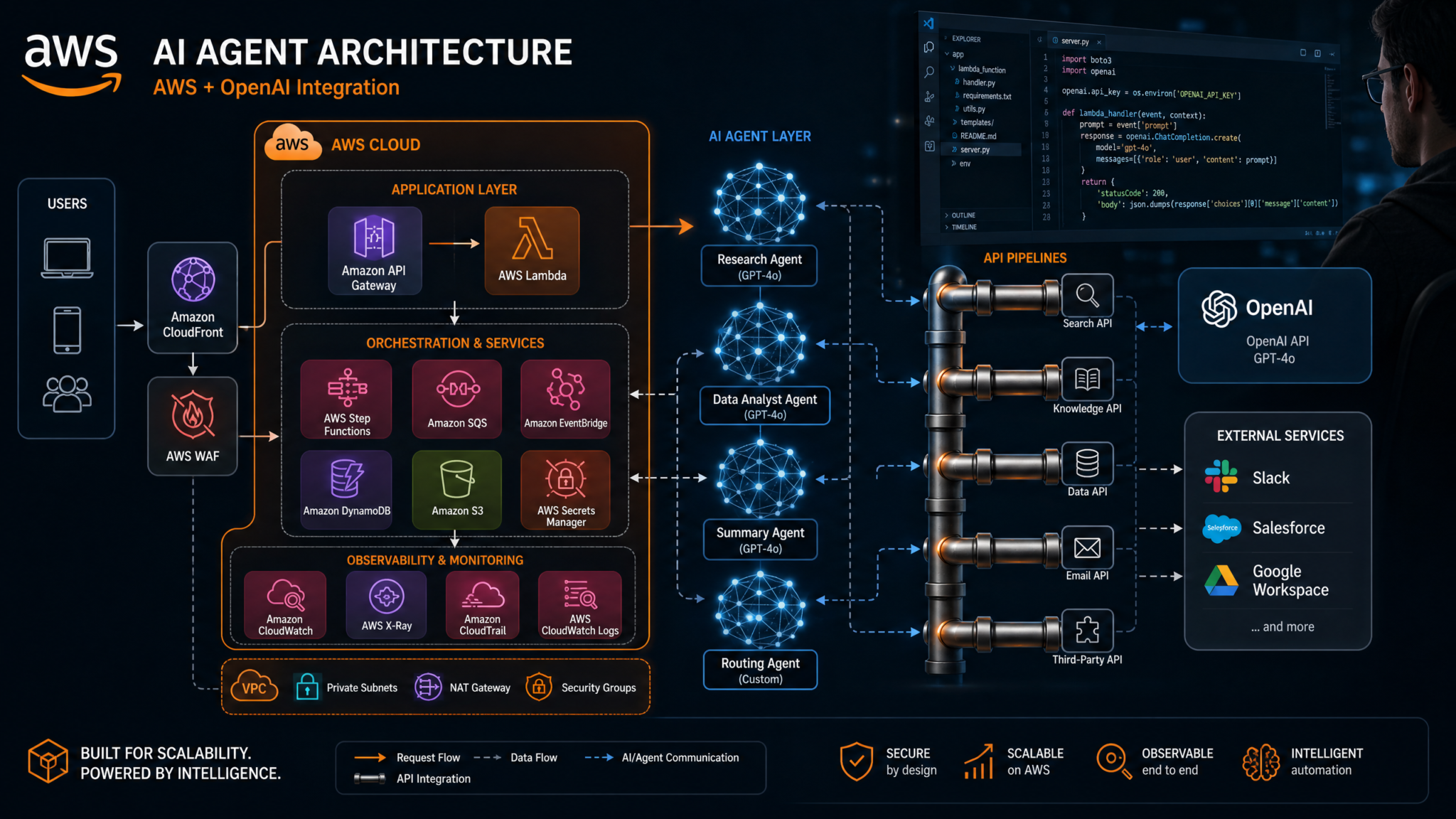
We will implement two complementary approaches to agents on Bedrock:
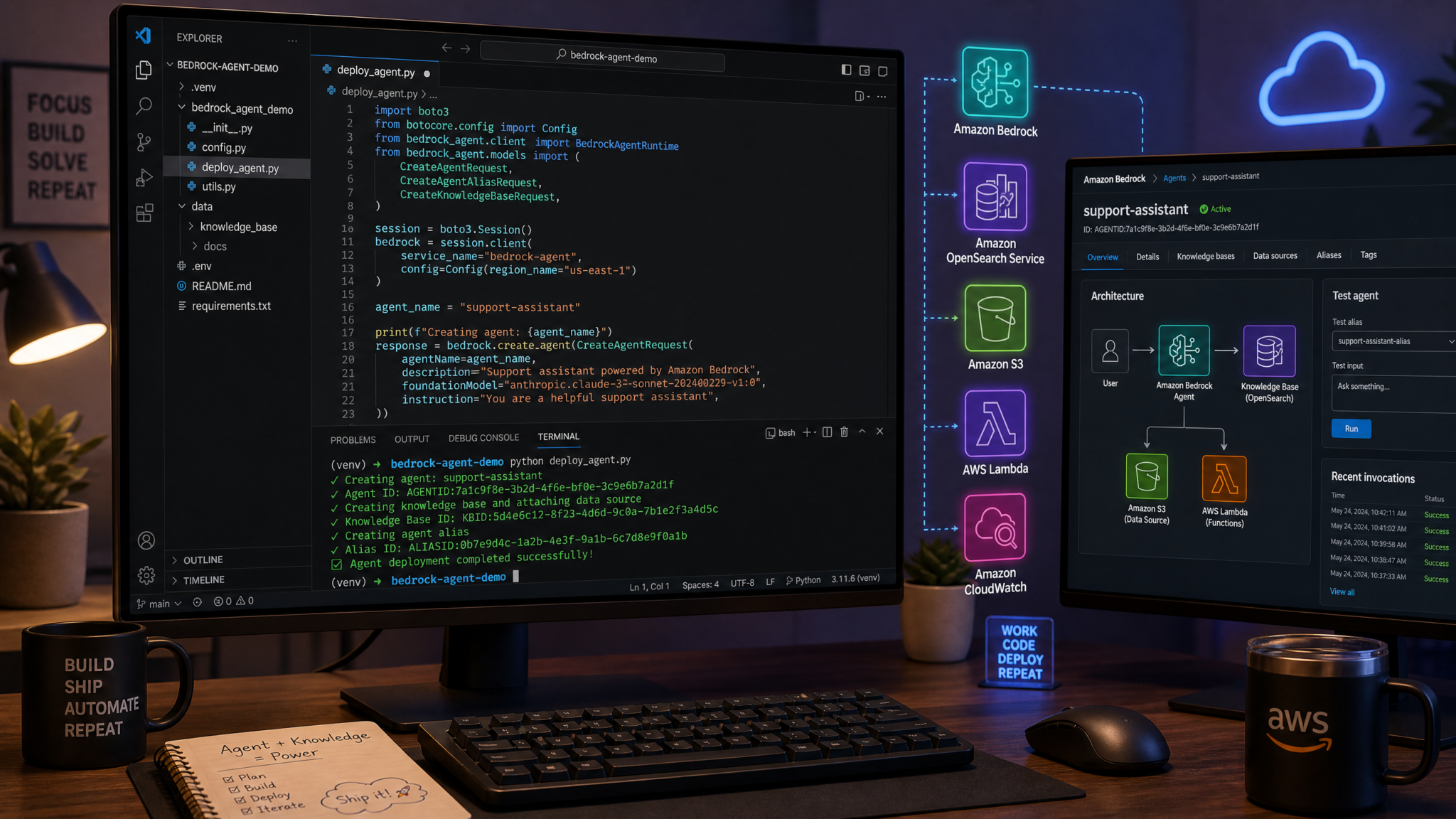
- Managed Agents for Bedrock: Define action groups (tools), policies, and knowledge bases. AWS orchestrates tool-use plans for you.
- DIY Orchestrator using the Bedrock Runtime Converse API: You control the conversation loop, tool calls, memory, and caching logic directly in your application.
For maximum flexibility and explainability, the tutorial focuses on the DIY orchestrator. You’ll still see where managed Agents for Bedrock can reduce operational work for certain use cases.
- User requests flow through API Gateway
- Lambda (or container) hosts the orchestrator
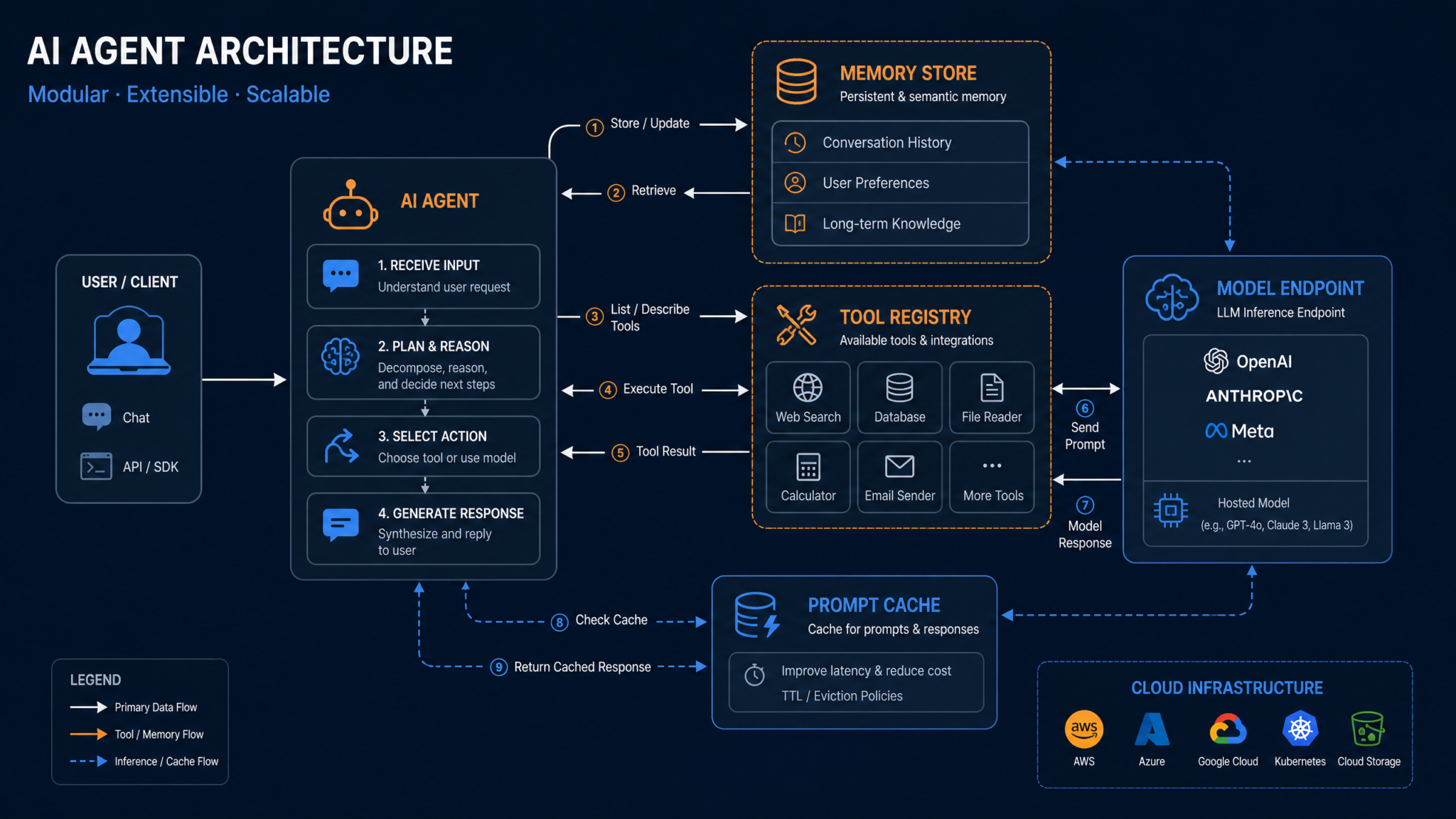
- Orchestrator calls Bedrock (GPT-5.6 Sol/Terra/Luna) using the Converse API with tool definitions
- Tools implement side effects (DynamoDB, HTTP, internal APIs), guarded by IAM
- Memory:
- Short-term: recent conversation turns, summarized to fit budgets
- Long-term: retrieved via Knowledge Bases for Bedrock or external vector DB
- Prompt caching: static system prompts and reusable RAG context cached to cut token costs
Model Selection: GPT-5.6 Variants on Bedrock
The GPT-5.6 family provides three tuned variants with different performance-cost tradeoffs:
| Variant | Best for | Relative speed | Max context | Tool-use reliability | Typical cost |
|---|---|---|---|---|---|
| GPT-5.6 Sol | Complex multi-step reasoning, planning, high-stakes outputs | Medium | Large (supports long RAG packets) | Highest | Highest |
| GPT-5.6 Terra | Balanced apps: chat agents, workflows with moderate tools | Fast | Large | High | Medium |
| GPT-5.6 Luna | Latency-sensitive tasks, high QPS, cost-conscious scenarios | Fastest | Moderate–Large | Medium–High | Lowest |
For this tutorial, we’ll set Terra as the default and allow per-request routing to Sol or Luna based on task complexity and budget. You can codify this with simple rules (e.g., “use Sol for over X retrieved tokens or when tool chain depth exceeds 3”).
Environment Setup and Authentication
1) Install dependencies
# Python environment
python -m venv .venv
source .venv/bin/activate  # Windows: .venv\Scripts\activate

pip install --upgrade boto3 botocore requests pydantic redis tenacity uvicorn fastapi
2) Configure IAM for Bedrock and tools
Create an execution role for your Lambda/container with least privilege. Attach a policy similar to:
{
  "Version": "2012-10-17",
  "Statement": [
    {
      "Sid": "BedrockInvoke",
      "Effect": "Allow",
      "Action": [
        "bedrock:InvokeModel",
        "bedrock:InvokeModelWithResponseStream",
        "bedrock:Converse",
        "bedrock:ConverseStream"
      ],
      "Resource": "*"
    },
    {
      "Sid": "KnowledgeBases",
      "Effect": "Allow",
      "Action": [
        "bedrock:Retrieve",
        "bedrock:RetrieveAndGenerate"
      ],
      "Resource": "*"
    },
    {
      "Sid": "DynamoDBAccess",
      "Effect": "Allow",
      "Action": [
        "dynamodb:GetItem",
        "dynamodb:PutItem",
        "dynamodb:UpdateItem",
        "dynamodb:Query"
      ],
      "Resource": "arn:aws:dynamodb:REGION:ACCOUNT_ID:table/YourAgentTable"
    },
    {
      "Sid": "Secrets",
      "Effect": "Allow",
      "Action": [
        "secretsmanager:GetSecretValue"
      ],
      "Resource": "arn:aws:secretsmanager:REGION:ACCOUNT_ID:secret:Your/*"
    },
    {
      "Sid": "Logs",
      "Effect": "Allow",
      "Action": [
        "logs:CreateLogGroup",
        "logs:CreateLogStream",
        "logs:PutLogEvents"
      ],
      "Resource": "*"
    }
  ]
}
For private networking, add an interface VPC endpoint for Bedrock in your VPC. Enforce IAM condition keys and VPC source restrictions in a service control policy if operating in a multi-account setup. These patterns align with enterprise guardrails described in
For a deeper exploration of related concepts, our comprehensive guide on Running AI Coding Agents Safely: Enterprise Security Best Practices for Codex provides detailed frameworks and practical strategies that complement the approaches discussed in this article.
.
3) Initialize the Bedrock Runtime client
import boto3
import os

REGION = os.getenv("AWS_REGION", "us-east-1")

bedrock_runtime = boto3.client("bedrock-runtime", region_name=REGION)

# Optional: Bedrock Agent Runtime client for Knowledge Bases
bedrock_agent_runtime = boto3.client("bedrock-agent-runtime", region_name=REGION)

# Verify access to GPT-5.6 Terra (model IDs are examples; confirm in your console)
MODEL_TERRA = "openai.gpt-5_6.terra"
MODEL_SOL   = "openai.gpt-5_6.sol"
MODEL_LUNA  = "openai.gpt-5_6.luna"
4) Sanity test
from botocore.exceptions import ClientError

def sanity():
    try:
        resp = bedrock_runtime.converse(
            modelId=MODEL_TERRA,
            messages=[{
                "role": "user",
                "content": [{"text": "Return the string 'ok' only."}]
            }],
            inferenceConfig={"temperature": 0.0, "maxTokens": 10}
        )
        print(resp.get("output", {}).get("message", {}).get("content"))
    except ClientError as e:
        print("Bedrock error:", e.response["Error"]["Message"])

if __name__ == "__main__":
    sanity()
Agent Architecture Patterns on Bedrock
Managed agents vs. DIY orchestrator
| Dimension | Managed Agents for Bedrock | DIY Converse Orchestrator |
|---|---|---|
| Tool orchestration | Automated via action groups | Full control; implement loop and policies |
| Knowledge integration | Native with Knowledge Bases | Use Retrieve APIs or custom vector DB |
| Customization | Opinionated, faster to start | Max flexibility and debuggability |
| Costs | Service overhead + model tokens | Model tokens only; your infra costs |
| Observability | CloudWatch, agent traces | CloudWatch + custom tracing (X-Ray, OTEL) |
In this tutorial we implement the DIY pattern first, then note where you can swap in managed Agents. For in-depth guidance on service trade-offs, see
For a deeper exploration of related concepts, our comprehensive guide on Dell AI Factory + OpenAI Codex: How On-Premises AI Agents Are Changing Enterprise Software Development provides detailed frameworks and practical strategies that complement the approaches discussed in this article.
.
Step-by-Step: Build a Tool-Using Agent with Memory
1) Project layout
ai-agent-bedrock/
├── app.py                 # FastAPI or Lambda handler
├── orchestrator.py        # Converse loop, routing, caching
├── tools.py               # Tool implementations (weather, ddb, http)
├── memory.py              # Short- and long-term memory utilities
├── prompts.py             # System prompts, templates, safety
├── cache.py               # Prompt caching (server hint + local Redis)
├── tests/                 # Unit tests (tools and loop)
└── template.yaml          # SAM (or Terraform) for deployment
2) Define the system prompt and safety guardrails
Keep system directives stable and cacheable. Split them into composable segments so you can reuse across agents:
# prompts.py
SYSTEM_CORE = """You are an executive assistant and operations agent.
- Be concise, cite tools used and assumptions.
- If a tool is required, call a tool instead of guessing.
- When writing to DynamoDB, confirm keys and idempotency.
- Use JSON when returning structured data.
"""

STYLE_GUIDE = """Style:
- Prefer bullet points for multi-step answers.
- Use ISO 8601 for timestamps.
- Always include a short 'Next actions' section.
"""

TOOL_USE_POLICY = """Tool policy:
- NEVER fabricate data. If the tool fails, return a clear error and ask how to proceed.
- Don't call the same tool repeatedly without changing inputs.
- Respect rate limits: max 3 tool calls per user turn unless explicitly authorized.
"""

def build_system_prompt():
    return "\n\n".join([SYSTEM_CORE, STYLE_GUIDE, TOOL_USE_POLICY])
For safety, apply Bedrock Guardrails and domain policies to block unwanted topics or to require citations for certain domains. Guardrails complement the prompt’s policy layer and give you auditable controls.
3) Implement tools
We’ll implement three tools:
- get_weather(city): calls a public weather API
- ddb_get(table, pk): reads a record from DynamoDB
- http_get(url): fetches a JSON resource from an allowlist
Each tool has a strict JSON schema and a small timeout. The orchestrator will map LLM tool calls to Python functions.
# tools.py
import os
import json
import time
import boto3
import requests
from botocore.config import Config

ALLOWED_HOSTS = {"api.weather.gov", "status.mycorp.internal"}

dynamodb = boto3.resource("dynamodb", config=Config(retries={"max_attempts": 3}))

def get_weather(city: str) -> dict:
    # Example using a placeholder endpoint; replace with your provider
    url = f"https://api.weather.gov/points?city={city}"
    host = url.split("/")[2]
    if host not in ALLOWED_HOSTS:
        return {"error": f"Host {host} not allowed"}
    r = requests.get(url, timeout=4)
    if r.status_code != 200:
        return {"error": f"Weather API {r.status_code}"}
    data = r.json()
    # Simplify payload
    return {"city": city, "raw": data}

def ddb_get(table: str, pk: str) -> dict:
    t = dynamodb.Table(table)
    resp = t.get_item(Key={"pk": pk})
    return resp.get("Item", {})

def http_get(url: str) -> dict:
    host = url.split("/")[2]
    if host not in ALLOWED_HOSTS:
        return {"error": f"Host {host} not allowed"}
    r = requests.get(url, timeout=4)
    if r.status_code != 200:
        return {"error": f"HTTP {r.status_code}"}
    ct = r.headers.get("content-type", "")
    if "application/json" in ct:
        return r.json()
    return {"text": r.text[:4000]}
4) Memory: short-term and long-term
Short-term memory preserves a few prior turns and summarized context. Long-term memory uses Bedrock Knowledge Bases or your vector DB to retrieve relevant documents.
# memory.py
import hashlib
from typing import List, Dict

# Ring buffer for recent turns
class ShortTermMemory:
    def __init__(self, max_turns=8):
        self.max_turns = max_turns
        self.turns: List[Dict] = []

    def add(self, role: str, content: str):
        self.turns.append({"role": role, "content": content})
        if len(self.turns) > self.max_turns:
            self.turns.pop(0)

    def summarize_if_needed(self) -> str:
        # In production, call a small LLM or a summarize tool.
        # For tutorial, return joined last few messages.
        return "\n".join([f"{t['role']}: {t['content']}" for t in self.turns[-self.max_turns :]])

def retrieve_kb(bedrock_agent_runtime, knowledge_base_id: str, query: str, k=5) -> str:
    if not knowledge_base_id:
        return ""
    resp = bedrock_agent_runtime.retrieve(
        knowledgeBaseId=knowledge_base_id,
        retrievalQuery={"text": query},
        retrievalConfiguration={"vectorSearchConfiguration": {"numberOfResults": k}}
    )
    chunks = []
    for r in resp.get("retrievalResults", []):
        text = r.get("content", {}).get("text", "")
        if text:
            chunks.append(text)
    return "\n\n".join(chunks[:k])
Knowledge Bases handle ETL, chunking, embeddings, and vector search on AWS-native storage. If you maintain your own store (OpenSearch Serverless, Aurora PostgreSQL with pgvector, or Pinecone), switch retrieve_kb accordingly. For deeper RAG patterns, see
For a deeper exploration of related concepts, our comprehensive guide on How OpenAI’s Unified ChatGPT App Strategy Reshapes the AI Developer Ecosystem — From Fragmented Tools to a Single Platform Economy provides detailed frameworks and practical strategies that complement the approaches discussed in this article.
.
5) Prompt caching for 50–90% savings
Prompt caching pays off when large static segments repeat across requests: system prompts, policy blocks, tool specs, and stable RAG snippets (e.g., your handbook). With GPT-5.6 on Bedrock, you should combine two layers:
- Server-side prompt caching: Mark cacheable segments; when reused, Bedrock applies discounted pricing on cached tokens (up to 90% off depending on model and policy).
- Client-side cache: Hash stable context and reuse it across sessions; prune RAG packets to maximize cache hits.
The pattern below tracks cacheable “prefixes” and supplies cache hints to the model. Exact fields vary by model family; GPT-5.6 on Bedrock accepts additional request fields to signal reusable prompt segments and TTLs.
# cache.py
import hashlib
import json
import os
import time
from typing import Optional

try:
    import redis
except Exception:
    redis = None  # optional

REDIS_URL = os.getenv("REDIS_URL", "")
CACHE_TTL = int(os.getenv("PROMPT_CACHE_TTL", "86400"))

_redis = redis.Redis.from_url(REDIS_URL) if REDIS_URL else None

def stable_hash(obj) -> str:
    s = json.dumps(obj, sort_keys=True, separators=(",", ":"))
    return hashlib.sha256(s.encode("utf-8")).hexdigest()

def get_local_cache(key: str) -> Optional[dict]:
    if not _redis:
        return None
    val = _redis.get(key)
    return json.loads(val) if val else None

def set_local_cache(key: str, val: dict, ttl=CACHE_TTL):
    if not _redis:
        return
    _redis.setex(key, ttl, json.dumps(val))

def build_cache_hint(system_prompt: str, tool_specs: list, kb_snippets: str) -> dict:
    # The 'prefix' includes large, stable context
    prefix = {
        "system": system_prompt,
        "tools": tool_specs,
        "kb": kb_snippets[:40000]  # cap
    }
    key = stable_hash(prefix)
    return {"key": key, "prefix": prefix}
In the orchestrator, we’ll attach a provider-specific hint indicating that the system/tool/kb prefix is cacheable and can be reused across calls for a TTL window. On cache hits, Bedrock discounts the cached tokens while still processing any new user-specific tokens. For more on cost mechanics, check
For a deeper exploration of related concepts, our comprehensive guide on How to Deploy GPT-5.5 on Amazon Bedrock for Multi-Cloud Enterprise AI: Complete Setup Guide with IAM Policies, Cost Controls, and Production Patterns provides detailed frameworks and practical strategies that complement the approaches discussed in this article.
.
6) Orchestrator: Converse loop with tool calling and caching
# orchestrator.py
import json
import time
from typing import Dict, Any, List, Optional
from tenacity import retry, stop_after_attempt, wait_exponential

from prompts import build_system_prompt
from tools import get_weather, ddb_get, http_get
from memory import ShortTermMemory, retrieve_kb
from cache import build_cache_hint, get_local_cache, set_local_cache

TOOL_SPECS = [
    {
        "name": "get_weather",
        "description": "Get weather info for a city",
        "input_schema": {
            "type": "object",
            "properties": {"city": {"type": "string"}},
            "required": ["city"]
        }
    },
    {
        "name": "ddb_get",
        "description": "Read an item from DynamoDB by partition key",
        "input_schema": {
            "type": "object",
            "properties": {"table": {"type": "string"}, "pk": {"type": "string"}},
            "required": ["table", "pk"]
        }
    },
    {
        "name": "http_get",
        "description": "Fetch a JSON document from an allowlisted URL",
        "input_schema": {
            "type": "object",
            "properties": {"url": {"type": "string", "format": "uri"}},
            "required": ["url"]
        }
    }
]

TOOL_IMPLS = {
    "get_weather": lambda args: get_weather(args.get("city", "")),
    "ddb_get":    lambda args: ddb_get(args.get("table", ""), args.get("pk", "")),
    "http_get":   lambda args: http_get(args.get("url", "")),
}

def to_bedrock_tool_defs(tools: List[dict]) -> dict:
    return {
        "tools": [
            {
                "toolSpec": {
                    "name": t["name"],
                    "description": t["description"],
                    "inputSchema": {"json": t["input_schema"]}
                }
            } for t in tools
        ]
    }

def to_user_message(text: str) -> dict:
    return {"role": "user", "content": [{"text": text}]}

def to_system_message(text: str) -> dict:
    return {"role": "system", "content": [{"text": text}]}

def to_tool_result(name: str, call_id: str, result: dict) -> dict:
    return {
        "role": "tool",
        "content": [
            {
                "toolResult": {
                    "toolUseId": call_id,
                    "name": name,
                    "content": [{"json": result}]
                }
            }
        ]
    }

@retry(stop=stop_after_attempt(3), wait=wait_exponential(multiplier=0.4, min=1, max=5))
def converse_once(bedrock_runtime, model_id: str, messages: List[dict], tools: dict, cache_hint: Optional[dict] = None, temperature=0.2, max_tokens=1024):
    kwargs = {
        "modelId": model_id,
        "messages": messages,
        "inferenceConfig": {"temperature": temperature, "maxTokens": max_tokens},
        "toolConfig": tools
    }
    # Provider-specific additional fields for prompt caching
    if cache_hint:
        cached_key = cache_hint["key"]
        # Combine local cache + server hint
        kwargs["additionalModelRequestFields"] = {
            "cacheControl": {
                "prefixHash": cached_key,
                "ttlSeconds": 86400,
                "scope": "model"  # or "account" depending on policy
            }
        }
    return bedrock_runtime.converse(**kwargs)

def run_agent(bedrock_runtime, bedrock_agent_runtime, model_id: str, user_input: str, kb_id: Optional[str] = None, memory: Optional[ShortTermMemory] = None) -> Dict[str, Any]:
    system = build_system_prompt()

    kb_snips = retrieve_kb(bedrock_agent_runtime, kb_id, user_input, k=6) if kb_id else ""
    kb_block = f"Knowledge:\n{kb_snips}" if kb_snips else ""

    # Build cacheable prefix: system + tool specs + kb snippets
    tools = to_bedrock_tool_defs(TOOL_SPECS)
    cache_hint = build_cache_hint(system, TOOL_SPECS, kb_snips)

    # Maintain short-term memory
    memory = memory or ShortTermMemory(max_turns=8)
    mem_summary = memory.summarize_if_needed()
    if mem_summary:
        kb_block += f"\n\nConversation summary:\n{mem_summary}"

    messages = [
        to_system_message(system + ("\n\n" + kb_block if kb_block else "")),
        to_user_message(user_input)
    ]

    tool_calls = 0
    max_tool_calls = 4
    final_answer = None
    trace = []

    while tool_calls <= max_tool_calls:
        resp = converse_once(bedrock_runtime, model_id, messages, tools, cache_hint=cache_hint)
        output = resp.get("output", {}).get("message", {})
        content = output.get("content", [])

        # Inspect for tool-use directives
        tool_use_items = []
        assistant_texts = []
        for c in content:
            if "toolUse" in c:
                tool_use_items.append(c["toolUse"])
            if "text" in c:
                assistant_texts.append(c["text"])

        if tool_use_items:
            for tu in tool_use_items:
                name = tu["name"]
                call_id = tu.get("toolUseId", f"call_{int(time.time() * 1000)}")
                args = tu.get("input", {}) or {}
                impl = TOOL_IMPLS.get(name)
                if not impl:
                    tool_result = {"error": f"Unknown tool {name}"}
                else:
                    tool_result = impl(args)
                messages.append(to_tool_result(name, call_id, tool_result))
                trace.append({"tool": name, "args": args, "result": tool_result})
                tool_calls += 1
            # Loop: provide tool results and ask model to continue
            continue

        # No tool calls requested; produce final answer
        final_answer = "\n".join(assistant_texts).strip()
        break

    memory.add("user", user_input)
    if final_answer:
        memory.add("assistant", final_answer)

    usage = resp.get("usage", {})
    cached_stats = resp.get("additionalModelResponseFields", {}).get("cacheControl", {})
    return {
        "answer": final_answer,
        "trace": trace,
        "usage": usage,
        "cache": cached_stats
    }
Notes:
additionalModelRequestFields.cacheControlillustrates a server-side caching hint for GPT-5.6 on Bedrock. Actual field names can vary slightly; consult your region’s model docs. The client-side cache key ensures consistent reuse across requests.toolConfigdeclares JSON schemas that the model uses for structured function calls; the loop resolves tool results back into the conversation asrole=toolmessages.- We cap tool calls to prevent loops; the policy is also part of the system prompt.
7) FastAPI app (local dev) or Lambda handler
For local development, expose a small HTTP API with FastAPI; for serverless, wrap the same function as a Lambda handler behind API Gateway.
# app.py
import os
import json
from fastapi import FastAPI
from pydantic import BaseModel

import boto3
from orchestrator import run_agent
from memory import ShortTermMemory

REGION = os.getenv("AWS_REGION", "us-east-1")
MODEL_DEFAULT = os.getenv("MODEL_ID", "openai.gpt-5_6.terra")
KB_ID = os.getenv("KB_ID", "")

bedrock_runtime = boto3.client("bedrock-runtime", region_name=REGION)
bedrock_agent_runtime = boto3.client("bedrock-agent-runtime", region_name=REGION)

app = FastAPI(title="Bedrock GPT-5.6 Agent")

class Query(BaseModel):
    input: str
    model: str | None = None

@app.post("/chat")
def chat(q: Query):
    mem = ShortTermMemory(max_turns=8)
    res = run_agent(
        bedrock_runtime,
        bedrock_agent_runtime,
        q.model or MODEL_DEFAULT,
        q.input,
        kb_id=KB_ID,
        memory=mem
    )
    return res
Run locally:
uvicorn app:app --reload --port 80808) Unit tests
Test tool behaviors and the loop’s termination on bad tool outputs:
# tests/test_tools.py
from tools import http_get

def test_http_get_allowlist():
    res = http_get("https://status.mycorp.internal/health.json")
    assert "error" in res or isinstance(res, dict)
Using Managed Agents for Bedrock (optional)
If you prefer managed orchestration, define an agent with action groups corresponding to your tools and attach the same Knowledge Base. Your application then calls the Agent Runtime with an agentId and user query, and Bedrock handles the iterative tool planning and knowledge retrieval.
# Example: bedrock-agent-runtime call
import boto3

client = boto3.client("bedrock-agent-runtime")

resp = client.invoke_agent(
    agentId="YOUR_AGENT_ID",
    agentAliasId="YOUR_ALIAS_ID",
    sessionId="user-123",
    inputText="Check today's weather in Seattle and look up my order 123 in DynamoDB."
)

# Stream result tokens or poll resp for final text and traces
print(resp)
Managed Agents can accelerate delivery for straightforward flows and offer standardized traces. DIY gives finer control of retries, memory representation, and token budgets. For migration considerations, see
For a deeper exploration of related concepts, our comprehensive guide on The Big AI Coding Agents Story: What July 22’s News Means for Developers provides detailed frameworks and practical strategies that complement the approaches discussed in this article.
.
Prompt Caching Deep Dive: Where 90% Savings Come From
With GPT-5.6 on Bedrock, prompt caching discounts reprocessed tokens that are byte-identical to a previously cached prefix within a TTL window. Think of it as “token de-duplication” across requests that share the same system prompt, tool schemas, and big chunks of RAG context.
Identify cacheable segments
- System prompt and policies (rarely change)
- Tool definitions and contracts (stable)
- RAG snippets with deterministic selection (e.g., handbook sections keyed by department)
- Persona and style blocks
Deduplicate at the right granularity
- Split prompts into stable “prefix” blocks and volatile “suffix” blocks (user inputs, dynamic context).
- Generate cache keys by hashing the prefix’s normalized JSON.
- Use TTLs aligned with how often the content actually changes (e.g., 24h for handbooks, 1h for FAQs).
Measuring savings
Bedrock usage metadata includes input and output token counts and, for cached requests, discounted cached-token counts. Example:
| Scenario | Input tokens | Cached tokens | Discount | Effective billed tokens | Notes |
|---|---|---|---|---|---|
| No cache | 16,000 | 0 | 0% | 16,000 | All tokens billed at standard rate |
| Prefix cache (system+tools) | 16,000 | 12,000 | 90% | 16,000 – (12,000 * 0.90) = 5,200 | Same RAG packet, new user query |
| Prefix cache + pruned RAG | 9,000 | 7,000 | 90% | 9,000 – (7,000 * 0.90) = 2,700 | Cheapest; faster latency too |
In production, emit per-request metrics (CloudWatch EMF) for total tokens, cached tokens, and hit rates by cache key. Use these to guide refactors of prompts and RAG to maximize cacheability.
Production-Ready Prompt Engineering for Agents
Make tool schemas explicit and minimal
- Use tight JSON schemas to reduce hallucinated fields and token waste.
- Prefer strings and enums; avoid deep nesting unless needed.
- Disallow freeform text in inputs; map to IDs where possible.
Separate policy from task instructions
- Keep a high-level system policy block stable for caching.
- Inject narrow, task-specific context as user or assistant messages.
Constrain tool loops
- Max tool calls per turn; exponential backoff on transient tool failures.
- Stop after no-new-information conditions to avoid infinite loops.
Deployment Options
Option A: AWS Lambda + API Gateway (serverless)
Best for spiky traffic and operational simplicity. Package your FastAPI app with Mangum or write a native Lambda handler that calls run_agent. Provision via AWS SAM:
# template.yaml (SAM)
AWSTemplateFormatVersion: '2010-09-09'
Transform: AWS::Serverless-2016-10-31
Description: Bedrock GPT-5.6 Agent

Globals:
  Function:
    Timeout: 30
    MemorySize: 1024
    Tracing: Active
    Runtime: python3.12
    Environment:
      Variables:
        AWS_REGION: us-east-1
        MODEL_ID: openai.gpt-5_6.terra
        KB_ID: <your-kb-id>

Resources:
  AgentFunction:
    Type: AWS::Serverless::Function
    Properties:
      CodeUri: .
      Handler: lambda_handler.handler
      Policies:
        - AWSLambdaBasicExecutionRole
        - Statement:
            Effect: Allow
            Action:
              - bedrock:Converse
              - bedrock:ConverseStream
              - bedrock:InvokeModel
              - bedrock:InvokeModelWithResponseStream
              - bedrock:Retrieve
              - bedrock:RetrieveAndGenerate
            Resource: "*"
      Events:
        Api:
          Type: Api
          Properties:
            Path: /chat
            Method: post
Wrap run_agent with a Lambda handler:
# lambda_handler.py
import json
import boto3
import os
from orchestrator import run_agent
from memory import ShortTermMemory

bedrock_runtime = boto3.client("bedrock-runtime")
bedrock_agent_runtime = boto3.client("bedrock-agent-runtime")

MODEL_ID = os.getenv("MODEL_ID", "openai.gpt-5_6.terra")
KB_ID = os.getenv("KB_ID", "")

def handler(event, context):
    body = json.loads(event.get("body") or "{}")
    user_input = body.get("input", "")
    model_id = body.get("model", MODEL_ID)
    mem = ShortTermMemory(8)
    result = run_agent(bedrock_runtime, bedrock_agent_runtime, model_id, user_input, kb_id=KB_ID, memory=mem)
    return {
        "statusCode": 200,
        "headers": {"content-type": "application/json"},
        "body": json.dumps(result)
    }
Option B: ECS Fargate or EKS (containers)
- Use for steady high throughput or when you need custom dependencies like GPU preprocessing.
- Place tasks in private subnets with Bedrock VPC endpoints; restrict egress.
- Sidecar Redis for local prompt cache or use ElastiCache for shared caching across pods.
Option C: Hybrid
- Latency-critical paths on Luna via Lambda; complex planning on Sol via containers.
- Share memory stores and caching keys; apply global rate limits via API Gateway or ALB + WAF.
Cost Optimization Playbook
Prompt caching tactics
- Segment prompts: system/policy/tool specs as the stable prefix; user turns and tool results as suffix.
- Deterministic RAG: pin commonly-used docs by ID so they’re cacheable; avoid non-deterministic sampling.
- TTL tuning: longer TTLs for policy/tool specs (days), shorter for RAG (hours).
Model routing
- Default to Terra; route to Sol for deep chains or high-confidence tasks; use Luna for FAQ-like flows or short lookups.
- Expose a “cost control” header for clients to influence routing (e.g., allow_slow=true).
Token diet
- Summarize conversation history every N turns; keep running facts only.
- Compress RAG: dedupe sections, strip boilerplate, cap citations.
- Prefer JSON tool I/O over verbose text for intermediate steps.
Example monthly savings
| Workload | Requests/day | Avg input tokens | Cacheable tokens | Discount | Monthly token bill (relative) |
|---|---|---|---|---|---|
| No caching | 50,000 | 12,000 | 0 | 0% | 100% |
| Prefix cached | 50,000 | 12,000 | 8,500 | 90% | 100% – (8,500 / 12,000 * 90%) ≈ 36.3% |
| Prefix cached + RAG pruned | 50,000 | 8,000 | 6,000 | 90% | 100% – (6,000 / 12,000 * 90%) ≈ 55% |
Combine caching with Luna routing for high-volume intents to compound savings. Monitor hit rates and tune prompt segmentation accordingly.
Observability and Reliability
Instrumentation
- Log every model call with: modelId, temperature, tokens in/out, cached tokens, tool calls, latency.
- Emit CloudWatch metrics per route and model; create alarms on error rate, P95 latency, and cache hit rate dips.
- Use AWS X-Ray traces around tool calls to isolate slow dependencies.
Resilience patterns
- Retry 429/5xx with exponential backoff (as shown with
tenacity). - Set request timeouts and circuit breakers around flaky tools.
- Dead-letter queue for failed requests with user notification hook.
Testing and evaluation
- Unit-test tools and a golden set of prompts with expected function calls and outputs.
- Offline evals: run held-out transcripts and validate accuracy/coverage; compare Sol vs. Terra vs. Luna routing decisions.
- Online A/B: ship prompt versions behind feature flags; log outcome metrics (success, escalation, cost).
Security and Compliance
- VPC endpoints for Bedrock, DynamoDB, Secrets Manager; block public egress where possible.
- IAM least privilege: scope Bedrock, DDB, and KB permissions; use resource ARNs.
- KMS encryption: at rest for DynamoDB and Secrets; TLS in transit; rotate secrets.
- Bedrock Guardrails for content moderation and PII redaction before tool executions.
- Input allowlists: restrict
http_gettargets; validate tool inputs rigorously.
For a deeper walkthrough of controls and patterns, see
For a deeper exploration of related concepts, our comprehensive guide on Running AI Coding Agents Safely: Enterprise Security Best Practices for Codex provides detailed frameworks and practical strategies that complement the approaches discussed in this article.
.
End-to-End Example: Putting It All Together
Below is a minimal script demonstrating a single-turn run including knowledge retrieval and caching hints. Adapt it into your Lambda handler or service.
# run_once.py
import os
import boto3
from orchestrator import run_agent
from memory import ShortTermMemory

REGION = os.getenv("AWS_REGION", "us-east-1")
MODEL = os.getenv("MODEL_ID", "openai.gpt-5_6.terra")
KB_ID = os.getenv("KB_ID", "")

bedrock_runtime = boto3.client("bedrock-runtime", region_name=REGION)
bedrock_agent_runtime = boto3.client("bedrock-agent-runtime", region_name=REGION)

if __name__ == "__main__":
    mem = ShortTermMemory(8)
    q = "Summarize the on-call handbook escalation steps and check my order 123 in DynamoDB table Orders."
    result = run_agent(bedrock_runtime, bedrock_agent_runtime, MODEL, q, kb_id=KB_ID, memory=mem)
    print("Answer:\n", result["answer"])
    print("\nTrace:\n", result["trace"])
    print("\nUsage:\n", result["usage"])
    print("\nCache:\n", result.get("cache"))
Troubleshooting
- AccessDeniedException: Ensure Bedrock model access is enabled in your account/region and IAM policy includes Converse/Invoke actions.
- Tool-use ignored: Verify
toolConfigschemas and that your system prompt instructs the model to prefer tools over guessing. - Cache misses: Confirm that the stable prefix is byte-identical; normalize whitespace and JSON ordering; check TTL not expired.
- RAG drift: If retrieved chunks are inconsistent, pin by document IDs or enforce deterministic vector search parameters.
Roadmap Additions
- Multi-agent collaboration: Have a planner agent (Sol) delegate tasks to a specialist (Luna) for speed, then synthesize.
- Streaming UI: Use ConverseStream for token streaming to clients; apply client-side backpressure for slow readers.
- Batch mode: Precompute answers to recurring queries and seed the cache for business hours.
Actionable Checklist
- Enable GPT-5.6 Sol/Terra/Luna in your Bedrock region; create IAM role with Converse permissions.
- Implement system prompt, tool schemas, and safety policy as stable, cacheable blocks.
- Wire up tools (DDB, HTTP, proprietary APIs) with tight input validation and timeouts.
- Add memory: short-term ring buffer + Knowledge Bases retrieval for long-term facts.
- Integrate prompt caching: hash the stable prefix; attach cache hints; monitor hit rates.
- Deploy to Lambda + API Gateway (or containers) with VPC endpoints and CloudWatch dashboards.
- Instrument tokens, latency, and cache stats; set budgets and alarms.
- Iterate with offline evals and online A/B; consider routing rules across Sol/Terra/Luna.
Access 40,000+ AI Prompts for ChatGPT, Claude & Codex — Free!
Subscribe to get instant access to our complete Notion Prompt Library — the largest curated collection of prompts for ChatGPT, Claude, OpenAI Codex, and other leading AI models. Optimized for real-world workflows across coding, research, content creation, and business.
Conclusion
By running GPT-5.6 on Amazon Bedrock, you combine state-of-the-art OpenAI reasoning with AWS-grade security, observability, and cost controls. The DIY Converse orchestrator gives you precision over tool use, memory, and caching strategy, while managed Agents for Bedrock can simplify routine patterns. With prompt caching applied to stable prefixes, many enterprise agents see 50–90% token savings on day one—often alongside latency wins. Use the patterns and code in this tutorial to ship your first production agent, then harden with model routing, guardrails, and telemetry. For expanded patterns and deeper dives, see
For a deeper exploration of related concepts, our comprehensive guide on How to Build Voice AI Agents with GPT-Realtime-2: Complete Developer Tutorial provides detailed frameworks and practical strategies that complement the approaches discussed in this article.
and
For a deeper exploration of related concepts, our comprehensive guide on OpenAI Codex and GPT-5.5 Land on AWS: What Amazon Bedrock Integration Means for Enterprise AI provides detailed frameworks and practical strategies that complement the approaches discussed in this article.
in our reference library.
