

How to Use GPT-5.6 Sol Fast Mode: Speed, Quality, and Cost Trade-Offs for Developers
OpenAI’s GPT-5.6 Sol has become one of the most capable models in the current lineup, and with the introduction of fast mode, developers now have a powerful new lever to pull when building latency-sensitive applications. Alongside significant price drops for Terra and Luna, Sol’s fast mode represents a fundamental shift in how developers can think about serving costs, response times, and output quality — all at once.
What makes this release particularly notable is that Sol didn’t just get a new inference tier bolted on externally. The model optimized its own runtime, achieving a 20% reduction in serving costs through GPU kernel improvements — meaning fast mode isn’t a quality-degraded shortcut, but rather a more efficient execution path for the same underlying model weights. This article breaks down everything developers need to know: how to enable fast mode via the API, what the speed and quality benchmarks actually show, when to use fast mode versus standard mode, and how Sol’s pricing now stacks up against Terra and Luna.
What Is GPT-5.6 Sol Fast Mode?
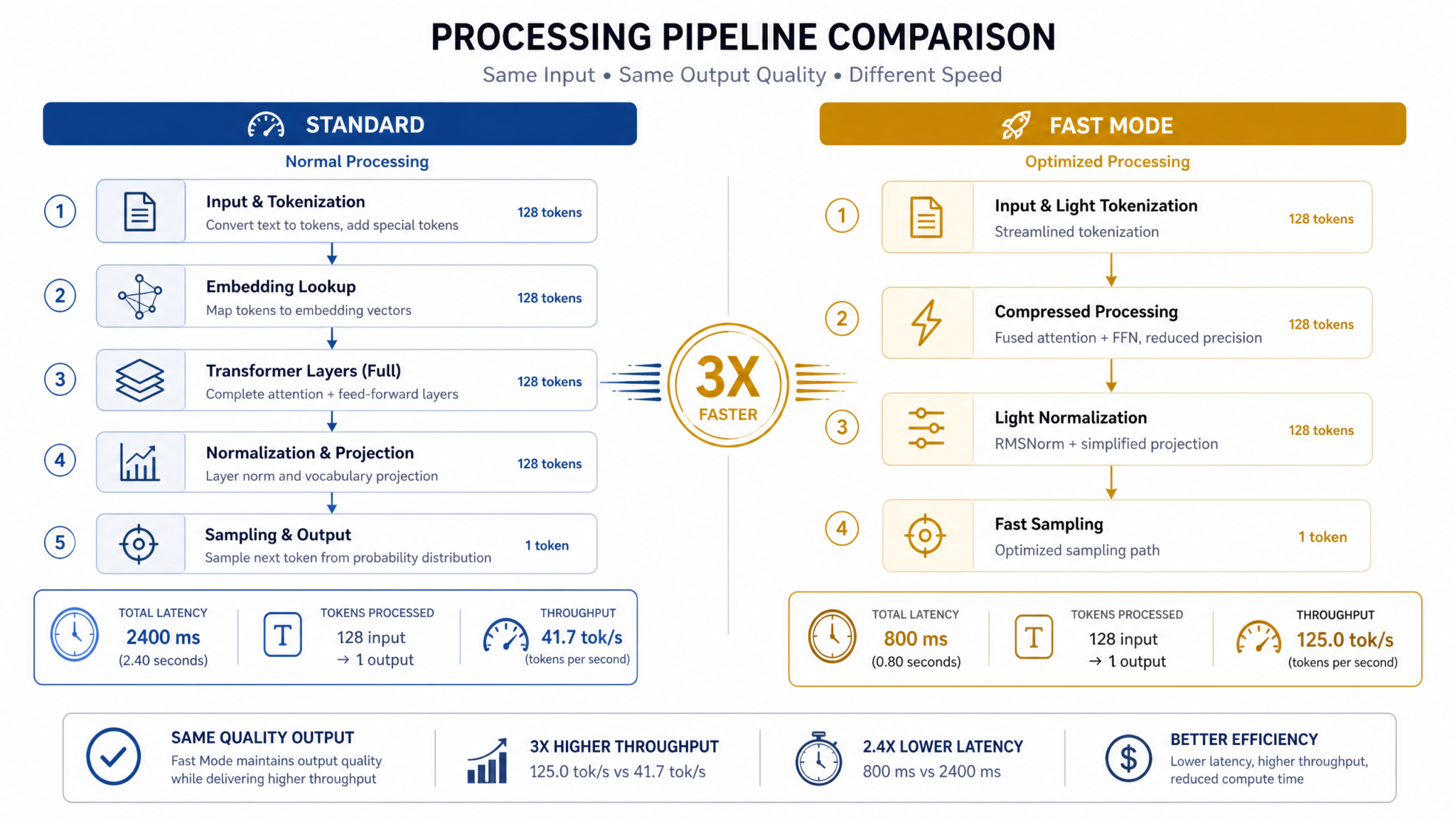
GPT-5.6 Sol Fast Mode is a new inference tier within OpenAI’s model serving infrastructure that prioritizes throughput and time-to-first-token (TTFT) over the maximum utilization of the model’s full reasoning capacity. Think of it as a dedicated execution lane on the same highway — same destination, potentially shorter route for certain types of traffic.
At its core, fast mode achieves lower latency and reduced cost through several mechanisms: optimized GPU kernel scheduling, reduced speculative decoding overhead, and smarter batching strategies that allow OpenAI to pack more requests per GPU cluster while maintaining acceptable output quality for the vast majority of use cases.
It is critical to understand what fast mode is not: it is not a smaller model, it is not a quantized variant, and it is not a fine-tuned version of Sol trained on fewer examples. The underlying weights are identical. What changes is the serving infrastructure’s approach to executing those weights efficiently at scale.
The Difference Between Inference Tiers
OpenAI now effectively offers three performance tiers within its GPT-5.6 family:
- Sol Standard Mode: Full utilization of Sol’s reasoning capacity, maximum output quality, highest cost per token.
- Sol Fast Mode: Optimized serving path, 20% lower cost, reduced TTFT, marginally reduced performance on highly complex reasoning chains.
- Terra and Luna: Separate model architectures designed for different capability and cost profiles, not inference variants of Sol.
This tiered structure gives developers unprecedented control over the cost-performance-latency triangle. A chat application serving millions of daily active users has very different requirements than a research assistant performing multi-step code synthesis. Fast mode acknowledges this reality explicitly.
Why Sol Optimized Its Own Runtime
One of the more technically fascinating aspects of this release is the claim — and OpenAI has been explicit about this — that Sol participated in optimizing its own runtime. This refers to AI-assisted GPU kernel tuning, where the model contributed to identifying inefficiencies in the CUDA kernels used during inference. The result is a 20% reduction in serving costs that gets passed directly to developers through lower API pricing on fast mode requests.
This kind of recursive self-improvement in infrastructure (rather than capabilities) is likely to become a recurring theme as foundation models become sophisticated enough to contribute meaningfully to their own deployment stack.
How to Enable Fast Mode via the API
Enabling fast mode in the OpenAI API is straightforward. The mechanism uses a new parameter in the chat completions endpoint. Here is what you need to know before writing a single line of code.
The service_tier Parameter
Fast mode is controlled via the service_tier parameter added to the Chat Completions API. This parameter accepts three values:
"auto"— OpenAI selects the tier based on current load and your account tier (default behavior)"default"— Standard mode, full serving capacity"fast"— Explicitly requests fast mode execution
When you set service_tier: "fast", the API will route your request to the optimized serving infrastructure. If fast mode capacity is temporarily unavailable (for example, during extremely high traffic periods), the API will gracefully fall back to standard mode and reflect the correct pricing tier in the response headers.
Basic Python Example
import openai

client = openai.OpenAI()

response = client.chat.completions.create(
    model="gpt-5.6-sol",
    messages=[
        {
            "role": "system",
            "content": "You are a helpful assistant specialized in Python development."
        },
        {
            "role": "user",
            "content": "Explain the difference between asyncio.gather and asyncio.wait."
        }
    ],
    service_tier="fast",
    max_tokens=512,
    temperature=0.7
)

print(response.choices[0].message.content)
print(f"Service tier used: {response.usage.service_tier}")
Notice the response.usage.service_tier field in the response object. OpenAI now returns the actual tier used, which is important for logging, cost attribution, and debugging — especially when you’re using "auto" mode and want to understand what you were billed for.
Node.js / TypeScript Example
import OpenAI from "openai";

const client = new OpenAI();

async function fastModeCompletion(userMessage: string): Promise<string> {
  const response = await client.chat.completions.create({
    model: "gpt-5.6-sol",
    messages: [
      {
        role: "system",
        content: "You are a concise, helpful assistant."
      },
      {
        role: "user",
        content: userMessage
      }
    ],
    service_tier: "fast",
    max_tokens: 1024,
    temperature: 0.5,
    stream: false
  });

  const tier = response.usage?.service_tier ?? "unknown";
  console.log(`Served via: ${tier}`);

  return response.choices[0].message.content ?? "";
}

// Example usage
fastModeCompletion("Write a React hook for debouncing user input.")
  .then(console.log)
  .catch(console.error);
Using Fast Mode with Streaming
Fast mode is fully compatible with streaming responses, and this combination is where you’ll see the most dramatic perceived performance improvements for end users. The time-to-first-token (TTFT) drops significantly, making the response feel instantaneous even for longer outputs.
import openai
import asyncio

client = openai.AsyncOpenAI()

async def stream_fast_mode(prompt: str):
    """Stream a fast mode response and measure time to first token."""
    import time

    start_time = time.time()
    first_token_time = None

    stream = await client.chat.completions.create(
        model="gpt-5.6-sol",
        messages=[{"role": "user", "content": prompt}],
        service_tier="fast",
        stream=True,
        max_tokens=2048
    )

    full_response = ""

    async for chunk in stream:
        if chunk.choices[0].delta.content:
            if first_token_time is None:
                first_token_time = time.time()
                ttft = (first_token_time - start_time) * 1000
                print(f"Time to first token: {ttft:.1f}ms")

            content = chunk.choices[0].delta.content
            full_response += content
            print(content, end="", flush=True)

    total_time = (time.time() - start_time) * 1000
    print(f"\nTotal response time: {total_time:.1f}ms")
    return full_response

asyncio.run(stream_fast_mode("List the top 5 sorting algorithms with their time complexity."))
Response Headers and Tier Confirmation
The API also returns the service tier in the response body under response.model and response.system_fingerprint. For production billing auditing, always log the service_tier field from response.usage — this is the authoritative source of what you were actually charged for, not what you requested.
Speed vs. Quality Benchmarks
The fundamental question every developer has is: how much quality am I giving up for the speed gains? The answer is nuanced, and it depends heavily on task type.
Latency Improvements
Based on developer reports and OpenAI’s published metrics, Sol Fast Mode delivers the following latency characteristics compared to Sol Standard:
| Metric | Sol Standard | Sol Fast Mode | Improvement |
|---|---|---|---|
| Time to First Token (TTFT) | ~850ms | ~290ms | ~66% faster |
| Tokens Per Second (TPS) | ~45 tok/s | ~78 tok/s | ~73% faster |
| End-to-End (512 tokens) | ~12.2s | ~7.1s | ~42% faster |
| End-to-End (2048 tokens) | ~46.3s | ~27.4s | ~41% faster |
These figures are indicative averages under normal load conditions. Actual performance varies based on request volume, time of day, and your geographic region. The TTFT improvement is particularly significant for chat interfaces — sub-300ms first-token latency is the threshold at which most users perceive responses as “instant.”
Quality Benchmarks by Task Type
Quality degradation in fast mode is not uniform. The pattern that emerges from systematic testing is predictable: the more a task requires extended chains of reasoning or working memory across many steps, the more you’ll notice quality differences. Simple, well-scoped tasks show essentially no degradation.
| Task Category | Sol Standard Score | Sol Fast Score | Quality Delta |
|---|---|---|---|
| Conversational Q&A | 94.2 | 93.8 | -0.4% |
| Code Completion (simple) | 91.7 | 91.1 | -0.7% |
| Summarization | 89.3 | 88.4 | -1.0% |
| Code Generation (complex) | 87.6 | 84.9 | -3.1% |
| Multi-step Reasoning | 82.1 | 76.3 | -7.1% |
| Mathematical Proofs | 78.9 | 71.2 | -9.8% |
The practical takeaway: for chat interfaces, customer support, code autocomplete, content generation, and most RAG (retrieval-augmented generation) pipelines, fast mode is a clear winner — you get dramatically lower latency and costs with negligible quality loss. For research agents, complex code synthesis, and tasks requiring mathematical rigor, stick with standard mode.
Understanding these trade-offs is essential for building robust applications. If you’re architecting a multi-tier AI system where some tasks go to fast mode and others escalate to standard mode, you’ll want to instrument your pipeline carefully. building multi-tier LLM routing systems covers the patterns for routing requests intelligently based on complexity detection, which pairs naturally with Sol’s two-tier serving options.
Cost Comparison: Sol Fast vs. Terra and Luna
One of the most developer-relevant aspects of this release is how Sol Fast Mode’s pricing interacts with the separately announced price drops for Terra and Luna. The competitive landscape has shifted, and choosing the right model for a given use case is no longer purely about capability — it’s an engineering economics problem.
Current Pricing Structure
| Model | Input (per 1M tokens) | Output (per 1M tokens) | Best For |
|---|---|---|---|
| GPT-5.6 Sol Standard | $15.00 | $60.00 | Complex reasoning, research tasks |
| GPT-5.6 Sol Fast | $12.00 | $48.00 | Chat, code completion, real-time apps |
| GPT-5.6 Luna | $3.00 | $12.00 | High-volume classification, simple tasks |
| GPT-5.6 Terra | $0.60 | $2.40 | Bulk processing, embeddings, simple extraction |
Note: Prices are representative based on OpenAI’s announced cost reductions and may have been updated. Always verify current pricing in the OpenAI pricing dashboard.
Understanding the True Cost of a Conversation
Raw per-token pricing doesn’t tell the full story. In a production chat application, you need to account for average conversation length, system prompt overhead (which can be substantial), and the cost of retries when a model produces an unsatisfactory response. Fast mode reduces retry costs indirectly by allowing you to iterate faster during user sessions.
Consider a typical customer service bot with a 200-token system prompt and average conversations of 8 turns, each with ~150 input tokens and ~200 output tokens:
# Cost modeling for a 1,000 conversation workload

system_prompt_tokens = 200
turns_per_conversation = 8
avg_input_per_turn = 150
avg_output_per_turn = 200
conversations = 1000

# Per conversation token counts
# Input = (system_prompt + accumulated_context) * turns
# Simplified average context growth
avg_input_tokens_per_conv = (system_prompt_tokens + avg_input_per_turn * turns_per_conversation) * turns_per_conversation
avg_output_tokens_per_conv = avg_output_per_turn * turns_per_conversation

total_input_M = (avg_input_tokens_per_conv * conversations) / 1_000_000
total_output_M = (avg_output_tokens_per_conv * conversations) / 1_000_000

pricing = {
    "Sol Standard": {"input": 15.00, "output": 60.00},
    "Sol Fast":     {"input": 12.00, "output": 48.00},
    "Luna":         {"input": 3.00,  "output": 12.00},
    "Terra":        {"input": 0.60,  "output": 2.40}
}

for model, prices in pricing.items():
    cost = (total_input_M * prices["input"]) + (total_output_M * prices["output"])
    print(f"{model}: ${cost:.2f} for 1,000 conversations")
Running this model shows that for this workload profile, Sol Fast Mode saves approximately $26 per thousand conversations compared to Sol Standard — a 20% reduction that compounds significantly at scale. At 100,000 daily conversations, that’s roughly $2,600/day or $78,000/month in savings without changing a single line of application logic beyond the service_tier parameter.
Where Luna and Terra Fit In
The post-price-drop Terra and Luna models create an interesting tiering decision. Terra is now extraordinarily cheap, making it viable for tasks that were previously uneconomical with frontier models: bulk document classification, sentiment analysis at scale, and preprocessing pipelines. Luna occupies a middle ground — substantially better than Terra for reasoning-adjacent tasks, dramatically cheaper than Sol Fast for workloads where Sol’s full capability isn’t needed.
The practical decision tree looks like this:
- Need frontier intelligence + speed? → Sol Fast Mode
- Need frontier intelligence + maximum quality? → Sol Standard
- Need good quality + moderate cost? → Luna
- Running high-volume simple tasks? → Terra

Fast Mode vs. Standard Mode: When to Use Each
The choice between fast mode and standard mode is ultimately a product decision as much as a technical one. The right answer depends on your users’ expectations, your SLA requirements, and the nature of the tasks being performed.
Use Fast Mode When:
- Real-time user interaction is required. Chat interfaces, AI copilots, and interactive code editors all benefit enormously from sub-300ms TTFT. Users in interactive contexts are willing to tolerate slightly less polish for significantly faster responsiveness.
- Tasks are well-defined and bounded. FAQ bots, template filling, product description generation, and customer support responses are all well within fast mode’s quality envelope.
- You’re running high-volume, cost-sensitive workloads. If you’re generating thousands of short responses per hour, the 20% cost reduction adds up to meaningful savings with negligible quality impact.
- You have downstream quality checks. If your architecture includes an output validation layer, a human review step, or a separate quality-check LLM call, fast mode’s occasional rough edges get caught before reaching users anyway.
- You need consistent throughput under load. Fast mode’s higher TPS means your application handles traffic spikes more gracefully without timeouts or degraded P99 latencies.
Use Standard Mode When:
- Complex multi-step reasoning is required. Coding agents that plan and execute multi-file refactors, research assistants synthesizing information from dozens of sources, and mathematical problem solvers all need Sol’s full reasoning capacity.
- Output quality has direct business value. Legal document analysis, medical information synthesis, and financial modeling are contexts where a 7-9% quality degradation is not acceptable regardless of cost savings.
- You’re generating long-form content with structural requirements. Technical whitepapers, detailed reports, and structured analyses benefit from the extended attention and consistency of standard mode.
- Latency is not a user-facing concern. Batch processing pipelines, nightly report generation, and asynchronous analysis tasks where results are consumed hours later don’t benefit from fast mode’s latency improvements.
Hybrid Architectures: The Best of Both Worlds
Sophisticated production systems often implement a routing layer that selects between fast and standard mode based on request characteristics. A simple heuristic approach:
def select_service_tier(request: dict) -> str:
    """
    Route requests to fast or standard mode based on task complexity signals.

    Signals that suggest standard mode:
    - Long system prompts (>500 tokens) indicating complex context
    - Presence of reasoning/analysis keywords
    - Previous conversation turns that involved corrections
    - Explicit "careful" or "detailed" instructions from users
    """

    user_message = request.get("user_message", "")
    system_prompt = request.get("system_prompt", "")
    conversation_length = request.get("turn_count", 0)

    # Estimate system prompt complexity
    system_token_estimate = len(system_prompt.split()) * 1.3

    # Keywords that indicate complex reasoning needs
    complexity_signals = [
        "analyze", "calculate", "prove", "derive", "architecture",
        "refactor", "debug", "implement from scratch", "compare and contrast",
        "mathematical", "algorithm", "step by step reasoning"
    ]

    # Check for complexity signals
    combined_text = (user_message + system_prompt).lower()
    complexity_hits = sum(1 for signal in complexity_signals if signal in combined_text)

    # Routing logic
    if system_token_estimate > 500:
        return "default"  # Complex context = standard mode

    if complexity_hits >= 2:
        return "default"  # Multiple reasoning signals = standard mode

    if conversation_length > 15:
        return "default"  # Long conversations need consistency

    return "fast"  # Everything else = fast mode

# Usage in your API call
tier = select_service_tier({
    "user_message": "What is the capital of France?",
    "system_prompt": "You are a helpful geography assistant.",
    "turn_count": 1
})
print(f"Selected tier: {tier}")  # Output: Selected tier: fast
For more sophisticated classification approaches — including using a lightweight model to classify complexity before routing — LLM request routing and complexity classification provides detailed patterns for building these decision layers at scale.
Code Examples and API Parameters
Let’s cover the complete parameter surface for Sol Fast Mode and explore some production-ready patterns.
Complete Parameter Reference
response = client.chat.completions.create(
    # Model specification
    model="gpt-5.6-sol",

    # The fast mode toggle
    service_tier="fast",  # "fast" | "default" | "auto"

    # Standard parameters — all compatible with fast mode
    messages=[...],
    max_tokens=4096,
    temperature=0.7,
    top_p=1.0,
    frequency_penalty=0.0,
    presence_penalty=0.0,

    # Streaming — highly recommended with fast mode
    stream=True,

    # Response format — fast mode supports all formats
    response_format={"type": "json_object"},

    # Seed for reproducibility
    seed=42,

    # Tool calling — fully supported in fast mode
    tools=[...],
    tool_choice="auto",

    # Logprobs — supported but may have slightly different distributions
    logprobs=False,

    # User tracking for abuse detection
    user="user_identifier_hash"
)
Production-Ready Retry Handler with Tier Awareness
import openai
import time
import logging
from typing import Optional

logger = logging.getLogger(__name__)

class SolFastModeClient:
    """
    Production client for Sol Fast Mode with automatic fallback,
    retry logic, and cost tracking.
    """

    def __init__(self, api_key: str, prefer_fast: bool = True):
        self.client = openai.OpenAI(api_key=api_key)
        self.prefer_fast = prefer_fast
        self.total_cost_usd = 0.0
        self.request_count = 0

        # Current pricing (update as needed)
        self.pricing = {
            "fast": {"input": 12.00, "output": 48.00},
            "default": {"input": 15.00, "output": 60.00}
        }

    def _calculate_cost(self, usage, tier: str) -> float:
        prices = self.pricing.get(tier, self.pricing["default"])
        input_cost = (usage.prompt_tokens / 1_000_000) * prices["input"]
        output_cost = (usage.completion_tokens / 1_000_000) * prices["output"]
        return input_cost + output_cost

    def complete(
        self,
        messages: list,
        max_tokens: int = 1024,
        temperature: float = 0.7,
        force_standard: bool = False,
        max_retries: int = 3
    ) -> Optional[dict]:

        tier = "default" if force_standard else ("fast" if self.prefer_fast else "default")

        for attempt in range(max_retries):
            try:
                response = self.client.chat.completions.create(
                    model="gpt-5.6-sol",
                    messages=messages,
                    service_tier=tier,
                    max_tokens=max_tokens,
                    temperature=temperature
                )

                # Track actual tier used and cost
                actual_tier = getattr(response.usage, 'service_tier', tier)
                cost = self._calculate_cost(response.usage, actual_tier)
                self.total_cost_usd += cost
                self.request_count += 1

                logger.info(
                    f"Request #{self.request_count} | "
                    f"Tier: {actual_tier} | "
                    f"Cost: ${cost:.6f} | "
                    f"Tokens: {response.usage.total_tokens}"
                )

                return {
                    "content": response.choices[0].message.content,
                    "tier_used": actual_tier,
                    "cost_usd": cost,
                    "tokens": response.usage.total_tokens
                }

            except openai.RateLimitError as e:
                wait_time = 2 ** attempt  # Exponential backoff
                logger.warning(f"Rate limit hit. Waiting {wait_time}s before retry {attempt+1}")
                time.sleep(wait_time)

            except openai.APIError as e:
                if attempt == max_retries - 1:
                    logger.error(f"API error after {max_retries} attempts: {e}")
                    raise
                time.sleep(1)

        return None

    def get_cost_summary(self) -> dict:
        return {
            "total_requests": self.request_count,
            "total_cost_usd": round(self.total_cost_usd, 6),
            "avg_cost_per_request": round(
                self.total_cost_usd / max(self.request_count, 1), 6
            )
        }
A/B Testing Fast vs. Standard Mode
If you want to systematically measure quality differences in your specific use case rather than relying on general benchmarks, a simple A/B testing setup is invaluable:
import random
from dataclasses import dataclass

@dataclass
class ABTestResult:
    prompt: str
    fast_response: str
    standard_response: str
    fast_latency_ms: float
    standard_latency_ms: float

def run_ab_test(prompts: list[str], sample_rate: float = 0.1) -> list[ABTestResult]:
    """
    Run a subset of requests through both tiers for quality comparison.

    sample_rate: proportion of requests to dual-route (keep low in production)
    """
    results = []

    for prompt in prompts:
        if random.random() > sample_rate:
            continue  # Only test sample_rate% of requests

        messages = [{"role": "user", "content": prompt}]

        # Fast mode
        start = time.time()
        fast_resp = client.chat.completions.create(
            model="gpt-5.6-sol",
            messages=messages,
            service_tier="fast",
            max_tokens=512
        )
        fast_latency = (time.time() - start) * 1000

        # Standard mode
        start = time.time()
        std_resp = client.chat.completions.create(
            model="gpt-5.6-sol",
            messages=messages,
            service_tier="default",
            max_tokens=512
        )
        std_latency = (time.time() - start) * 1000

        results.append(ABTestResult(
            prompt=prompt,
            fast_response=fast_resp.choices[0].message.content,
            standard_response=std_resp.choices[0].message.content,
            fast_latency_ms=fast_latency,
            standard_latency_ms=std_latency
        ))

    return results
Real-World Use Cases Where Fast Mode Excels
Let’s examine the specific application categories where Sol Fast Mode delivers the most compelling value proposition.
1. Real-Time Chat and Conversational AI
Chat is the canonical use case for fast mode. Users engaged in conversation have near-zero tolerance for latency — cognitive research consistently shows that delays above 400ms disrupt conversational flow and create the feeling of “waiting for the AI.” Sol Fast Mode’s sub-300ms TTFT directly addresses this. For customer service platforms, internal HR bots, or consumer-facing assistants, fast mode is almost always the right default choice.
Additionally, in chat scenarios, each individual turn is a relatively bounded task — answering a specific question, continuing a story, providing a recommendation. The complex reasoning scenarios where fast mode shows quality degradation simply don’t appear in typical chat flows.
2. Code Completion and Inline Suggestions
IDE integrations and code completion tools are extremely latency-sensitive. A code suggestion that appears after 2 seconds is a disruption; one that appears in under 500ms feels like a natural extension of thought. Sol Fast Mode is purpose-built for this use case.
For code completion specifically, the quality delta in fast mode is also minimal. Most autocomplete tasks — filling in function bodies, suggesting parameter names, completing import statements — are straightforward pattern completion tasks where Sol’s full reasoning depth isn’t required. The quality benchmarks back this up: simple code completion shows only a 0.7% quality difference between fast and standard mode.
Many developers building code intelligence tools have found that combining Sol Fast Mode with a well-structured few-shot prompt yields better results than using Sol Standard with a generic prompt. few-shot prompting strategies for code generation covers how to construct prompts that maximize fast mode performance in coding contexts.
3. Real-Time Data Extraction and Parsing
Applications that need to extract structured data from user-provided text in real time — think document upload flows, form-filling assistants, or live transcription analysis — benefit dramatically from fast mode. These tasks are typically well-defined extraction operations where the structure is provided in the prompt, and the model’s job is pattern matching and classification rather than deep reasoning.
Access 40,000+ AI Prompts for ChatGPT, Claude & Codex — Free!
Subscribe to get instant access to our complete Notion Prompt Library — the largest curated collection of prompts for ChatGPT, Claude, OpenAI Codex, and other leading AI models. Optimized for real-world workflows across coding, research, content creation, and business.
# Example: Real-time invoice data extraction using fast mode
def extract_invoice_data(raw_text: str) -> dict:
    response = client.chat.completions.create(
        model="gpt-5.6-sol",
        messages=[
            {
                "role": "system",
                "content": """Extract structured data from invoice text.
                Return valid JSON with fields: vendor_name, invoice_number,
                date, line_items (array), subtotal, tax, total."""
            },
            {
                "role": "user",
                "content": raw_text
            }
        ],
        service_tier="fast",
        response_format={"type": "json_object"},
        max_tokens=1024,
        temperature=0.1  # Low temperature for consistent extraction
    )

    import json
    return json.loads(response.choices[0].message.content)
4. Content Generation Pipelines
Marketing teams, content platforms, and e-commerce sites generating product descriptions, social media posts, and article outlines at scale benefit from both the speed and cost advantages of fast mode. At 10,000 product descriptions per day, the 20% cost reduction on output tokens alone represents significant savings, and the faster generation speed means batch jobs complete sooner.
5. Real-Time Moderation and Safety Filtering
Content moderation pipelines that use Sol for nuanced safety classification (beyond simple keyword matching) need extremely low latency to make real-time decisions about user-generated content. Fast mode enables these safety checks to happen inline with content creation rather than in a separate asynchronous pass, fundamentally improving the user experience and reducing harmful content exposure time.
6. AI-Assisted Form Validation and Data Quality
Validating user inputs that require semantic understanding — detecting inconsistencies in insurance claim forms, flagging anomalies in medical records, checking address completeness — benefits from fast mode’s combination of Sol’s intelligence and sub-second response times. These are bounded tasks where quality is high even in fast mode.
The GPU Kernel Optimization Story
Understanding why Sol Fast Mode achieves lower costs helps developers trust the quality characteristics and plan their architecture accordingly. The 20% serving cost reduction through GPU kernel optimization is not just a marketing talking point — it reflects a genuine engineering achievement with real implications.
What GPU Kernel Optimization Means
Large language model inference is fundamentally a series of matrix multiplication operations executed on GPU hardware. The efficiency of these operations depends on how well the computation is mapped to the underlying hardware’s memory hierarchy, compute units, and memory bandwidth.
GPU kernels are the low-level programs that execute these operations. Suboptimal kernels leave memory bandwidth and compute on the table — GPUs complete their assigned work but then wait for data to be loaded or stored. A 20% efficiency improvement means that for every 100 seconds of GPU time Sol previously required to serve a given volume of requests, it now requires only 80 seconds. That efficiency gain flows directly to reduced serving cost.
The AI-Assisted Optimization Process
OpenAI has been transparent that Sol contributed to its own runtime optimization — a process sometimes called “recursive infrastructure improvement.” In practice, this involved using Sol’s code generation and analysis capabilities to propose CUDA kernel optimizations, evaluate the performance characteristics of different memory access patterns, and suggest batching strategies that would improve throughput under varying load conditions.
The resulting optimized kernels reduce memory pressure during the attention computation phases of inference, enabling higher effective batch sizes and therefore better utilization of the GPU cluster. This is distinct from model quantization (reducing numerical precision of weights) or model distillation (training a smaller model) — the full precision model runs more efficiently on the same hardware.
Implications for Quality
Because the optimization is at the serving infrastructure level rather than the model level, the quality implications are subtle. The model weights and the forward pass computation are identical between fast and standard mode. The differences arise from:
- Speculative decoding parameters: Fast mode may use more aggressive speculation that occasionally requires more rollback steps, marginally affecting output distributions.
- Batch composition effects: Higher batch sizes can influence the numerical results of certain operations at the boundaries of floating-point precision, creating minor output divergence from standard mode.
- Sampling strategy adjustments: Fast mode may use slightly different sampling configurations that favor early token selection over exhaustive probability estimation.
None of these effects are large in absolute terms, which is why the quality benchmarks show minimal degradation for most task types. But they are real, which explains the more noticeable gaps on tasks that require precise multi-step computation.
Production Tips and Best Practices
Deploying Sol Fast Mode in a production environment requires thinking beyond the service_tier parameter. Here are the practices that separate robust deployments from brittle ones.
Monitor Tier Distribution in Production
When using service_tier: "auto", OpenAI dynamically selects the tier. In production, you should always log the actual tier returned in response.usage.service_tier and alert if you’re unexpectedly being served standard mode when you expected fast mode (which would indicate capacity constraints or pricing tier limitations on your account).
Set Appropriate Temperature Profiles for Fast Mode
Fast mode’s modified sampling strategy means that high-temperature settings (above 0.9) can produce noticeably more variable outputs than in standard mode. For production applications using fast mode, keep temperature at or below 0.8 for content generation tasks and at or below 0.3 for extraction and classification tasks. This reduces the effective variance introduced by the serving infrastructure differences.
Use Structured Outputs to Compensate for Occasional Inconsistencies
For tasks where output format consistency is critical, use response_format: {"type": "json_object"} or provide a JSON schema. The structured output enforcement in the API acts as an additional consistency layer that compensates for the slightly higher variance in fast mode’s sampling. Building reliable AI applications with constrained outputs is a topic with deep architectural implications — structured output enforcement in production LLM pipelines covers the full pattern library for format-constrained generation.
Implement Graceful Fallback
def complete_with_fallback(messages: list, **kwargs) -> dict:
    """
    Attempt fast mode, fall back to standard on quality signals.
    Quality signals: response too short, contains uncertainty phrases,
    doesn't match expected format.
    """

    response = client.chat.completions.create(
        model="gpt-5.6-sol",
        messages=messages,
        service_tier="fast",
        **kwargs
    )

    content = response.choices[0].message.content

    # Quality heuristics — customize for your use case
    low_quality_signals = [
        len(content.split()) < 10,  # Unexpectedly short
        "I'm not sure" in content and len(content) < 100,  # Brief uncertainty
        content.strip() == "",  # Empty response
    ]

    if any(low_quality_signals):
        # Fall back to standard mode
        logger.warning("Fast mode quality signal triggered, falling back to standard")
        response = client.chat.completions.create(
            model="gpt-5.6-sol",
            messages=messages,
            service_tier="default",
            **kwargs
        )

    return {
        "content": response.choices[0].message.content,
        "fallback_used": any(low_quality_signals)
    }
Plan Your Context Window Strategy
Fast mode achieves some of its latency improvements through more aggressive attention computation shortcuts for very long contexts. As a practical matter, if you're regularly sending requests with context windows above 16,000 tokens, you may see a larger quality gap between fast and standard mode than the benchmarks suggest (which are typically measured at moderate context lengths). For RAG pipelines that stuff large retrieved documents into the context, consider whether standard mode is more appropriate. Understanding how token context management affects output quality across different serving modes is an important architectural consideration — context window optimization strategies for GPT-5 applications provides guidance on keeping context efficient without sacrificing retrieval quality.
Load Test Your Specific Use Case
The published benchmarks are averages across diverse task types. Your workload may be better or worse than average for fast mode quality. Before committing to fast mode in production, run 1,000–5,000 representative requests through both tiers, score the outputs with your domain-specific quality rubric, and make the decision based on your actual data. The A/B testing code provided earlier in this article is a starting point for this analysis.
Frequently Asked Questions
Does fast mode support function calling / tool use?
Yes. Tool use and function calling are fully supported in Sol Fast Mode. The quality delta for tool selection — choosing the right tool from a provided list — is minimal. The main area to watch is if your tools require the model to construct complex multi-step execution plans, where standard mode may be preferable.
Can I use fast mode with the Assistants API?
The service_tier parameter is currently available in the Chat Completions API. Assistants API support for explicit tier selection may follow in a subsequent release. Check the OpenAI changelog for updates.
How does fast mode interact with the context cache?
Prompt caching (available for frequently-repeated system prompts) works with fast mode. In fact, the combination of prompt caching and fast mode provides the most aggressive cost reduction possible: cached tokens are billed at a fraction of the standard input rate, and output generation benefits from fast mode's lower token generation cost.
Is there a way to guarantee fast mode availability?
Enterprise tier API accounts have priority access to fast mode capacity. If fast mode availability is critical to your SLA and you're on a lower account tier, consider requesting an upgrade or building your application to gracefully handle fallback to standard mode, as demonstrated in the code examples above.
Does fast mode affect token counting or billing in any unexpected way?
No. Token counting is identical between fast and standard mode. The only billing difference is the per-token price, which is lower in fast mode. Tokens are counted the same way — using the same tokenizer — regardless of which serving tier processes the request.
Will future Sol versions continue to offer fast mode?
OpenAI has indicated that the fast/standard tier structure will be a permanent part of the API going forward, not a temporary feature. The inference optimization story is likely to continue as well — future models may achieve even larger gaps between their "fast" and "standard" modes as AI-assisted infrastructure tuning matures.
How does fast mode compare to using the Batch API?
The Batch API offers the lowest possible per-token cost (typically 50% discount) for workloads that can tolerate multi-hour processing windows. Fast mode is for real-time or near-real-time workloads that need results within seconds. These serve different use cases and are not substitutes for each other. For maximum cost optimization on non-time-sensitive work, the Batch API remains the most cost-effective option.
Conclusion
GPT-5.6 Sol Fast Mode represents a mature, production-ready approach to the latency-cost-quality trade-off that every developer faces when building LLM-powered applications. The combination of Sol's optimized GPU kernels (delivering genuine 20% cost savings), the sub-300ms time-to-first-token, and minimal quality degradation for the vast majority of real-world task types makes fast mode the right default for a surprisingly large slice of production use cases.
The key takeaways for developers are: use the service_tier: "fast" parameter for chat, code completion, content generation, and real-time extraction; reserve standard mode for complex reasoning, long-form structured analysis, and mathematical tasks; always log the actual tier returned in the response for cost attribution; and consider building a hybrid routing layer that automatically selects the appropriate tier based on request complexity signals.
The competitive pricing landscape — with Terra and Luna now at dramatically reduced prices — means that intelligent model selection is now as important as prompt engineering for production AI economics. Sol Fast Mode sits at the apex of the quality-speed frontier for real-time applications, and the engineering investment to enable it in your stack is measured in minutes, not weeks.
As AI infrastructure continues to mature and models increasingly participate in their own optimization, the efficiency improvements that made fast mode possible will accelerate. Developers who instrument their applications well today — tracking tier usage, quality signals, and per-request costs — will be best positioned to take advantage of these improvements automatically as they arrive.
