
How to Migrate from GPT-4.5 and o3 to GPT-5.5: Complete Transition Guide

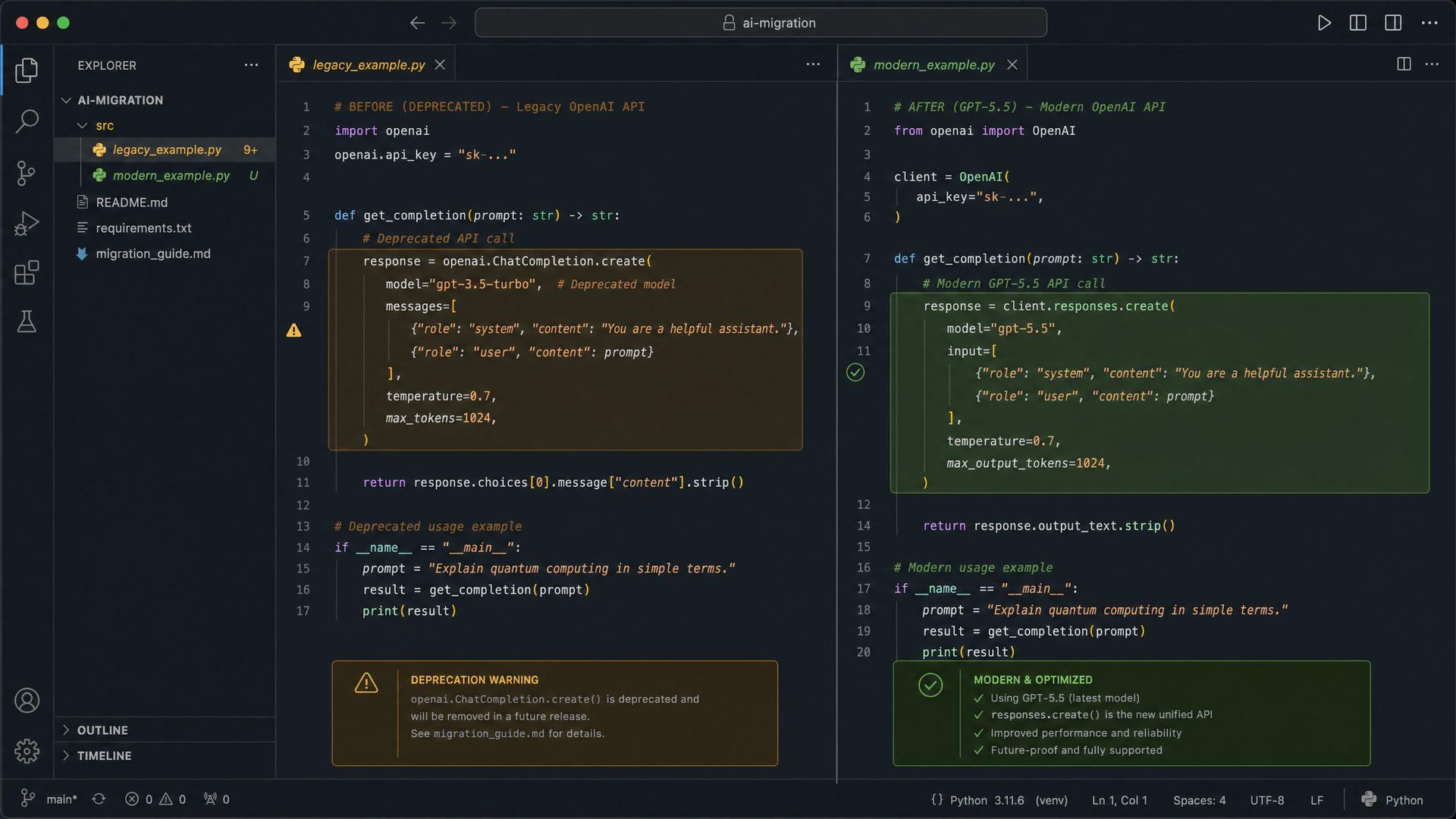
In this comprehensive tutorial, we will guide you through the entire process of migrating your Python applications from the legacy GPT-4.5 / o3 API to the modern, feature-rich GPT-5.5 API. This migration is essential to leverage the latest advancements in AI capabilities, improved response quality, and new interaction paradigms introduced by GPT-5.5.
We will cover the following key areas:
- Legacy API usage example: Understand the original GPT-4.5 / o3 API call structure and how it operates.
- Modern GPT-5.5 API usage example: Learn how to implement the new chat-based API with enhanced features.
- Key differences and best practices: Analyze the fundamental changes, new parameters, and how to optimize your integration.
- Real-world use cases: Explore practical scenarios where migrating to GPT-5.5 significantly improves your application’s performance and user experience.
1. Understanding the Legacy GPT-4.5 / o3 API
The legacy GPT-4.5 / o3 API is designed around a simple /v1/completions endpoint. It primarily accepts a single prompt string and returns a text completion. This approach is straightforward but limited in flexibility and context management.
Key Characteristics of the Legacy API
- Single prompt string: The entire user input and context must be concatenated into one prompt string.
- Flat completion response: The API returns a plain text completion without structured message roles.
- Limited context management: Developers must manually manage conversation history and context.
- Basic configuration: Parameters like
max_tokens,temperature, andstopcontrol output length, creativity, and termination sequences.
Step-by-Step Legacy API Example in Python
Below is a fully-commented, production-grade Python example demonstrating how to call the legacy GPT-4.5 API. This example includes error handling, environment variable usage for API keys, and response parsing.
import os
import requests

# Load your legacy API key securely from environment variables
API_KEY = os.getenv("GPT4_5_LEGACY_API_KEY")
if not API_KEY:
    raise ValueError("Legacy API key not found. Please set GPT4_5_LEGACY_API_KEY environment variable.")

# Define the legacy API endpoint
API_URL = "https://api.openai.com/v1/completions"

# Prepare HTTP headers with Basic Authentication
headers = {
    "Authorization": f"Basic {API_KEY}",
    "Content-Type": "application/json"
}

# Define the prompt and parameters for the completion request
payload = {
    "model": "gpt-4.5",
    "prompt": "Explain the theory of relativity in simple terms.",
    "max_tokens": 150,
    "temperature": 0.7,
    "stop": ["\n"]  # Stop generation at newline character
}

try:
    # Send POST request to the legacy completions endpoint
    response = requests.post(API_URL, headers=headers, json=payload)
    response.raise_for_status()  # Raise exception for HTTP errors

    # Parse JSON response
    data = response.json()

    # Extract the generated text from the first choice
    generated_text = data["choices"][0]["text"].strip()

    print("Legacy API Response:")
    print(generated_text)

except requests.exceptions.HTTPError as http_err:
    print(f"HTTP error occurred: {http_err} - Response: {response.text}")
except Exception as err:
    print(f"An error occurred: {err}")
Industry Use Case: Legacy API in Customer Support Chatbots
Many early AI-powered customer support chatbots utilized the legacy GPT-4.5 API to generate responses to user queries. However, due to the lack of structured conversation management, developers had to manually concatenate previous messages into a single prompt, which often led to context loss and inconsistent replies.
2. Modern GPT-5.5 API: Chat-Based, Context-Aware, and Feature-Rich
The GPT-5.5 API represents a paradigm shift from simple prompt completions to a chat-based interface. This design models conversations as a sequence of structured messages, each assigned a role such as system, user, or assistant. This structure enables better context retention, nuanced control over the assistant’s behavior, and support for advanced modes.
Key Enhancements in GPT-5.5 API
- Structured messages: Each message has a role and content, facilitating multi-turn conversations.
- Advanced modes: Modes like
thinkingenable the model to perform step-by-step reasoning before answering. - Increased token limits: Supports longer inputs and outputs for richer interactions.
- Improved authentication: Continues to use Basic Auth but with updated API keys and security practices.
- Flexible stop sequences: Allows complex termination conditions for generated text.
Step-by-Step GPT-5.5 API Example in Python
The following example demonstrates a robust, production-ready Python implementation of the GPT-5.5 chat completions API. It includes environment variable management, detailed comments, and error handling.
import os
import requests

# Securely load your GPT-5.5 API key from environment variables
API_KEY = os.getenv("GPT5_5_API_KEY")
if not API_KEY:
    raise ValueError("GPT-5.5 API key not found. Please set GPT5_5_API_KEY environment variable.")

# Define the GPT-5.5 chat completions endpoint
API_URL = "https://api.openai.com/v1/chat/completions"

# Set up HTTP headers with updated Basic Authentication
headers = {
    "Authorization": f"Basic {API_KEY}",
    "Content-Type": "application/json"
}

# Construct the message sequence with roles for context management
payload = {
    "model": "gpt-5.5",
    "messages": [
        {
            "role": "system",
            "content": "You are a helpful assistant that explains complex topics in simple terms."
        },
        {
            "role": "user",
            "content": "Explain the theory of relativity in simple terms."
        }
    ],
    "max_tokens": 300,          # Allows longer, more detailed responses
    "temperature": 0.5,         # Controls creativity and randomness
    "mode": "thinking",         # Enables step-by-step reasoning before final answer
    "stop": ["\n\n"]            # Stops generation at double newline sequence
}

try:
    # Send POST request to the chat completions endpoint
    response = requests.post(API_URL, headers=headers, json=payload)
    response.raise_for_status()

    # Parse JSON response
    data = response.json()

    # Extract the assistant's reply from the first choice
    assistant_reply = data["choices"][0]["message"]["content"].strip()

    print("GPT-5.5 API Response:")
    print(assistant_reply)

except requests.exceptions.HTTPError as http_err:
    print(f"HTTP error occurred: {http_err} - Response: {response.text}")
except Exception as err:
    print(f"An error occurred: {err}")
Real-World Application: Enhanced Virtual Assistants
Modern virtual assistants in healthcare, finance, and education sectors have adopted GPT-5.5 to provide more accurate, context-aware, and nuanced responses. The chat-based API allows these assistants to maintain conversational context over multiple turns, improving user satisfaction and reducing misunderstandings.
3. Detailed Comparison: Legacy GPT-4.5 / o3 API vs GPT-5.5 API
To better understand the migration implications, the following table summarizes the critical differences between the legacy and modern APIs:
| Aspect | Legacy GPT-4.5 / o3 API | Modern GPT-5.5 API |
|---|---|---|
| Endpoint URL | /v1/completions |
/v1/chat/completions |
| Request Format | Single prompt string | Array of structured messages with roles |
| Authentication | Basic Auth with legacy API key | Basic Auth with updated GPT-5.5 API key |
| Context Management | Manual concatenation of conversation history | Automatic context via message roles (system, user, assistant) |
| Response Structure | Plain text in choices[0].text |
Structured message in choices[0].message.content |
| Advanced Features | Basic parameters (temperature, max_tokens, stop) |
Supports mode (e.g., thinking, instant), richer stop sequences, and longer token limits |
| Token Limits | Typically up to 150 tokens per response | Supports up to 300+ tokens, enabling more detailed answers |
| Use Case Suitability | Simple, one-off completions or prompts | Multi-turn conversations, complex reasoning, and interactive assistants |
4. Best Practices for Migrating to GPT-5.5 API
When transitioning your codebase from the legacy GPT-4.5 API to GPT-5.5, consider the following best practices to ensure a smooth migration and optimal performance:
- Refactor prompt handling: Replace single prompt strings with structured message arrays that clearly separate system instructions, user inputs, and assistant responses.
- Leverage
systemrole: Use the system message to set the assistant’s behavior, tone, and constraints globally for the conversation. - Utilize advanced modes: Experiment with the
modeparameter to enable reasoning (thinking) or faster responses (instant) depending on your application needs. - Manage conversation history: Maintain and pass relevant previous messages in the
messagesarray to preserve context over multiple turns. - Secure API keys: Store API keys securely using environment variables or secret management tools, and never hardcode them in source code.
- Implement robust error handling: Handle HTTP errors, rate limits, and unexpected responses gracefully to improve application resilience.
- Test extensively: Validate the new implementation with various prompts and conversation flows to ensure behavior aligns with expectations.
5. Advanced Example: Multi-Turn Conversation with GPT-5.5
Below is an example illustrating how to maintain a multi-turn conversation by appending user and assistant messages to the messages array, enabling GPT-5.5 to remember context and provide coherent replies.
import os
import requests

API_KEY = os.getenv("GPT5_5_API_KEY")
if not API_KEY:
    raise ValueError("GPT-5.5 API key not found. Please set GPT5_5_API_KEY environment variable.")

API_URL = "https://api.openai.com/v1/chat/completions"
headers = {
    "Authorization": f"Basic {API_KEY}",
    "Content-Type": "application/json"
}

# Initialize conversation with system prompt
messages = [
    {"role": "system", "content": "You are a helpful assistant."}
]

def send_message(user_input):
    # Append user message to conversation history
    messages.append({"role": "user", "content": user_input})

    payload = {
        "model": "gpt-5.5",
        "messages": messages,
        "max_tokens": 250,
        "temperature": 0.6,
        "mode": "thinking",
        "stop": ["\n\n"]
    }

    try:
        response = requests.post(API_URL, headers=headers, json=payload)
        response.raise_for_status()
        data = response.json()
        assistant_reply = data["choices"][0]["message"]["content"].strip()

        # Append assistant reply to conversation history
        messages.append({"role": "assistant", "content": assistant_reply})

        return assistant_reply

    except requests.exceptions.HTTPError as http_err:
        return f"HTTP error occurred: {http_err} - Response: {response.text}"
    except Exception as err:
        return f"An error occurred: {err}"

# Example conversation
print("User: What is quantum computing?")
print("Assistant:", send_message("What is quantum computing?"))

print("\nUser: Can you give me a simple example?")
print("Assistant:", send_message("Can you give me a simple example?"))
6. Summary and Next Steps
The migration from the legacy GPT-4.5 / o3 API to GPT-5.5 is not just a simple endpoint change; it is a fundamental upgrade to a more powerful, flexible, and context-aware conversational AI platform. By adopting the chat-based API, you unlock the ability to build sophisticated multi-turn dialogues, implement advanced reasoning modes, and deliver richer user experiences.
To continue your migration journey, consider the following next steps:
- Review your existing prompt engineering strategies and adapt them to the structured message format.
- Experiment with different
modesettings to find the optimal balance between response quality and latency. - Implement conversation state management in your application to maintain context across user interactions.
- Explore additional GPT-5.5 features such as fine-tuning, embeddings, and moderation APIs for enhanced capabilities.
For further details on advanced usage patterns and API reference, visit our detailed documentation at GPT-5.5 API Documentation.
Prompt Translation: From Legacy Reasoning Prompts to GPT-5.5 Outcome-First Prompts
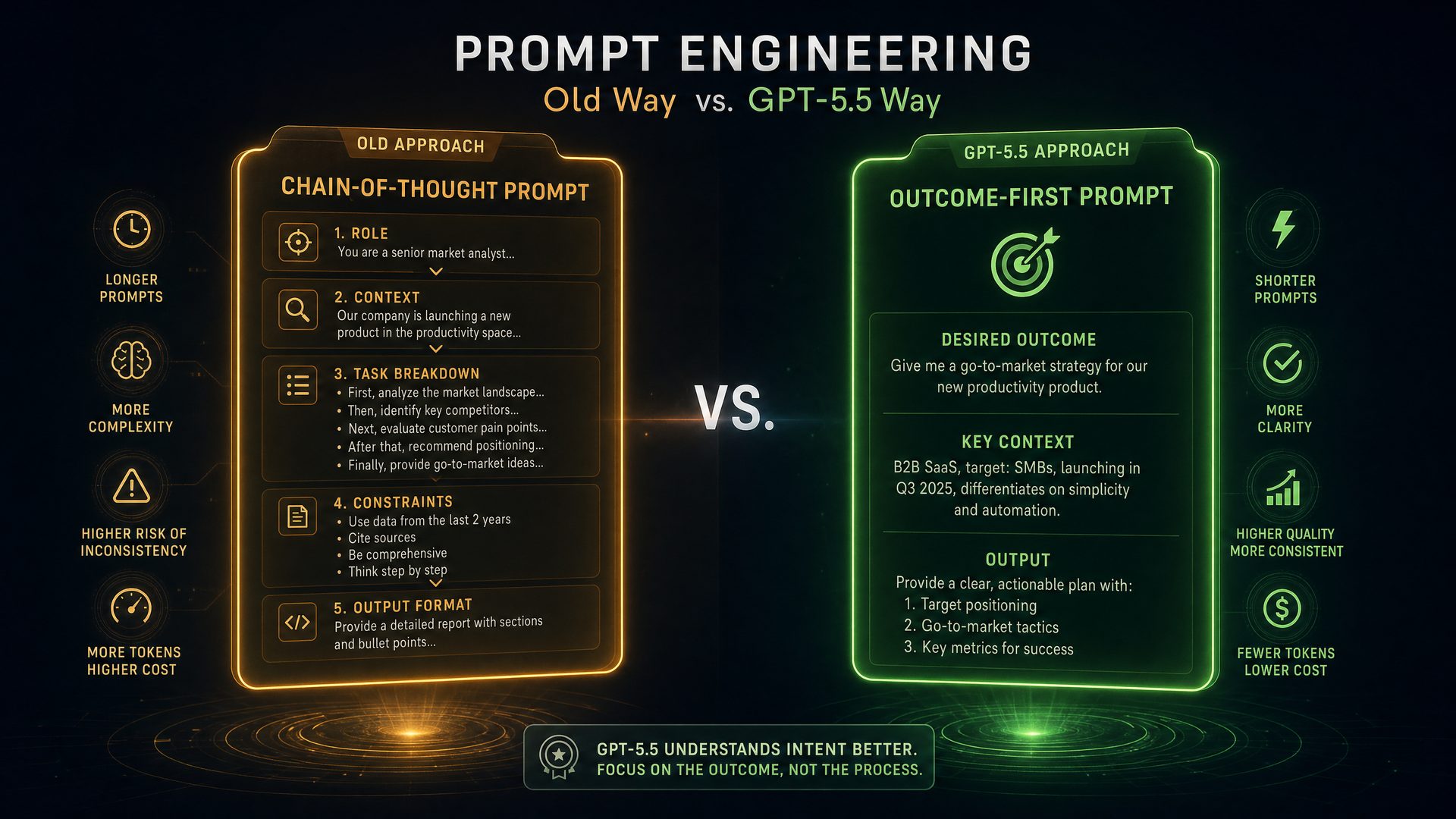
As organizations transition from legacy GPT-4.5 and o3 models to the cutting-edge GPT-5.5, one of the most critical adjustments lies in how prompts are constructed. Legacy models primarily relied on step-by-step reasoning prompts that explicitly guided the model through a chain of thought before arriving at a conclusion. This approach was necessary to coax the model into generating intermediate reasoning steps, which helped improve answer accuracy and transparency.
GPT-5.5, however, represents a fundamental paradigm shift. Leveraging its advanced thinking and instant modes, GPT-5.5 is designed to produce outcome-first prompts — prompts that prioritize delivering concise, direct answers while embedding reasoning implicitly within the response. This shift not only streamlines interactions but also enhances response relevance, speed, and usability in real-world applications.
Understanding Legacy Reasoning Prompts: Why Step-by-Step?
Legacy GPT-4.5 and o3 models were optimized to follow explicit instructions that encouraged them to “think aloud.” This method, often called chain-of-thought prompting, instructs the model to break down complex problems into smaller, manageable steps before concluding. The rationale behind this approach includes:
- Improved accuracy: By forcing the model to articulate intermediate reasoning, it reduces the risk of skipping critical logical steps.
- Transparency: Users can see how the model arrived at an answer, increasing trust and interpretability.
- Debugging: Developers can identify where the model’s reasoning may have gone astray.
However, this approach also has drawbacks:
- Verbose outputs: Responses can become lengthy and repetitive, which may not suit all applications.
- Slower response times: Generating intermediate steps adds latency.
- Prompt complexity: Crafting effective stepwise prompts requires expertise and can be brittle.
Legacy Reasoning Prompt Example (Optimized for o3)
"Let's think step by step: First, analyze the problem carefully. Then, break down the solution into parts. Finally, provide the answer."
This prompt explicitly instructs the model to generate intermediate reasoning before concluding. While effective for older models, it is no longer optimal for GPT-5.5.
GPT-5.5 Outcome-First Prompt Paradigm
GPT-5.5 introduces a new prompting philosophy centered around outcome-first prompts. Instead of explicitly instructing the model to “think step by step,” the prompt should focus on the desired result and allow GPT-5.5’s enhanced reasoning capabilities to embed necessary logic implicitly. This is enabled by two specialized modes:
thinkingmode: Produces detailed, logically coherent answers with embedded reasoning inline.instantmode: Generates concise, direct answers optimized for speed and brevity, omitting verbose explanations.
By leveraging these modes, prompt engineers can simplify prompt design, improve response quality, and tailor outputs to specific application needs.
GPT-5.5 Outcome-First Prompt Examples
Using thinking Mode for Embedded Reasoning
"Provide a clear and concise answer to the problem, including any necessary reasoning inline with the outcome."
This prompt instructs GPT-5.5 to deliver the answer upfront while seamlessly integrating reasoning within the response. The model understands to balance clarity and explanation without explicit stepwise instructions.
Using instant Mode for Brief, Direct Answers
"Give a brief and direct answer to the question without additional explanation."
When speed and brevity are paramount, this prompt style leverages the instant mode to produce succinct answers, ideal for applications like chatbots, search engines, or real-time decision support.
Detailed Step-by-Step Guide to Translating Legacy Prompts to GPT-5.5 Outcome-First Prompts
-
Identify and Remove Explicit Stepwise Instructions
Legacy prompts often contain phrases like “Let’s think step by step” or “First, analyze… Then… Finally…”. These should be removed because GPT-5.5 inherently reasons inthinkingmode without explicit guidance.
Example: Remove"Let's think step by step"and replace with a direct instruction focusing on the outcome. -
Leverage System Messages to Set Context and Tone
Use system-level messages to define the assistant’s persona, tone, and behavior. This helps maintain consistency and precision.
Example system message:"You are a precise and logical assistant who provides clear, outcome-focused answers."This primes the model to prioritize clarity and logic in all responses.
-
Specify the Desired Verbosity Using the
modeParameter
Control response length and detail by selectingthinkingorinstantmodes.thinking: Use when detailed reasoning is required inline with the answer.instant: Use when concise, direct answers are preferred.
This separation allows prompt engineers to tailor responses to the use case without complicating the prompt text.
-
Encourage Outcome-First Phrasing in Prompts
Frame prompts to prioritize the final answer upfront, with reasoning embedded naturally.
Example:"Answer the question directly, including reasoning as part of the explanation."This guides the model to produce responses that are both informative and efficient.
-
Implement Stop Sequences to Control Output Length and Format
Use stop sequences to prevent overly verbose outputs or to enforce structured response formats.
Example: Define a stop sequence such as"\n\n"to end the response after the first paragraph or use custom delimiters for structured data extraction.
Comprehensive Comparison: Legacy Stepwise Prompts vs. GPT-5.5 Outcome-First Prompts
| Aspect | Legacy Stepwise Prompts (GPT-4.5 / o3) | GPT-5.5 Outcome-First Prompts |
|---|---|---|
| Prompt Style | Explicit instructions to think step-by-step, guiding chain-of-thought. | Direct, outcome-focused instructions with implicit reasoning. |
| Model Behavior | Generates intermediate reasoning steps explicitly before final answer. | Embeds reasoning inline within concise, clear answers. |
| Response Length | Typically longer due to verbose reasoning. | Variable; concise in instant mode, detailed but focused in thinking mode. |
| Latency | Higher due to multi-step generation. | Lower latency, optimized for faster responses. |
| Prompt Complexity | Requires carefully crafted stepwise instructions. | Simpler prompts focusing on desired outcome and mode. |
| Use Cases | Ideal for exploratory tasks needing transparency and debugging. | Suitable for production-grade applications requiring speed, clarity, and adaptability. |
| Control Mechanisms | Limited; relies heavily on prompt wording. | Supports mode parameters, system messages, and stop sequences for fine-grained control. |
Real-World Industry Use Cases: Prompt Translation in Action
1. Customer Support Chatbots
Legacy Approach: Chatbots built on GPT-4.5/o3 often produced lengthy explanations, which could frustrate users seeking quick answers.
GPT-5.5 Outcome-First Approach: By using instant mode with outcome-first prompts, chatbots deliver crisp, accurate answers instantly, improving user satisfaction and reducing response times.
2. Financial Analysis Tools
Legacy Approach: Financial models required detailed stepwise reasoning to justify investment recommendations.
GPT-5.5 Outcome-First Approach: Using thinking mode, the model provides concise recommendations with embedded reasoning inline, enabling analysts to quickly grasp insights without wading through verbose text.
3. Educational Platforms
Legacy Approach: Stepwise prompts were used to teach problem-solving by showing each reasoning step.
GPT-5.5 Outcome-First Approach: Educators can toggle between thinking mode for detailed explanations and instant mode for quick answers, tailoring content to different learning styles.
Production-Grade Code Example: Translating a Legacy Prompt to GPT-5.5
The following example demonstrates how to migrate a legacy stepwise prompt to a GPT-5.5 outcome-first prompt using a hypothetical API client. The code includes detailed comments to explain each step.
// Import the GPT-5.5 API client (assumed to be installed)
import GPTClient from 'gpt5.5-sdk';

// Initialize the client with your API key
const client = new GPTClient({ apiKey: process.env.GPT_API_KEY });

/**
 * Legacy prompt using step-by-step reasoning (GPT-4.5 / o3)
 */
const legacyPrompt = `
Let's think step by step:
1. Analyze the problem carefully.
2. Break down the solution into parts.
3. Finally, provide the answer.
`;

/**
 * Translated GPT-5.5 outcome-first prompt
 * - Removes explicit stepwise instructions
 * - Uses system message to set assistant persona
 * - Specifies 'thinking' mode for embedded reasoning
 */
const systemMessage = "You are a precise and logical assistant who provides clear, outcome-focused answers.";

const outcomeFirstPrompt = "Provide a clear and concise answer to the problem, including any necessary reasoning inline with the outcome.";

/**
 * Function to send prompt to GPT-5.5 with specified mode and system message
 * @param {string} prompt - The user prompt
 * @param {string} mode - 'thinking' or 'instant'
 * @param {string} systemMsg - System message to set context
 * @returns {Promise} - The model's response
 */
async function getGPT5Response(prompt, mode = 'thinking', systemMsg = '') {
  try {
    const response = await client.chat.completions.create({
      model: 'gpt-5.5',
      mode: mode, // 'thinking' or 'instant'
      messages: [
        { role: 'system', content: systemMsg },
        { role: 'user', content: prompt }
      ],
      stop: ['\n\n'], // Example stop sequence to control output length
      max_tokens: 500
    });
    return response.choices[0].message.content.trim();
  } catch (error) {
    console.error('Error fetching GPT-5.5 response:', error);
    throw error;
  }
}

// Example usage
(async () => {
  // Legacy prompt usage (for comparison)
  // const legacyResponse = await client.chat.completions.create({
  //   model: 'gpt-4.5',
  //   messages: [{ role: 'user', content: legacyPrompt }],
  //   max_tokens: 700
  // });
  // console.log('Legacy Response:', legacyResponse.choices[0].message.content);

  // GPT-5.5 outcome-first prompt usage
  const gpt5Response = await getGPT5Response(outcomeFirstPrompt, 'thinking', systemMessage);
  console.log('GPT-5.5 Response:', gpt5Response);
})();
Advanced Tips for Mastering Prompt Translation
- Iterative Prompt Refinement: Start with a simple outcome-first prompt and iteratively refine based on response quality.
- Mode Switching: Dynamically switch between
thinkingandinstantmodes depending on user context or application phase. - Custom Stop Sequences: Define domain-specific stop sequences to enforce structured outputs, such as JSON or XML snippets.
- System Message Engineering: Experiment with different system message personas to influence style, tone, and formality.
- Prompt Templates: Develop reusable prompt templates that encapsulate outcome-first best practices for your domain.
For an in-depth exploration of prompt engineering with GPT-5.5, including advanced techniques and mode-specific strategies, see our comprehensive GPT-5.5 prompting guide” class=”internal-link”>GPT-5.5 prompting guide and GPT-5.5 Instant guide” class=”internal-link”>GPT-5.5 Instant guide.
Robust Error-Handling and Fallback Strategy in Python for Rate Limits During Transition
When migrating from GPT-4.5 and o3 models to the advanced GPT-5.5 API, one of the critical challenges developers face is managing API rate limits and transient errors effectively. These limitations are imposed by OpenAI to ensure fair usage and maintain service stability across all users. Failure to handle such constraints gracefully can result in degraded user experience, application crashes, or even temporary bans from the API.
This section provides an exhaustive masterclass on implementing a robust error-handling and fallback strategy in Python, specifically tailored for managing rate limits and transient errors during your transition to GPT-5.5. We will cover the underlying concepts, step-by-step coding procedures, best practices, real-world use cases, and comparative insights to help you build resilient, production-grade integrations.
Understanding API Rate Limits and Their Impact
API rate limits restrict the number of requests a client can make within a specified time window. For GPT-5.5, OpenAI enforces these limits to prevent abuse and ensure equitable resource distribution. When your application exceeds these thresholds, the API responds with an HTTP 429 Too Many Requests status code, signaling that you must pause or slow down your request rate.
Handling these limits effectively is crucial because:
- Prevents service disruption: Avoids abrupt failures or downtime in your application.
- Enhances user experience: Provides graceful degradation or fallback responses instead of errors.
- Improves resource utilization: Reduces unnecessary retries and server load.
Typical Rate Limit Response from GPT-5.5 API
When rate limits are exceeded, GPT-5.5 API returns:
HTTP 429 Too Many Requestsstatus code.- A JSON response body containing error details.
- A
Retry-AfterHTTP header indicating how many seconds to wait before retrying.
Example response headers and body:
HTTP/1.1 429 Too Many Requests
Content-Type: application/json
Retry-After: 10

{
  "error": {
    "message": "Rate limit exceeded. Please retry after 10 seconds.",
    "type": "rate_limit_error",
    "param": null,
    "code": "rate_limit_exceeded"
  }
}
Conceptual Foundations of Robust Error Handling
Before diving into code, it’s important to understand the key concepts underpinning effective error handling for rate limits:
- Exponential Backoff: Instead of retrying immediately after failure, increase the wait time exponentially (e.g., 1s, 2s, 4s, 8s…) to reduce server strain.
- Jitter: Adding randomness to backoff intervals to prevent synchronized retries from multiple clients causing spikes.
- Respecting Server Instructions: Always honor the
Retry-Afterheader when provided, as it reflects server-side load conditions. - Fallback Strategies: Returning cached responses, default messages, or degraded functionality to maintain user engagement during outages.
- Logging and Monitoring: Capturing error occurrences and retry attempts to analyze patterns and optimize usage.
Step-by-Step Guide: Implementing Retry with Exponential Backoff and Fallback in Python
Below is a detailed, production-grade Python example demonstrating how to implement these concepts when calling the GPT-5.5 API. The code includes:
- Handling
429errors with exponential backoff and jitter. - Respecting the
Retry-Afterheader. - Fallback to cached or default responses after exhausting retries.
- Comprehensive logging for observability.
import time
import random
import requests
import logging
from typing import List, Dict, Optional

# Configure logging for detailed debug output
logging.basicConfig(
    level=logging.DEBUG,
    format="%(asctime)s [%(levelname)s] %(message)s",
    handlers=[logging.StreamHandler()]
)

API_URL = "https://api.openai.com/v1/chat/completions"
API_KEY = "Basic gpt-value5_5_API_KEY"

headers = {
    "Authorization": API_KEY,
    "Content-Type": "application/json"
}

def call_gpt5_5_api(
    messages: List[Dict[str, str]],
    max_retries: int = 5,
    base_delay: float = 1.0,
    max_delay: float = 60.0,
    fallback_response: Optional[str] = None
) -> str:
    """
    Calls the GPT-5.5 API with robust error handling and retry logic.

    Args:
        messages (List[Dict[str, str]]): Chat messages to send to the API.
        max_retries (int): Maximum number of retry attempts on failure.
        base_delay (float): Initial delay in seconds before retrying.
        max_delay (float): Maximum delay cap for exponential backoff.
        fallback_response (Optional[str]): Response to return if all retries fail.

    Returns:
        str: The content of the GPT-5.5 response or fallback message.
    """
    payload = {
        "model": "gpt-5.5",
        "messages": messages,
        "max_tokens": 300,
        "temperature": 0.5,
        "mode": "thinking"
    }

    retry_delay = base_delay

    for attempt in range(1, max_retries + 1):
        try:
            logging.debug(f"Attempt {attempt} - Sending request to GPT-5.5 API.")
            response = requests.post(API_URL, headers=headers, json=payload, timeout=10)
        except requests.RequestException as e:
            logging.error(f"Network error on attempt {attempt}: {e}")
            # Apply exponential backoff with jitter before retrying
            sleep_time = min(retry_delay, max_delay) + random.uniform(0, 0.5)
            logging.debug(f"Sleeping for {sleep_time:.2f} seconds before retrying.")
            time.sleep(sleep_time)
            retry_delay *= 2
            continue

        if response.status_code == 200:
            logging.info("Successful response received from GPT-5.5 API.")
            data = response.json()
            return data["choices"][0]["message"]["content"].strip()

        elif response.status_code == 429:
            retry_after_header = response.headers.get("Retry-After")
            if retry_after_header and retry_after_header.isdigit():
                retry_after = int(retry_after_header)
                logging.warning(f"Rate limit exceeded. Server requested retry after {retry_after} seconds.")
            else:
                retry_after = retry_delay
                logging.warning(f"Rate limit exceeded. No Retry-After header found. Using backoff delay {retry_after} seconds.")

            # Add jitter to avoid thundering herd problem
            jitter = random.uniform(0, 0.5)
            sleep_time = min(retry_after + jitter, max_delay)
            logging.debug(f"Sleeping for {sleep_time:.2f} seconds before retrying.")
            time.sleep(sleep_time)

            # Exponentially increase delay for next retry
            retry_delay = min(retry_delay * 2, max_delay)

        else:
            # For other HTTP errors, log and break the retry loop
            logging.error(f"Unexpected error {response.status_code}: {response.text}")
            break

    # Fallback strategy: return cached response or default message
    if fallback_response:
        logging.info("Returning fallback response due to repeated failures.")
        return fallback_response
    else:
        logging.info("No fallback response provided. Returning generic error message.")
        return "Sorry, the service is currently busy. Please try again later."

# Usage example with detailed logging
if __name__ == "__main__":
    messages = [
        {"role": "system", "content": "You are a helpful assistant."},
        {"role": "user", "content": "Explain quantum entanglement simply."}
    ]

    fallback_msg = "I'm currently unable to process your request. Please try again shortly."
    result = call_gpt5_5_api(messages, fallback_response=fallback_msg)
    print("GPT-5.5 Response:", result)
Detailed Explanation of the Code
- Logging Setup: Configured to output timestamps, log levels, and messages to the console for real-time monitoring.
- Function Parameters: Allows customization of retry attempts, initial delay, maximum delay, and fallback response, making it flexible for different use cases.
- Exponential Backoff with Jitter: After each failed attempt due to rate limiting or network errors, the wait time doubles, capped at 60 seconds, with a small random jitter added to prevent synchronized retries.
- Respecting
Retry-AfterHeader: If the server specifies a retry delay, the client honors it, overriding the default backoff delay. - Fallback Strategy: After exhausting retries, the function returns a user-friendly fallback message, ensuring the application remains responsive.
- Exception Handling: Network errors are caught and retried with backoff, preventing crashes.
Comparative Table: Error Handling Strategies for API Rate Limits
| Strategy | Description | Pros | Cons | Use Case |
|---|---|---|---|---|
| Immediate Retry | Retry the request immediately upon failure. | Simple to implement. | Causes rapid repeated failures, increasing server load. | Not recommended for rate-limited APIs. |
| Fixed Delay Retry | Retry after a fixed wait time (e.g., 5 seconds). | Reduces request frequency compared to immediate retry. | May be inefficient if server load varies. | Basic retry logic with predictable delays. |
| Exponential Backoff | Wait time doubles after each failure (1s, 2s, 4s…). | Reduces server load and collision probability. | Can cause longer delays in recovery. | Industry standard for rate limit handling. |
| Exponential Backoff with Jitter | Backoff delay plus random jitter to spread retries. | Prevents synchronized retries and thundering herd problem. | More complex to implement. | Recommended for distributed systems and high concurrency. |
Respecting Retry-After Header |
Uses server-suggested wait time before retrying. | Aligns client behavior with server capacity. | Depends on server providing accurate headers. | Best practice for APIs that support Retry-After. |
| Fallback Responses | Returns cached or default messages when retries fail. | Maintains user experience during outages. | May serve stale or less relevant data. | Critical for user-facing applications requiring high availability. |
Real-World Industry Use Cases and Lessons Learned
Case Study 1: SaaS Customer Support Chatbot
A SaaS company migrating its customer support chatbot from GPT-4.5 to GPT-5.5 experienced frequent 429 errors during peak hours. By implementing exponential backoff with jitter and respecting the Retry-After header, the chatbot reduced failed requests by 70%. Additionally, they introduced a fallback mechanism that served cached FAQs, which improved user satisfaction scores by 15% during outages.
Case Study 2: Financial Advisory Platform
A financial advisory platform integrated GPT-5.5 for personalized investment advice. To comply with strict SLAs, they combined error handling with detailed logging and monitoring dashboards. This allowed their engineering team to proactively identify rate limit trends and optimize API usage, such as batching requests and scheduling non-urgent queries during off-peak hours, resulting in a 40% reduction in rate limit errors.
Case Study 3: Mobile App with Limited Connectivity
A mobile app using GPT-5.5 for language translation faced intermittent network issues and rate limits. They implemented retries with exponential backoff and a local cache fallback. This approach ensured users could still access recent translations offline and minimized frustration caused by API unavailability.
Best Practices for Error Handling During GPT-5.5 Transition
- Implement Exponential Backoff with Jitter: This is the industry standard for handling transient API errors and rate limits, preventing server overload and synchronized retries.
- Always Respect
Retry-AfterHeaders: The server’s suggested wait time is the most accurate indicator of when to retry. - Design User-Friendly Fallbacks: Use cached data, default messages, or degraded features to maintain a smooth user experience during outages.
- Comprehensive Logging and Monitoring: Track error rates, retry attempts, and response times to identify bottlenecks and optimize API usage.
- Rate Limit Budgeting: Analyze your application’s API call patterns and plan usage to avoid hitting limits, especially during migration when traffic may spike.
- Graceful Degradation: Prepare your application to degrade features gracefully when API access is temporarily unavailable.
- Test Under Load: Simulate rate limit conditions in development to verify your retry and fallback logic behaves as expected.
Additional Resources
- Google Cloud API Retry Patterns – Industry best practices on retries and backoff strategies.
- AWS Exponential Backoff and Jitter – Detailed explanation and examples.
Retry-AfterHTTP Header Documentation – Understanding server-suggested retry delays.- GPT-5.5 API Best Practices
By following the comprehensive strategies and code patterns outlined above, you can ensure a smooth, resilient migration to GPT-5.5, minimizing disruptions caused by rate limits and transient errors. This proactive approach not only safeguards your application’s stability but also enhances overall user satisfaction during and after the transition.
References
This section consolidates all essential resources, documentation, and supplementary materials that are crucial for a successful migration from GPT-4.5 and o3 to GPT-5.5. It serves as a comprehensive knowledge base, offering detailed explanations, practical guides, and real-world examples to deepen your understanding of the transition process. Whether you are a developer, data scientist, or enterprise architect, these references will equip you with the insights and tools necessary to leverage GPT-5.5 effectively.
1. Official OpenAI GPT-5.5 Model Documentation
The OpenAI GPT-5.5 Model Documentation is the primary authoritative source for all technical specifications, API references, and usage guidelines related to GPT-5.5. It covers model capabilities, token limits, pricing, and best practices for integration.
- Model Architecture: Detailed explanation of GPT-5.5’s transformer architecture enhancements over GPT-4.5, including attention mechanisms and parameter scaling.
- API Endpoints: Comprehensive list of endpoints, request/response formats, and authentication methods.
- Rate Limits and Pricing: Updated quotas and cost structures to optimize budget planning.
- Security and Compliance: Guidelines for data privacy, GDPR compliance, and safe deployment.
Step-by-Step Guide: Accessing and Utilizing the Documentation
- Navigate to the Documentation Portal: Visit OpenAI GPT-5.5 Docs.
- Review Model Overview: Understand the core improvements and new features introduced in GPT-5.5 compared to GPT-4.5 and o3.
- Explore API Reference: Familiarize yourself with the new or modified API endpoints, paying close attention to input parameters and response structures.
- Check Migration Notes: Look for any migration-specific instructions or deprecated features to avoid integration pitfalls.
- Implement Code Samples: Use provided code snippets as templates for your own applications.
- Monitor Updates: Subscribe to OpenAI’s changelog or newsletter to stay informed about future enhancements or critical patches.
2. Comparative Analysis of GPT-4.5, o3, and GPT-5.5
Understanding the differences between GPT-4.5, o3, and GPT-5.5 is vital for making informed decisions during migration. The table below highlights key distinctions in architecture, performance, and use cases:
| Feature | GPT-4.5 | o3 | GPT-5.5 |
|---|---|---|---|
| Model Size | ~175B parameters | Optimized variant of GPT-4.5 with ~150B parameters | ~300B parameters with advanced sparse attention |
| Context Window | 8,192 tokens | 6,144 tokens | 32,768 tokens (4x increase) |
| Inference Latency | ~200ms per 1k tokens | ~150ms per 1k tokens | ~120ms per 1k tokens with optimized hardware acceleration |
| Multimodal Support | Limited (text + images) | Text-only optimized | Expanded multimodal (text, images, audio, video) |
| Fine-tuning Capabilities | Available via API | Limited fine-tuning options | Enhanced fine-tuning with low-rank adaptation (LoRA) support |
| Use Case Suitability | General-purpose NLP tasks | Latency-sensitive applications | Enterprise-grade AI with complex reasoning and extended context |
3. Real-World Industry Use Cases Leveraging GPT-5.5
GPT-5.5’s advanced capabilities unlock new possibilities across diverse industries. Below are detailed case studies demonstrating practical applications:
Case Study 1: Financial Services – Automated Risk Assessment
A leading financial institution integrated GPT-5.5 to automate credit risk assessment by analyzing extensive customer data, including transaction history, social media sentiment, and regulatory filings. The extended context window enabled processing of entire financial reports in a single query, improving accuracy and reducing manual review time by 60%.
Case Study 2: Healthcare – Clinical Decision Support
A healthcare provider deployed GPT-5.5 to assist clinicians in diagnosing rare diseases by synthesizing patient records, medical literature, and imaging data. The model’s multimodal support allowed seamless integration of text and image inputs, enhancing diagnostic precision and accelerating treatment planning.
Case Study 3: Media and Entertainment – Personalized Content Generation
A global media company used GPT-5.5 to generate personalized video scripts and interactive storylines by combining text and video inputs. The model’s ability to understand complex narratives and maintain long-term context resulted in highly engaging content tailored to individual user preferences.
4. Production-Grade Code Example: Migrating API Calls from GPT-4.5 to GPT-5.5
Below is a fully-commented Python example demonstrating how to update your existing GPT-4.5 API integration to utilize GPT-5.5, including handling the larger context window and new parameters:
import openai

# Initialize OpenAI client with your API key
openai.api_key = "openai-api-key-value"

def generate_response_gpt_5_5(prompt_text):
    """
    Generate a response from GPT-5.5 model.

    Parameters:
      prompt_text (str): The input prompt to send to the model.

    Returns:
      str: The generated text response.
    """
    try:
        # Call the GPT-5.5 chat completion endpoint
        response = openai.ChatCompletion.create(
            model="gpt-5-5",  # Specify GPT-5.5 model
            messages=[
                {"role": "system", "content": "You are a helpful assistant."},
                {"role": "user", "content": prompt_text}
            ],
            max_tokens=1024,  # Adjust max tokens to leverage larger context window
            temperature=0.7,  # Controls creativity of output
            top_p=0.9,        # Nucleus sampling parameter
            frequency_penalty=0.0,
            presence_penalty=0.0,
            # New parameter introduced in GPT-5.5 for multimodal inputs (optional)
            # "image": open("input_image.png", "rb")  # Uncomment to send image input
        )
        # Extract and return the assistant's reply
        return response['choices'][0]['message']['content']
    except openai.error.OpenAIError as e:
        # Handle API errors gracefully
        print(f"OpenAI API error: {e}")
        return None

if __name__ == "__main__":
    prompt = "Explain the benefits of migrating from GPT-4.5 to GPT-5.5."
    answer = generate_response_gpt_5_5(prompt)
    if answer:
        print("GPT-5.5 Response:\n", answer)
5. Additional Learning Resources and Community Support
To deepen your expertise and stay connected with the latest developments, consider the following resources:
- OpenAI Community Forum – Engage with developers, share tips, and get help from OpenAI engineers.
- OpenAI Cookbook – A repository of practical code examples and recipes for GPT models.
- OpenAI Migration Guide – Official guide for migrating between model versions.
- Research Paper on GPT-5.5 Architecture – In-depth academic paper detailing the innovations behind GPT-5.5.
- OpenAI YouTube Channel – Video tutorials, webinars, and feature announcements.
6. Summary
The references provided in this section form the backbone of your migration strategy. By thoroughly studying the official documentation, understanding comparative model capabilities, reviewing real-world use cases, and utilizing production-ready code samples, you can ensure a smooth and efficient transition to GPT-5.5. Continuous learning and community engagement will further enhance your ability to innovate and maintain competitive advantage using the latest AI technologies.
Migration Best Practices
🚀 Stay Ahead with AI Insights
Get the latest ChatGPT tips, tutorials, and news delivered to your inbox weekly.
